Backend Function: put business logic where it belongs — the backend
In enterprise system development, some work must happen on the backend: validating sensitive data, enforcing permissions, complex business logic, and multi-table transactions. The frontend can do basic validation but cannot guarantee security; SQL can query data but struggles to express complex business rules.
The value of Backend Function is that developers can run custom business logic on the backend while cooperating seamlessly with the frontend SDK. The frontend just calls an API without caring about implementation details; the backend centralizes business rules in Backend Functions, keeping data secure and consistent.
💡 Backend Function is Lovrabet's business logic extension layer. It extends the standard data operations (CRUD) without limit to meet enterprise-specific requirements, while keeping your code clean and maintainable.
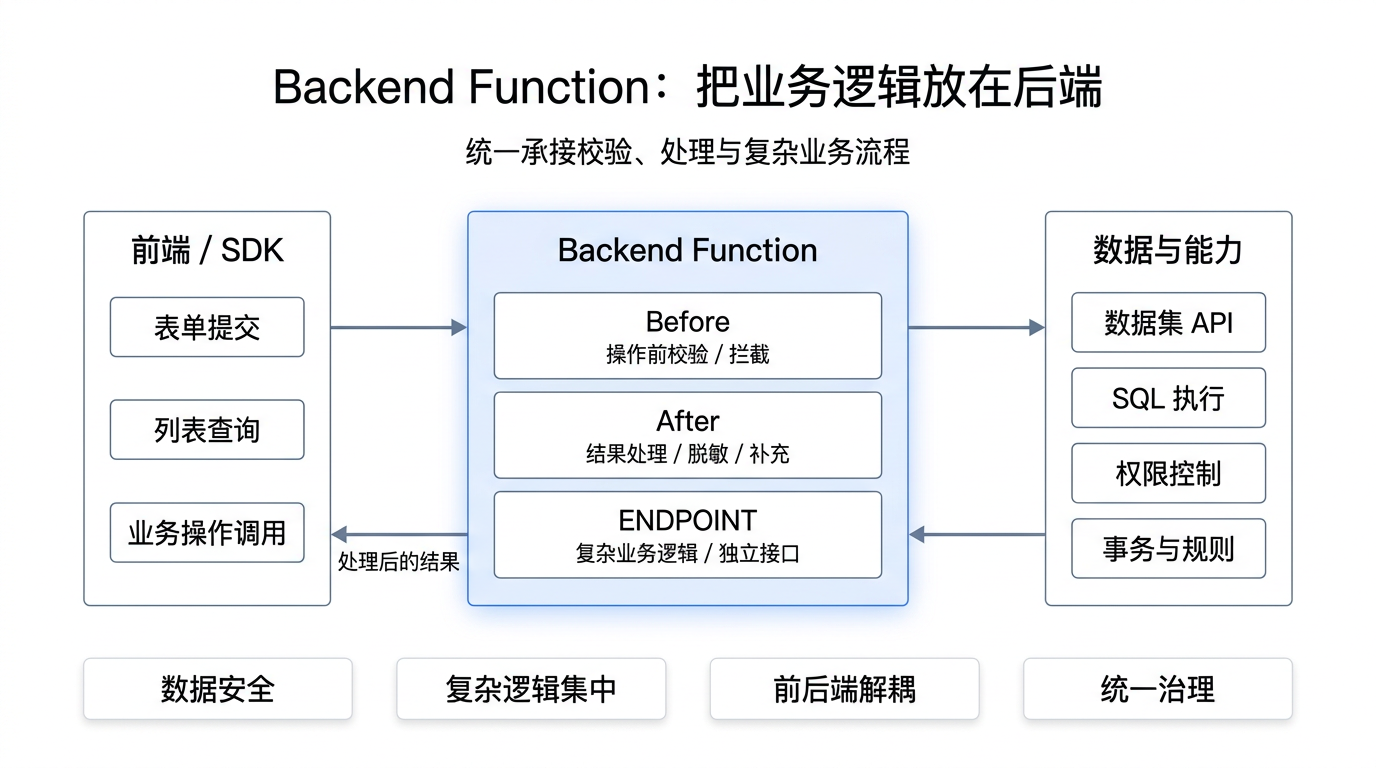
Why do you need Backend Function?
Teams building business systems keep running into three classes of problems:
| Problem | Pain point | How Backend Function solves it |
|---|---|---|
| Data security | Phone-number uniqueness checks, ID-number masking, permission control — the frontend can be bypassed and database constraints aren't flexible enough | Before- and after-functions run automatically around data operations, so business rules cannot be bypassed |
| Complex business logic | Price calculation, stock deduction, order state transitions — multi-table operations, transaction control, complex rules | Full JavaScript/TypeScript programming power to implement any business logic |
| Performance and maintainability | Queries joining many tables, batch processing, async execution | Standalone endpoints (ENDPOINT) run complex logic efficiently on the backend; the frontend calls a single API |
What is Backend Function?
Backend Function is Lovrabet's backend business logic extension capability. Developers write JavaScript/TypeScript code that runs in the Lovrabet server environment and access dataset APIs and SQL execution through context.client.
Technically, a Backend Function is a JavaScript function running on the Lovrabet server with these characteristics:
- Server-side execution: your code runs on Lovrabet's servers — secure and reliable
- Full programming power: JavaScript/TypeScript support for complex business logic
- Database access: work with datasets through
context.client.models, run SQL throughcontext.client.sql - User context: get the current logged-in user from
context.userInfo - Three types: before-functions (Before), after-functions (After), and standalone endpoints (ENDPOINT)
Its value goes beyond "being able to write backend code": business logic gets managed centrally, in the right place. The frontend focuses on interaction and presentation, the backend on business rules and data processing, and the two cooperate through clean APIs — the key to an enterprise system that can evolve over the long run.
What is Backend Function made of?
Broken down, Backend Function consists of three types of functions, each addressing different scenarios.
Three core types
1. Before-functions (Before scripts / RequestInception)
Triggered automatically before a data operation runs — for validation and interception.
Typical use cases:
- Uniqueness checks: phone numbers, email addresses, ID numbers, and more
- Business rule validation: age limits, amount limits, stock checks, and so on
- Permission control: multi-tenant isolation, role-based permissions, data ownership checks
- Auto-filling data: department, tenant ID, creator, and similar fields
⚡ When it runs: before
create,update,delete,filter, and similar operations
🚫 Blocking: throwing an error aborts the operation and returns the error to the frontend
/**
 * 客户创建先验函数 - 手机号唯一性校验
 */
export default async function beforeCreate(params, context) {
  const TABLES = {
    customers: "dataset_XXXXXXXXXX", // 客户数据集
  };
  const models = context.client.models;

  // 校验手机号唯一性
  if (params.phone) {
    const existing = await models[TABLES.customers].filter({
      where: { phone: { $eq: params.phone } },
    });
    if (existing.tableData && existing.tableData.length > 0) {
      throw new Error("手机号已被使用,请使用其他手机号");
    }
  }
  return params;
}
2. After-functions (After scripts / post-operation HOOK scripts)
Triggered automatically after a data operation completes and before the result returns to the frontend — for data processing.
Typical use cases:
- Masking sensitive data: phone numbers, ID numbers, bank card numbers, and more
- Computed fields on the fly: age from birthday, tier from spending
- Format conversion: date formatting, status codes to display names
- Enrichment: look up and attach related-table data automatically
⚡ When it runs: after
filter,getOne,create,update, and similar operations
✏️ Mutation: it can reshape the returned data, so the frontend receives the processed result
/**
 * 客户查询后验函数 - 数据脱敏
 */
export default async function afterFilter(params, context) {
  if (params.tableData) {
    params.tableData = params.tableData.map((customer) => {
      // 手机号脱敏:138****8000
      if (customer.phone) {
        customer.phone = customer.phone
          .replace(/(\d{3})\d{4}(\d{4})/, "$1****$2");
      }
      // 计算年龄
      if (customer.birthday) {
        const today = new Date();
        const birthDate = new Date(customer.birthday);
        customer.age = today.getFullYear() - birthDate.getFullYear();
      }
      return customer;
    });
  }
  return params;
}
3. Standalone endpoints (ENDPOINT)
Dedicated API endpoints that the frontend calls explicitly through the BFF API — for complex business logic.
Typical use cases:
- Complex workflows: order processing (stock deduction + pricing + coupon application)
- Bulk operations: batch import, batch update, batch delete
- Aggregations: complex reports, multi-dimensional analysis
- Third-party integration: calling external APIs, handling callbacks
📞 How to call:
client.bff.execute({ scriptName: "xxx", params: {...} })
💻 Programming power: full JavaScript/TypeScript, including loops, conditionals, and exception handling
/**
 * 订单处理 - Backend Function 独立端点
 */
export default async function processOrder(params, context) {
  const TABLES = {
    orders: "dataset_XXXXXXXXXX",
    products: "dataset_YYYYYYYYYY",
  };
  const models = context.client.models;
  const { items, couponCode } = params;

  // 1. 检查库存
  for (const item of items) {
    const product = await models[TABLES.products].getOne(item.productId);
    if (product.stock < item.quantity) {
      throw new Error(`产品 ${product.name} 库存不足`);
    }
  }

  // 2. 计算价格
  let totalPrice = 0;
  for (const item of items) {
    const product = await models[TABLES.products].getOne(item.productId);
    totalPrice += product.price * item.quantity;
  }

  // 3. 应用优惠券
  if (couponCode) {
    const discount = await calculateDiscount(couponCode, totalPrice);
    totalPrice -= discount;
  }

  // 4. 创建订单
  const orderId = await models[TABLES.orders].create({
    items: JSON.stringify(items),
    totalPrice,
    status: "pending",
    createTime: new Date().toISOString(),
  });

  // 5. 扣减库存
  for (const item of items) {
    const product = await models[TABLES.products].getOne(item.productId);
    await models[TABLES.products].update(item.productId, {
      stock: product.stock - item.quantity,
    });
  }

  return { success: true, orderId, totalPrice };
}
Core APIs
Dataset operations
const models = context.client.models;

// 查询单条
const record = await models[TABLES.customers].getOne(123);

// 查询列表
const result = await models[TABLES.customers].filter({
  where: { status: { $eq: "active" } },
  select: ["id", "name", "phone"],
  orderBy: [{ createTime: "desc" }],
  pageSize: 20,
});

// 创建
const id = await models[TABLES.customers].create({
  name: "张三", phone: "13800138000",
});

// 更新
await models[TABLES.customers].update(123, { status: "inactive" });

// 删除
await models[TABLES.customers].delete(123);
SQL execution
// Backend Function 中 SQL 直接返回数组
const rows = await context.client.sql.execute({
  sqlCode: "getUserStats",
  params: { userId: "123" },
});
console.log(rows[0].orderCount);
User information
const user = context.userInfo;
console.log(user.id);           // 用户ID
console.log(user.username);     // 用户名
console.log(user.tenantCode);   // 租户编码
console.log(user.department);   // 部门
Why does it make development easier?
The traditional way of implementing "create order" looks like this:
| Step | Traditional approach | With Backend Function |
|---|---|---|
| Frontend | Basic validation (quantity > 0) | Basic validation + one BFF API call |
| Backend API | Receive the request | No separate API to write |
| Backend logic | Check stock, calculate price, apply coupon, create order, deduct stock | One Backend Function handles it all |
| Database | Multiple SQL statements with manual transaction consistency | SDK operations with transactions handled automatically |
Core advantages:
- 🎯 Centralized code: business logic lives on the backend; the frontend doesn't care how it's implemented
- 🔒 Secure by construction: sensitive operations must pass through Backend Function — no way around it
- 🔧 Easy to maintain: change a business rule in one Backend Function, with zero frontend changes
- ⚡ Performance headroom: batch queries, caching, and async processing are all available
Real-world impact:
- 2-3x development efficiency: backend logic is managed centrally, eliminating back-and-forth between frontend and backend
- 60% more code reuse: the same business logic can serve multiple APIs
- 50% lower maintenance cost: business rules live on the backend; changes never touch the frontend
Typical scenarios
Scenario 1: Multi-tenant data isolation
An enterprise hosts multiple tenants (subsidiaries, business units), and each tenant must see only its own data.
export default async function beforeFilter(params, context) {
  const userTenantId = context.userInfo?.tenantCode;
  if (!userTenantId) {
    throw new Error("用户未分配租户,无法操作");
  }
  if (!params.where) { params.where = {}; }
  params.where.tenant_id = { $eq: userTenantId };
  return params;
}
✅ Result: queries are filtered automatically — no manual tenant conditions — keeping the data safe.
Scenario 2: Masking sensitive data
A customer list shows phone numbers, but the full number must not be exposed.
export default async function afterFilter(params, context) {
  if (params.tableData) {
    params.tableData = params.tableData.map((customer) => {
      if (customer.phone) {
        customer.phone = customer.phone
          .replace(/(\d{3})\d{4}(\d{4})/, "$1****$2");
      }
      return customer;
    });
  }
  return params;
}
✅ Result: the frontend receives already-masked data with no extra work, keeping the data safe.
Scenario 3: Complex order processing
Creating an order means checking stock, calculating the price, applying a coupon, and deducting stock.
export default async function processOrder(params, context) {
  const TABLES = {
    orders: "dataset_XXXXXXXXXX",
    products: "dataset_YYYYYYYYYY",
  };
  const models = context.client.models;
  // 1. 检查库存 → 2. 计算价格 → 3. 应用优惠券 → 4. 创建订单 → 5. 扣减库存
  return { success: true, orderId, totalPrice };
}
Frontend call:
const result = await client.bff.execute({
  scriptName: "processOrder",
  params: {
    items: [{ productId: "p1", quantity: 2 }],
    couponCode: "SUMMER2024",
  },
});
console.log(result.orderId); // 订单ID
✅ Result: the frontend calls one API while the backend handles all the business logic, keeping data consistent.
Final thoughts
As enterprises digitize, business logic keeps getting more complex. Plain CRUD no longer covers it — enterprises need a capability layer that implements business rules flexibly on the backend.
What Backend Function does is put business logic where it belongs — the backend. It standardizes common capabilities (before-functions, after-functions) and modularizes complex business logic (standalone endpoints), letting frontend and backend each do their own job and cooperate through clean APIs — the key to an enterprise system that can evolve over the long run.
Getting started
- Learn before-functions (data validation) → Backend Function, part 1: before-functions
- Learn after-functions (data masking) → Backend Function, part 2: after-functions
- Learn standalone endpoints (complex business logic) → Backend Function, part 3: standalone endpoints
- See the full API reference → BFF API reference
- Need technical support → check the FAQ or best practices, or contact your account manager