BF local development and debugging
INFO
Prerequisites: BFF local development requires upgrading to Rabetbase CLI 2.0 first: <cite doc-id="EaApwb1Wpi2j0ykAkhNcya0ZnEh" file-type="wiki" title="Rabetbase CLI - Vibe Coding研发套件" type="doc"></cite>
Quick tip: view the bff command set via help: rabetbase bff --help
Quick tip: after upgrading to the latest version, prefer rabetbase bff create when creating BFFs (new is still accepted for compatibility)
:::This document is for developers who build BFFs on their own. It covers three main paths:
- Pull platform BFFs down to local and keep developing and maintaining them there
- Create or edit scripts locally, then sync them back to the platform
- Integration-test local scripts, trace logs, and set breakpoints in a self-hosted deployment project
The main workflow:

confirm appCode / login state -> api pull -> list/detail -> pull to local -> edit files -> status -> push --dry-run -> push --yes -> runtime local debugging
Prerequisites
- The CLI is logged in
rabetbase auth login- The current project resolves the correct
appcode
rabetbase doctor check
Pay special attention to:

- `appCode`
- `env`
- `apiDir`
- `locale`- The current project has already pulled
api.ts
rabetbase api pull

This step matters because:
- `HOOK` script creation prefers aliases from `api.ts`
- runtime local debugging of HOOKs also resolves aliases by looking them up in `api.ts`- A
.rabetbasedirectory already exists in the business project root.
Runningbff pull,bff create, orbff pushfor the first time usually creates this local structure.
1. Local directory conventions
- All local BFF files live under the business project root at
.rabetbase/bff/<appCode>/- Common paths:
| Type | Path |
|------|------|
| ENDPOINT | `.rabetbase/bff/<appCode>/ENDPOINT/<name>.js` |
| COMMON | `.rabetbase/bff/<appCode>/COMMON/<name>.js` |
| HOOK | `.rabetbase/bff/<appCode>/HOOK/<alias-or-datasetCode>/<operationType>/<functionNode>/<name>.js` |

Two more common files/directories:

| Path | Purpose |
|------|------|
| `.rabetbase/bff.lock.json` | Records local-to-remote sync state |
| `.rabetbase/bff-trash/` | Recycle bin where local files are moved after `bff delete` actually runs |

Notes:

- The `lock` file is the core source of truth that `pull / push / delete` use to judge sync state
- Deleting a script never hard-deletes the local file; it is moved into `bff-trash`
2. Recommended development workflow
Inspect the remote first, then pull
This path applies when:

- You are modifying a BFF that already exists on the platform
- You just took over a project and need to sync remote scripts to local first
- You suspect the local version is behind the platform

### 1 Inspect remote scripts

```bash
rabetbase bff list --format json
rabetbase bff list --type COMMON --format json
rabetbase bff list --name getUserInfo --format json
```

If you need the full source, check the details:

```bash
rabetbase bff detail --id <scriptid> --format json
```

Recommended approach:

1. Run `list` first
2. Find the target `id`
3. Run `detail` to see the current remote code and description

### 2 Preview before pulling

Start with a `dry-run`:

```bash
rabetbase bff pull --dry-run --format json
```

To preview just one type:

```bash
rabetbase bff pull --type ENDPOINT --dry-run --format json
```

In the preview, focus on:

- `lockKey`
- `filePath`
- `remoteId`
- `status`

Common statuses:

- `would_pull`: will be pulled and written locally
- `conflict`: local has unsynced changes and will be protected on a real run
- `skipped`: no local target path can be resolved for the script, or pull conditions are not met

### 3 Pull for real

```bash
rabetbase bff pull --format json
```

Pull by type:

```bash
rabetbase bff pull --type ENDPOINT --format json
```

Only when you explicitly want remote to overwrite unsynced local changes, use:

```bash
rabetbase bff pull --force --format json
```

Notes:

- `--force` overwrites unsynced local content
- In normal team collaboration, make sure changes in the current directory are backed up or committed first

### 4 Verify after pulling

```bash
rabetbase bff status --format json
```

To also discover scripts that exist remotely but not locally:

```bash
rabetbase bff status --remote --format json
```
Create or edit locally, then sync back to the platform
This path applies when:

- Creating a new ENDPOINT / COMMON / HOOK
- Editing an existing local script and syncing it back to the platform

### 1 Create a local script

#### ENDPOINT

```bash
rabetbase bff create --type ENDPOINT --name getUserProfile --description "获取用户详情" --format json
```

#### COMMON

```bash
rabetbase bff create --type COMMON --name normalizePayload --description "公共参数归一化" --format json
```

#### HOOK

```bash
rabetbase bff create \
  --type HOOK \
  --name beforeGetList \
  --alias appUser \
  --operation-type getList \
  --function-node before \
  --description "列表前置处理" \
  --format json
```

If no alias exists, fall back to `--datasetcode`.

### 2 Edit an existing script

When editing an existing BFF, don't just start from a stale local file. The recommended order is:

```bash
rabetbase bff list --format json
rabetbase bff detail --id <scriptid> --format json
rabetbase bff pull --type ENDPOINT --format json
```

Then edit the files under your local `.rabetbase/bff/...`.

### 3 Check status after editing

```bash
rabetbase bff status --format json
```

At minimum, confirm:

- The target script has been recognized
- The `lockKey` looks right
- No extra files you don't intend to push are included

### 4 Always preview before pushing

Push the narrowest scope first:

```bash
rabetbase bff push --type ENDPOINT --name getUserProfile --dry-run --format json
```

Full preview:

```bash
rabetbase bff push --dry-run --format json
```

In the preview, focus on:

- `lockKey`
- `filePath`
- `remoteId`
- `mode`
- `status`

Common values:

- `mode: create`: not on the platform yet; the push creates it
- `mode: update`: a record already exists on the platform; the push updates it
- `status: unchanged`: local content is unchanged and nothing is actually pushed
- `status: would_push`: the push will run

### 5 Push for real

`push` is a high-risk write operation. Include `--yes` on real runs:

```bash
rabetbase bff push --yes --type ENDPOINT --name getUserProfile --format json
```

Push everything:

```bash
rabetbase bff push --yes --format json
```

Only use this when you know exactly which protection logic you are overriding:

```bash
rabetbase bff push --force --yes --type ENDPOINT --name getUserProfile --format json
```

---
Delete a script
Preview first:

```bash
rabetbase bff delete --target ENDPOINT/getUserProfile --dry-run --format json
```

Or use the short name:

```bash
rabetbase bff delete --target getUserProfile --dry-run --format json
```

Once the preview looks right, delete for real:

```bash
rabetbase bff delete --yes --target ENDPOINT/getUserProfile --format json
```

What happens on delete:

- The remote script is deleted
- `bff.lock.json` is updated
- The local file is moved into `.rabetbase/bff-trash/`

Before deleting, run at least once:

```bash
rabetbase bff list --name getUserProfile --format json
rabetbase bff status --format json
```
3. Common sync scenarios and recommended actions
Scenario A: taking over a project for the first time and pulling platform scripts down
### Scenario A: taking over a project for the first time and pulling platform scripts down

```bash
rabetbase api pull
rabetbase bff list --format json
rabetbase bff pull --dry-run --format json
rabetbase bff pull  --appcode <>  --format json
rabetbase bff status --remote --format json
```
Scenario B: created a new ENDPOINT and want to test it locally before pushing
### Scenario B: created a new ENDPOINT and want to test it locally before pushing

```bash
rabetbase bff create --type ENDPOINT --name demoOrder --format json
rabetbase bff status --format json
# 先去 runtime 本地调试,确认接口可用
rabetbase bff push --type ENDPOINT --name demoOrder --dry-run --format json
rabetbase bff push --yes --type ENDPOINT --name demoOrder --format json
```
Scenario C: the script already exists on the platform and I need to edit the latest version
### Scenario C: the script already exists on the platform and I need to edit the latest version

```bash
rabetbase bff list --name demoOrder --format json
rabetbase bff detail --id <scriptid> --format json
rabetbase bff pull --type ENDPOINT --format json
# 修改本地文件
rabetbase bff status --format json
rabetbase bff push --type ENDPOINT --name demoOrder --dry-run --format json
rabetbase bff push --yes --type ENDPOINT --name demoOrder --format json
```
Scenario D: local changed, remote changed too, unsure whether to pull or push
### Scenario D: local changed, remote changed too, unsure whether to pull or push

Recommended order:

1. `bff detail` to see current remote content
2. `bff status --remote` to see how local relates to remote
3. Back up local changes on a branch
4. Run `pull --dry-run` first
5. Then decide between `pull --force` and a manual merge

Never jump straight to `push --force`.
Scenario E: deleting a script but unsure of the lockKey
### Scenario E: deleting a script but unsure of the lockKey

```bash
rabetbase bff list --name demoOrder --format json
rabetbase bff status --format json
rabetbase bff delete --target demoOrder --dry-run --format json
```

If names collide, the CLI asks you to use the full `lockKey`.
4. Debugging overview
Local debugging follows this main line:
confirm appCode -> confirm local script files -> enable local-dev-mode -> start lovrabet-runtime -> call the endpoint -> read logs -> attach to 9622 -> set breakpoints -> fix issues
What you need before debugging:
Rabetbase CLI: for creating, editing, and deploying scripts.
A self-hosted deployment project: for debugging the scripts.
Step 1: Confirm the basics before debugging
- Confirm the current project's appCode is configured correctly
Pay special attention to these items:
- `appCode`
- `env`
- `apiDir`
> Note:
> A misconfigured `appCode` is the most common cause of the false alarm where "the script clearly exists but the API says it doesn't."- Pull
api.tsonce first
rabetbase api pull
Why this matters:

- Local HOOK debugging depends on alias resolution
- runtime local mode tries to look up aliases from `api.ts`- Local script directory conventions:
| Type | Path |
|---|---|
| ENDPOINT | .rabetbase/bff/<appCode>/ENDPOINT/<name>.js |
| COMMON | .rabetbase/bff/<appCode>/COMMON/<name>.js |
| HOOK | .rabetbase/bff/<appCode>/HOOK/<alias-or-datasetCode>/<operationType>/<functionNode>/<name>.js |
Note:
In local mode, runtime resolves files that actually exist in this directory — not scripts stored in the database.
Step 2: Enable local script development mode
- Enable local script development mode
In src/main/resources/application-dev.yml:
lovrabet:
  runtime:
    script:
      local-dev-mode: true
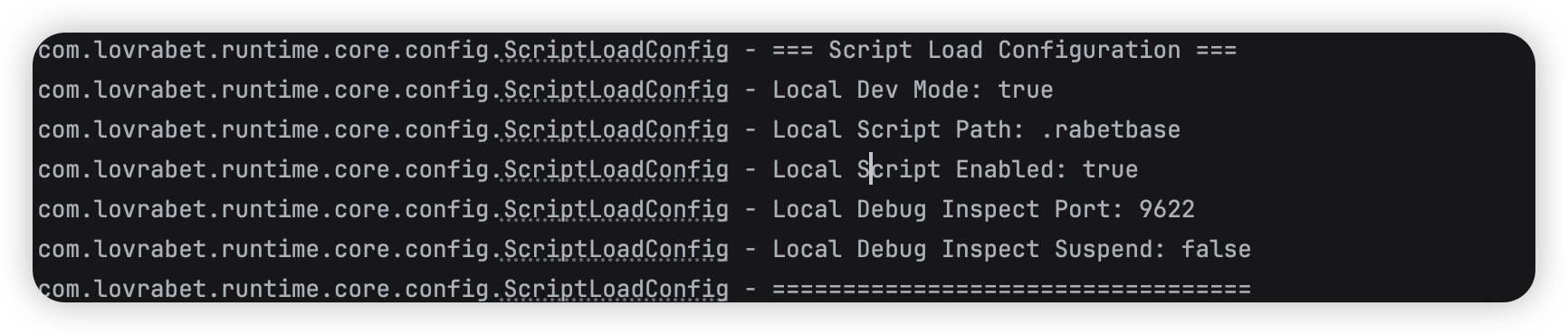
```- After startup succeeds, confirm the console shows logs like these:
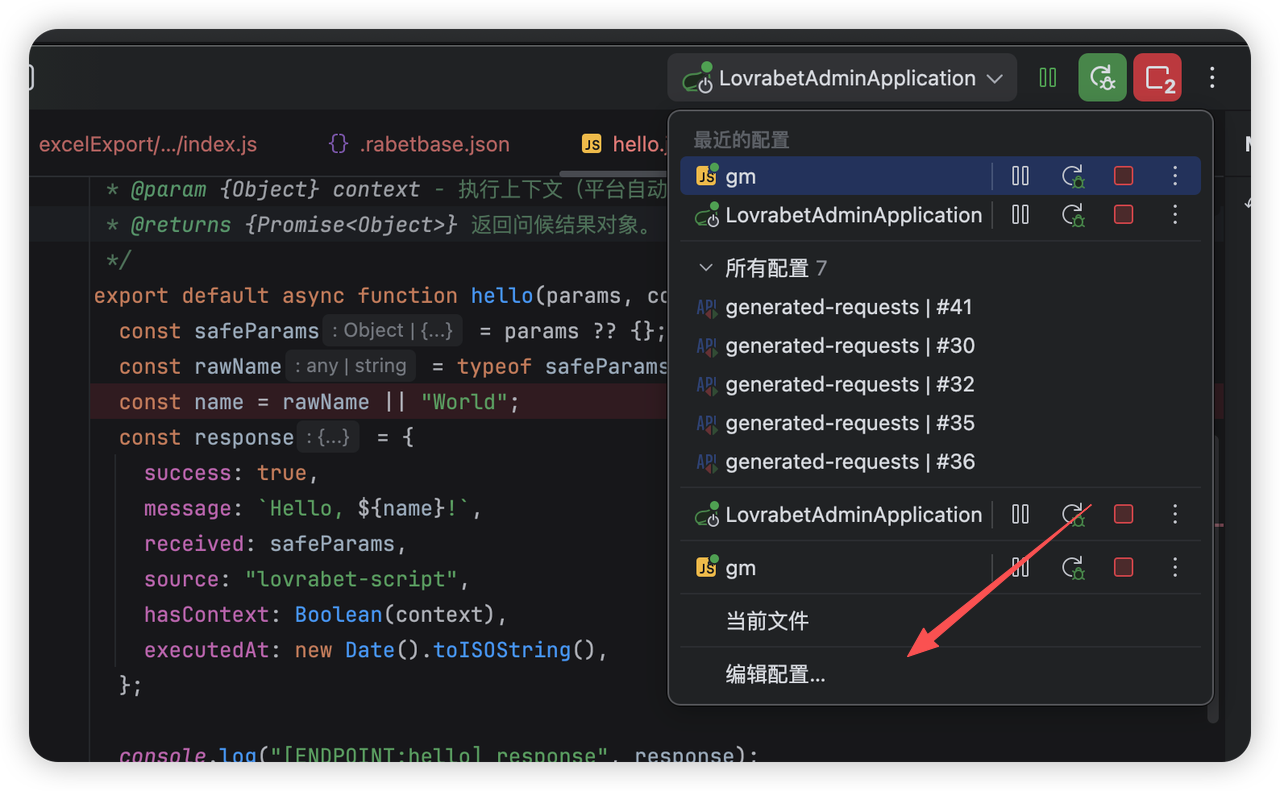
- Click Edit Configurations
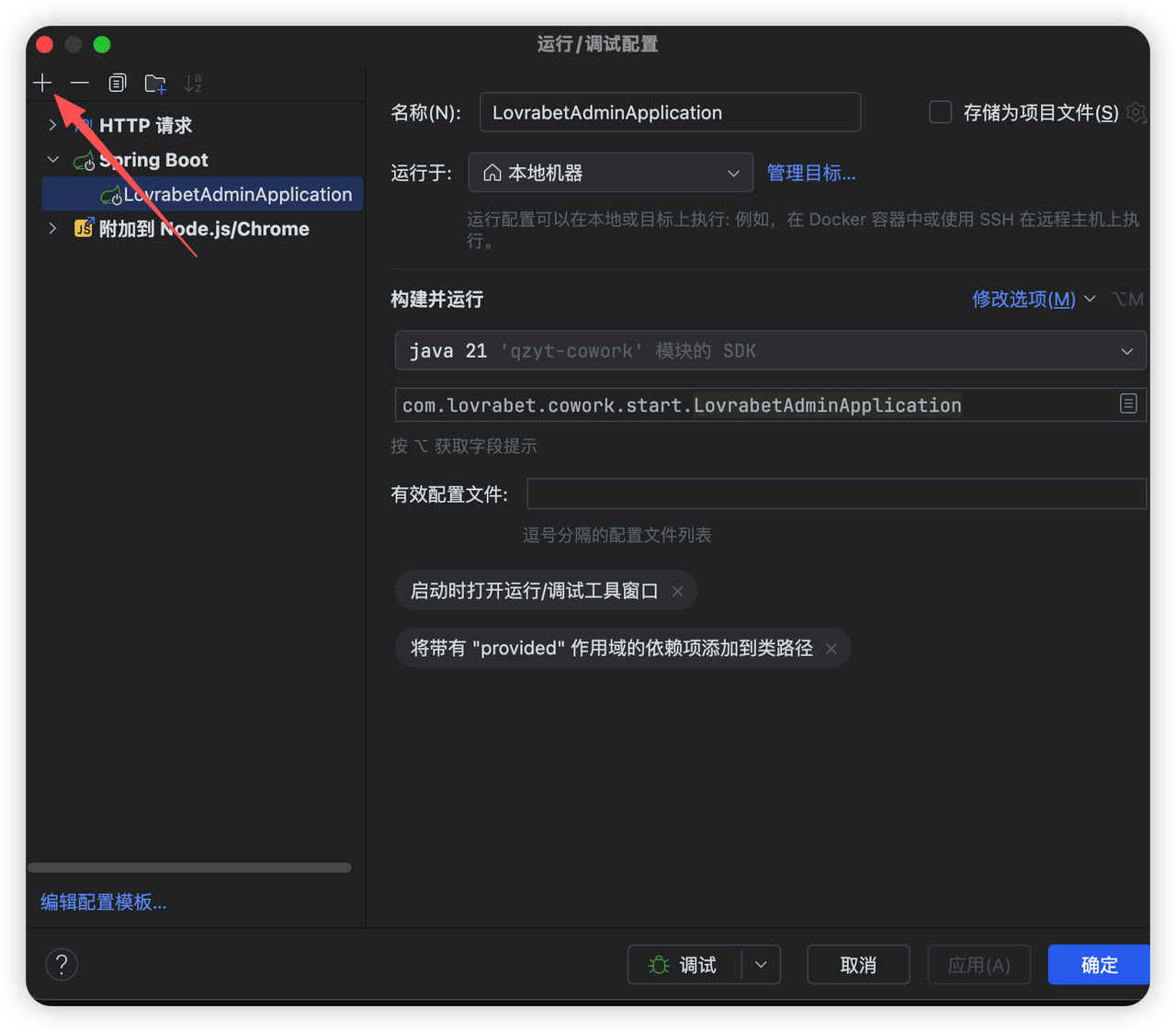
- Click the + button
- Create a new Node.js/Chrome debug configuration in the IDE
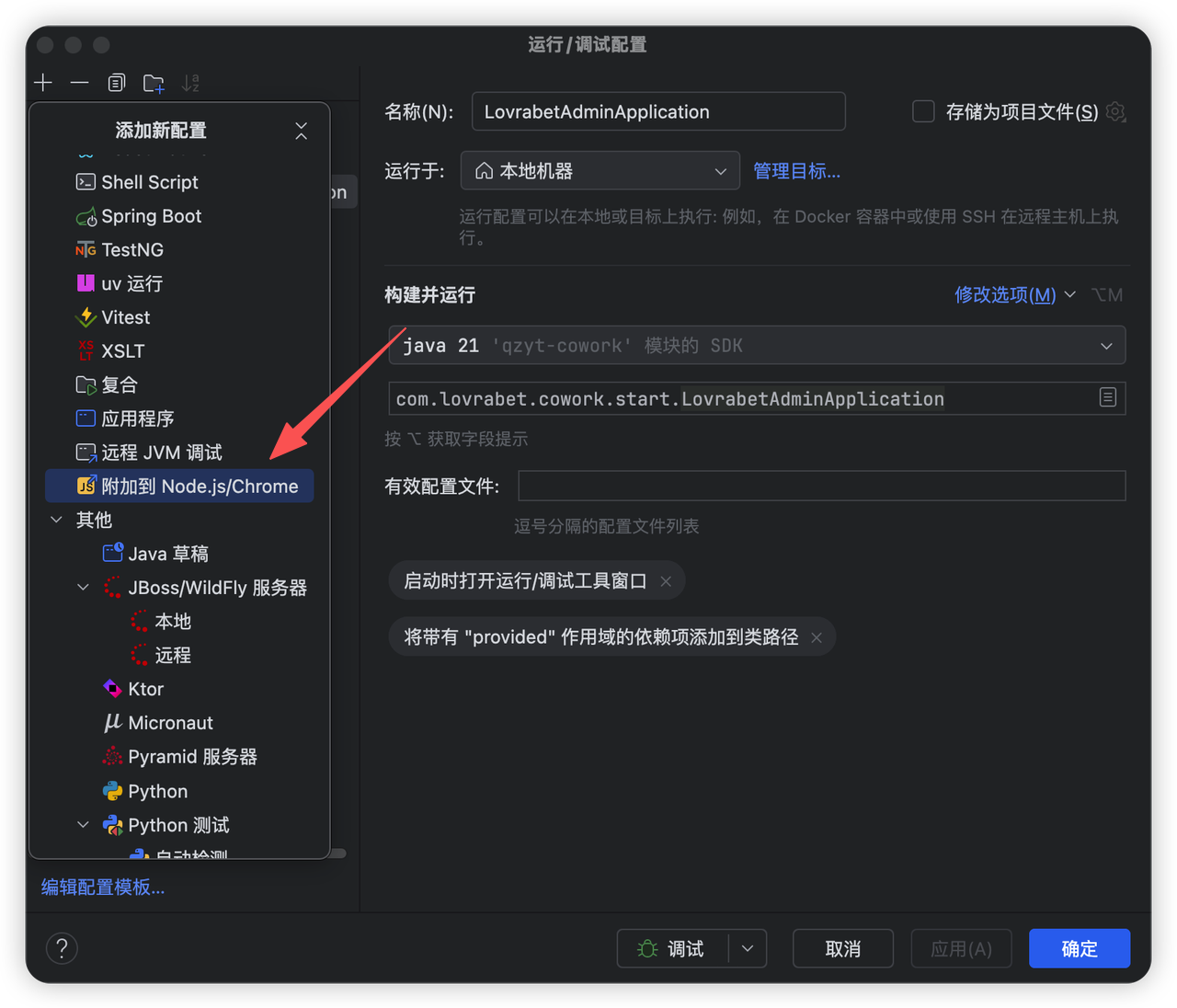
- The configuration looks like this:
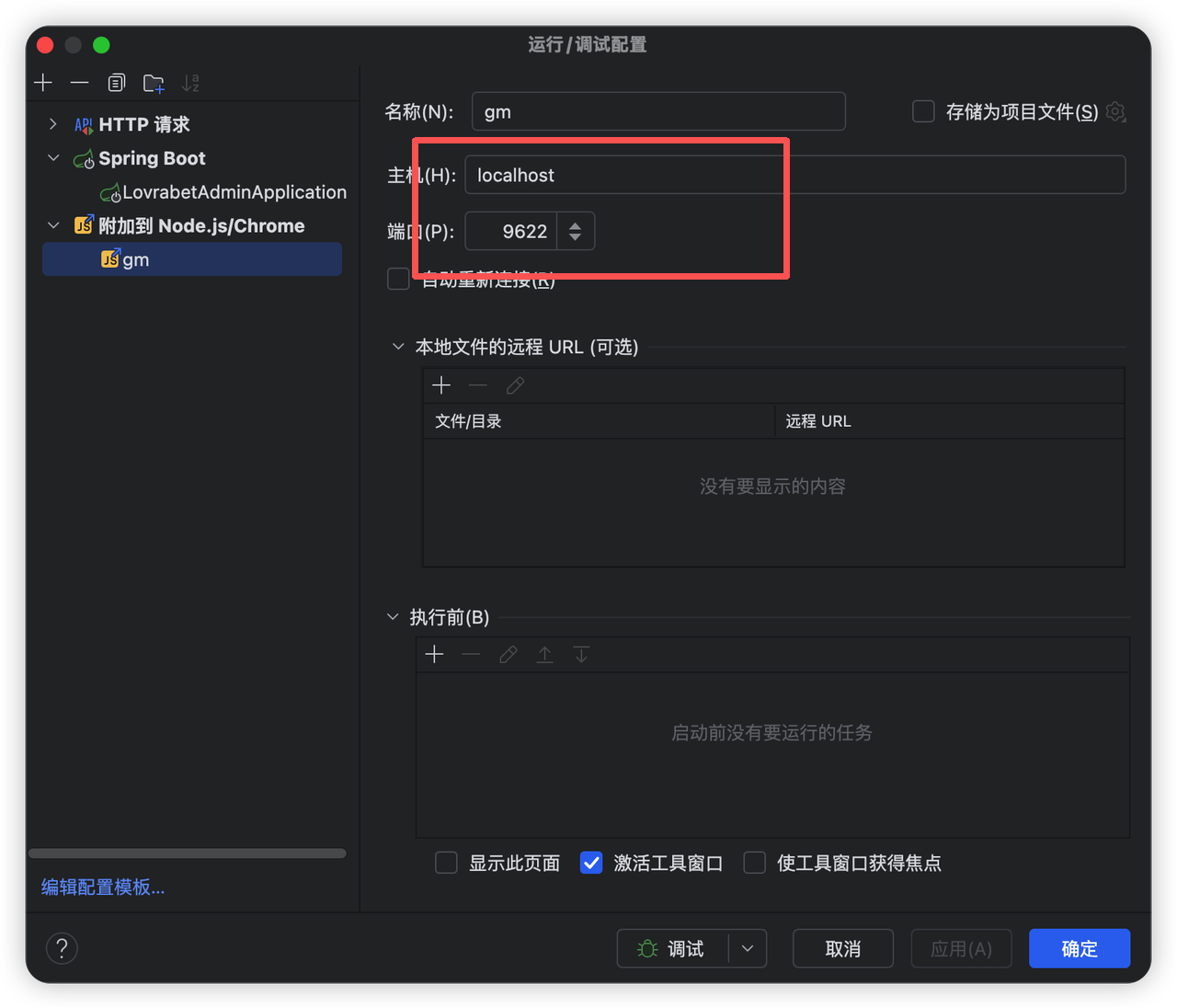
- When you see the screen below, the debugger is connected
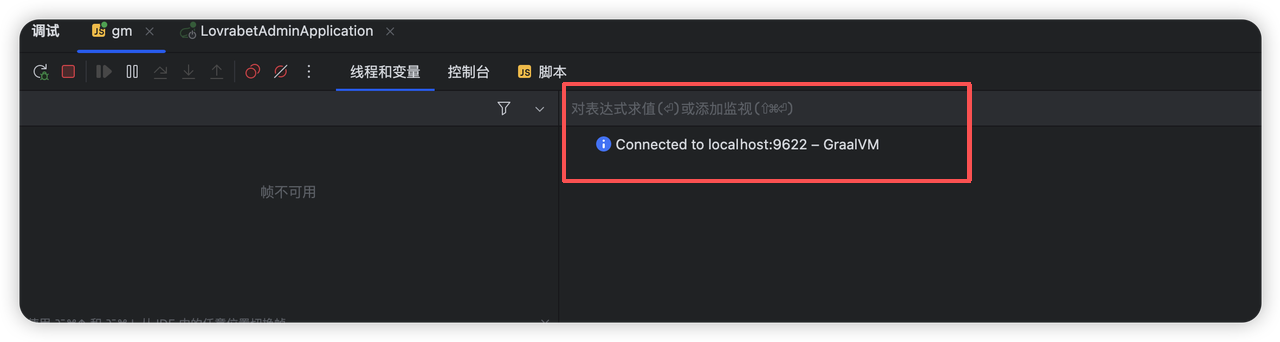
- This is where you can see the actual debug information
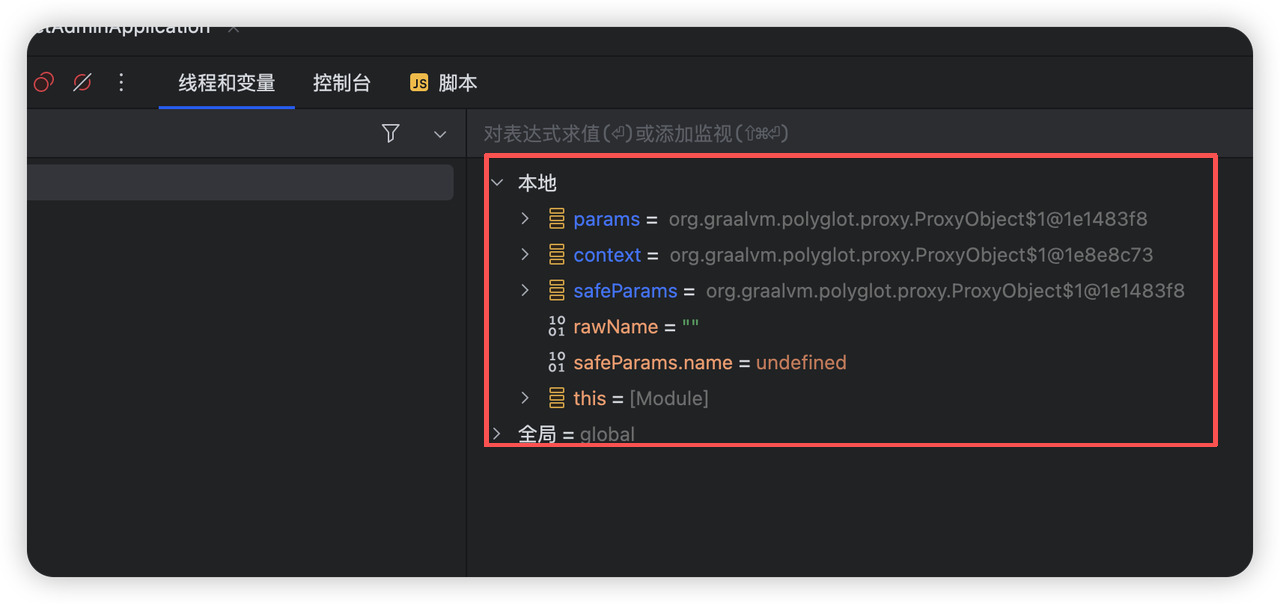
Step 3: Understand how runtime resolves local scripts
With `local-dev-mode` on, runtime loads scripts from the local file system first instead of the database.

Script layout rules:

- ENDPOINT / COMMON:
.rabetbase/bff/<appcode>/<scripttype>/<scriptname>.js
- HOOK:
.rabetbase/bff/<appcode>/HOOK/<alias-or-datasetcode>/<operationtype>/<functionnode>/*.js

> Common mistakes:
> - `appCode` is correct, but the file is in the wrong directory
> - `scriptName` doesn't match the file name
> - `HOOK` `operationType` or `functionNode` is wrong
Step 4: Debug the script
Apifox is recommended
Debugging an endpoint script
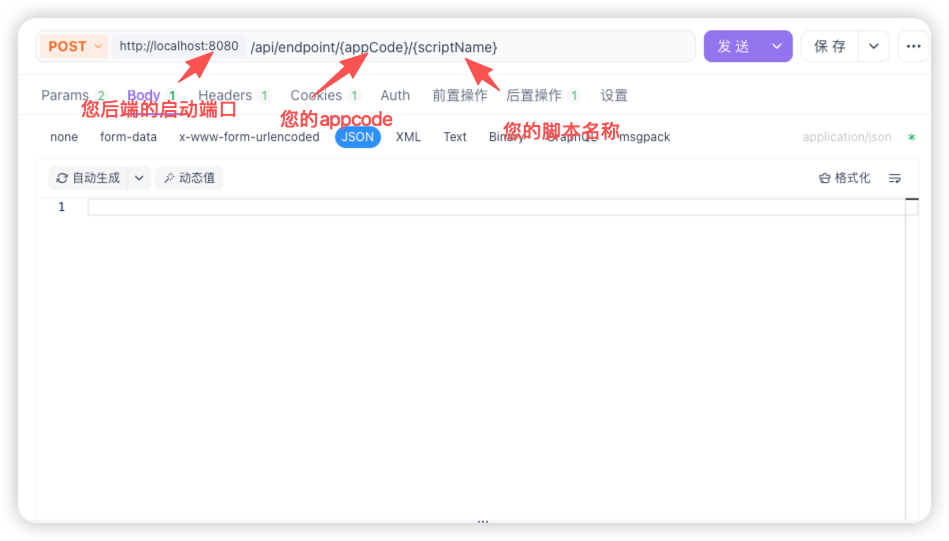
HTTP entry points you can call directly

The runtime currently exposes:

POST /api/endpoint/{appCode}/{scriptName}- Debugging COMMON
COMMON has no standalone public HTTP entry for debugging.

The recommended approach:

1. Write an ENDPOINT that calls the COMMON
2. Call that ENDPOINT

Example call:


return await context.client.bff.execute({
  scriptName: 'normalizePayload',
  params: { payload: params }
});


> Note:
> COMMON is meant to be tested indirectly through an ENDPOINT, not treated as a standalone API.- Step 7: Debugging HOOK
A HOOK is not a standalone HTTP entry — it must be triggered by a real data operation.
When debugging, check in this order:
Is the local HOOK file path correct?
Are the alias / datasetCode correct?
Is the operationType correct?
Is the functionNode the before or after you expect?
Does the triggering request actually reach the target database?
Notes
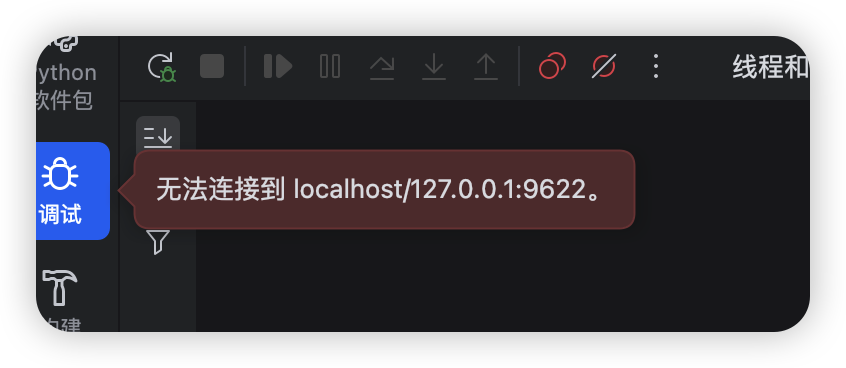
- The following issue may appear the first time you start debugging
Fix: manually call the endpoint script once before the prompt appears.
Why: the debugger's listen port isn't opened at application startup; it is created lazily the first time a local script actually executes.
- Local script changes take effect immediately — no application restart needed
- Scenario 1: "script not found" error
Check first:
- Is `appCode` correct?
- Does `scriptName` match the file name?
- Is `local-dev-mode` really on?
- Does the file path follow `.rabetbase/bff/<appCode>/...`?- Scenario 2: breakpoints don't hit
Check first:
- Did you attach before sending the request?
- Are you actually connected to `localhost:9622`?
- Is local script mode the one being hit?
- Are the breakpoints on the correct local files?