Standalone endpoint scripts and transactions
This guide shows developers how to write standalone endpoint scripts that support cross-database transactions. These scripts expose their own HTTP entry point, which makes them ideal for complex business aggregation logic.
1. Script definition
A standalone endpoint script is a special kind of JS script with the type ENDPOINT.
- API path:
/api/endpoint/{appCode}/{scriptName} - Method:
POST - Request body: a JSON object, passed to the script directly as
params.
2. Core syntax
Every standalone endpoint script must export an async function and use the unified context.client SDK for data operations.
2.1 Function signature
/**
 * 独立端点入口函数
 * @param {Object} params - HTTP 请求体中的 JSON 数据
 * @param {Object} context - 执行上下文,包含用户信息、数据库访问能力等
 */
export default async function(params, context) {
    // 业务逻辑...
}
2.2 The data SDK (context.client)
We provide an intuitive chained API for working with datasets. The API works exactly the same whether the underlying dataset lives in the primary database or a replica.
Basic form:await context.client.models.<dataset_code>.<operation>(args)
| Operation | Description | Example |
|---|---|---|
findOne | Fetch one record | await ...models.user.findOne({ id: 1 }) |
create | Create a record | await ...models.user.create({ name: "John" }) |
update | Update a record | await ...models.user.update({ id: 1, age: 20 }) |
delete | Delete a record | await ...models.user.delete({ id: 1 }) |
getList | Paginated list query | await ...models.user.getList({ page: 1, size: 10 }) |
Note: all database operations are asynchronous — you must
awaitthe result.
3. Cross-database transactions in practice
Thanks to the underlying Best Effort 1PC transaction mechanism, you never write transaction control code (such as begin or commit) in the script. Just write the business logic in order — the system opens and commits transactions for you.
3.1 Example scenario
Suppose we need to handle a cross-database operation:
- Query customer info from the CRM database.
- Query rule configuration from the Agent database.
- Update both the customer name in the CRM database and the rule name in the Agent database.
- Either everything succeeds or everything fails (data consistency).
3.2 Implementation
/**
 * 跨库事务测试脚本
 * 脚本名称: transaction_demo
 */
export default async function transactionDemo(params, context) {
  // ----------- 第一部分:数据查询 (读操作不开启事务) -----------

  // 1. 查询 CRM 库 (dataset_crm_customer)
  const customer = await context.client.models.dataset_680936453e5f491e8f36ef9169907808.findOne({
    id: params.customerId
  });

  if (!customer) {
      throw new Error("客户不存在");
  }

  // 2. 查询 Agent 库 (dataset_agent_rules)
  const agentRules = await context.client.models.dataset_5d8190a1f74d43d0b605aad16a898ba3.findOne({
    id: params.rulesId
  });

  if (!agentRules) {
      throw new Error("规则不存在");
  }

  // ----------- 第二部分:数据更新 (写操作自动开启事务) -----------
  // 系统检测到写操作,会自动开启对应数据库的事务。
  // 注意:为了保证最佳的事务一致性,建议将所有的写操作放在脚本的后半部分集中执行。

  // 3. 更新 CRM 库
  await context.client.models.dataset_680936453e5f491e8f36ef9169907808.update({
    id: customer.id,
    customer_name: customer.customer_name + '_Updated'
  });

  // 4. 更新 Agent 库
  // 此时,系统会自动开启第二个数据库的事务,并加入到当前会话中。
  await context.client.models.dataset_5d8190a1f74d43d0b605aad16a898ba3.update({
      id: agentRules.id,
      name: agentRules.name + '_Updated'
  });

  // ----------- 脚本结束 -----------
  // 脚本执行成功返回 -> 系统自动提交 CRM 库事务 -> 系统自动提交 Agent 库事务
  // 脚本抛出异常 -> 系统自动回滚所有已开启的事务

  return {
    success: true,
    message: "跨库更新成功",
    updatedIds: [customer.id, agentRules.id]
  };
}
3.3 What actually happens
Send an HTTP POST to the API endpoint path
{
"customer_id": 22,

"agent_rules_id": 379
}
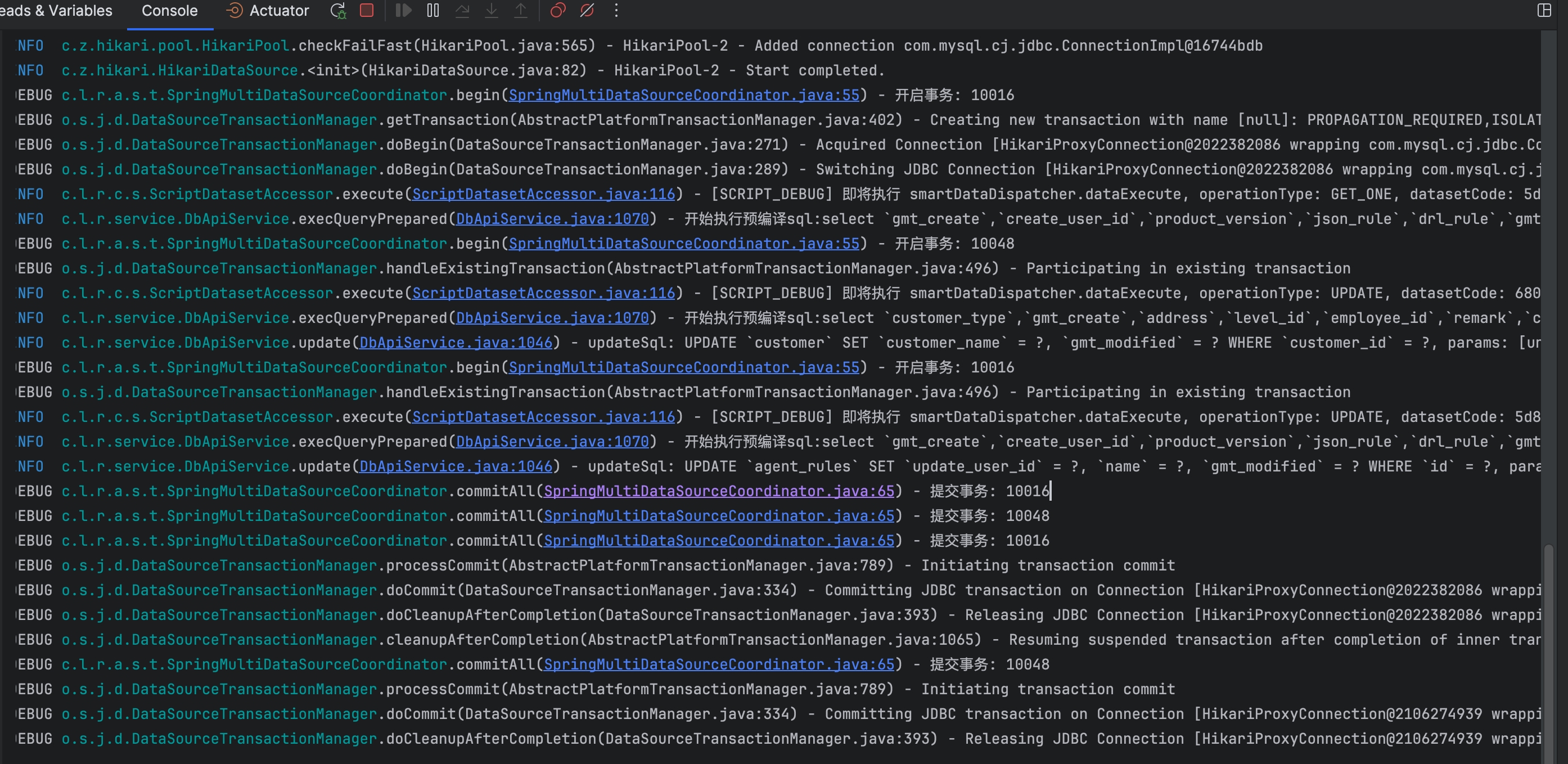
Transaction committed
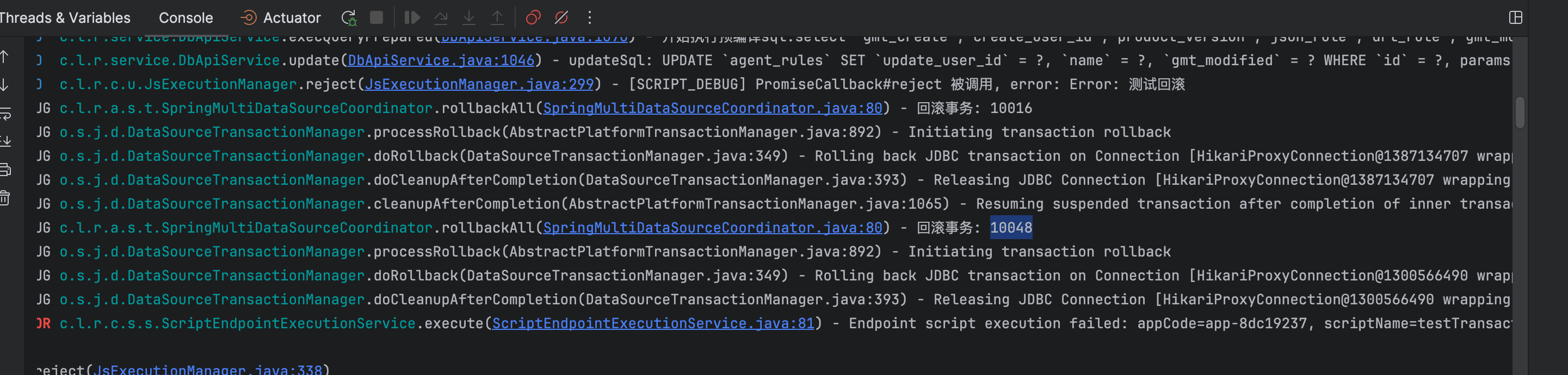
Transaction rolled back
3.4 How the transaction behaves
Lazy opening (Lazy Loading):
- During the reads in steps 1 and 2, the system opens no transaction and holds no database connection.
- When step 3's
updateruns, the system detects a write to the CRM database and automatically opens a transaction on it. - When step 4's
updateruns, it detects a write to the Agent database and opens a transaction there too.
Atomicity guarantee:
- If step 3 succeeds but the script throws before step 4 (or step 4 fails), the system catches the exception and rolls back the CRM database transaction, so no data is left partially modified.
Development tips:
- Separate reads from writes: put all
findOne/getListqueries at the top of the script andcreate/update/deletewrites at the end. This shortens transaction hold time and improves concurrency. - Validate first: complete parameter validation and business-rule checks before any write.
- Separate reads from writes: put all
4. FAQ
Q: Do I need to call commit manually?
A: No. As long as the script returns normally (without throwing an Error), the system commits all transactions automatically.
Q: What if I want to roll back?
A: Just throw an exception.
if (someCondition) {
    throw new Error("业务条件不满足,回滚所有操作");
}
Q: How many databases can one script operate on at once?
A: No limit in theory. The system manages every database connection involved, based on the datasets you operate on.
5. Script configuration (Advanced)
Fine-tune the script's runtime behavior through the config field (JSON) of the app_script table.
| Option | Type | Default | Description |
|---|---|---|---|
enableTransaction | boolean | true | Whether transaction support is enabled. - true: writes automatically open a transaction (recommended). - false: everything runs directly, with no transaction guarantee — suitable for pure queries or maximum-performance scenarios. |
Example configuration:
{
  "enableTransaction": true,
  "timeout": 5000
}