Example: embedding a Vite project as a source-code child app
INFO
A Vite project's local development output (dev / start) differs from its final production output (build). Only the build output can be embedded as ES modules.
Example project (GitHub)
<bookmark name="GitHub - Lovrabet/sub-app-vite-demo: 在lovrabet体系下使用源码页面的例子(vite工程)" href="https://github.com/Lovrabet/sub-app-vite-demo/tree/main"></bookmark>
Develop: run
pnpm run startand develop the app entirely as a standalone application.- Because Vite's dev and build outputs differ, the dev output cannot be embedded directly. Finish development as a standalone app first, then debug the embedded version.
Build: run
pnpm run build. The build output works both standalone and as an embedded child app (it's what goes into the "asset list").Debugging the embedding: after
pnpm run buildproduces the output, runpnpm run previewto serve it locally. Either fill the "asset list" with the local output or use a proxy tool — both work for debugging.
Key modifications
[Important] Vite build configuration and calling platform-generated APIs — code example
Local development needs cross-origin requests to work:
本地浏览器 (https://dev.yuntooai.com:5173)
    ↓
直接发送fetch请求(带CORS headers)
    ↓
API服务器 (https://api.yuntooai.com)
    ↓
返回响应(允许跨域)
    ↓
浏览器接收数据
The configuration:
import { defineConfig, loadEnv } from "vite";
import { dirname } from "node:path";
import { fileURLToPath } from "node:url";
import react from "@vitejs/plugin-react";
import htmlPlugin from "vite-plugin-index-html";
import pluginExternal from "vite-plugin-external";
import pkgJson from "./package.json";

const version = pkgJson.version;
const appName = pkgJson.name.split("/").pop();
const __dirname = dirname(fileURLToPath(import.meta.url));

// https://vitejs.dev/config/
export default defineConfig(async ({ mode }) => {
  const env = loadEnv(mode, __dirname);
  const PORT = Number(env.VITE_APP_PORT) || 5173;
  const isCdn = Boolean(process.env.CDN_DOMAIN);
  const outDir = isCdn ? `dist/${appName}/${version}` : "dist";
  const base = isCdn ? `${process.env.CDN_DOMAIN}${outDir}/` : "/";

  return {
    base,
    envDir: __dirname,
    plugins: [
      react(),
      // 关键配置:提供 vite lib 打包 + html plugin 能力
      htmlPlugin({
        input: "src/main.tsx",
        preserveEntrySignatures: "exports-only",
      }),
      pluginExternal({
        externals: {
          react: "React",
          "react-dom": "ReactDOM",
          antd: "antd",
          dayjs: "dayjs",
        },
      }),
    ],
    resolve: {
      alias: {
        "@": "/src",
      },
    },
    // 可选配置:提供https自签名证书及跨域访问能力
    // 因为接口域名为 api.yuntooai.com 存在跨域,服务端配置了允许 dev.yuntooai.com 的跨域请求,从而实现本地开发能够正常请求接口
    // 这些配置不是必须的,你也可以使用 proxy 等任意手段自行处理跨域问题
    server: {
      port: PORT,
      open: `https://dev.yuntooai.com:${PORT}`,
      strictPort: true,
      host: "dev.yuntooai.com",
      https: await (await fetch("https://g.yuntooai.com/cert/dev.json")).json(),
      headers: {
        "Access-Control-Allow-Origin": "*",
        "Access-Control-Allow-Methods":
          "GET, POST, PUT, DELETE, PATCH, OPTIONS",
        "Access-Control-Allow-Headers":
          "X-Requested-With, Content-Type, Authorization",
      },
    },
    build: {
      outDir,
      target: "esnext",
      rollupOptions: {
        output: {
          format: "es",
          entryFileNames: `assets/[name].js`,
          assetFileNames: `assets/[name].css`,
        },
      },
    },
    optimizeDeps: {
      include: ["react", "react-dom", "antd", "dayjs"],
    },
  };
});
[Important] Entry point changes — code example
- Expose
mountandunmount, which the parent app calls when loading and unloading the child app. - Use
isInIcestark()to detect the runtime environment, so the project works both standalone and embedded.
import React from "react";
import { createRoot } from "react-dom/client";
import { isInIcestark } from "@ice/stark-app";
import { ConfigProvider } from "antd";
import zhCN from "antd/locale/zh_CN";
import App from "./router";
import "./style.css";

// 可选:根据 isInIcestark() 判断当前的运行环境,可同时兼容独立使用和嵌入使用
if (!isInIcestark()) {
  const container = document.getElementById("root");
  if (container) {
    const root = createRoot(container);
    root.render(
      <ConfigProvider locale={zhCN}>
        <App />
      </ConfigProvider>,
    );
  }
}

// 关键:暴露 mount 供主应用加载时调用
export function mount({
  container,
  customProps,
}: {
  container: HTMLElement;
  customProps: object;
}) {
  const root = createRoot(container);
  root.render(
    <React.StrictMode>
      <ConfigProvider locale={zhCN}>
        <App {...customProps} />
      </ConfigProvider>
    </React.StrictMode>,
  );
  return root;
}

// 关键:暴露 unmount 供主应用卸载时调用
export function unmount({ container }: { container: HTMLElement }) {
  // React 18 中不再需要手动卸载,但为了兼容性保留
  const root = (container as any)._reactRoot;
  if (root) {
    root.unmount();
  }
}
[Optional] Frontend routing — code example
- Call
getBasename()to read the child app's runtime basename and pass it to the router.
const router = createBrowserRouter(
  [
    {
      path: "/",
      element: <MainLayout />,
      children: [
        {
          index: true,
          element: <Home />,
        },
        {
          path: "about",
          element: <About />,
        },
        {
          path: "settings",
          element: <Settings />,
        },
      ],
    },
  ],
  {
    basename: getBasename() || "/",
  }
);
[Optional] Layout — code example
- Use
isInIcestark()to detect the runtime environment; when embedded, skip the layout.
import React from "react";
import { isInIcestark } from "@ice/stark-app";
import { Outlet, useNavigate, useLocation } from "react-router";
import { Layout, Menu } from "antd";

const MainLayout: React.FC = () => {

  // 可选:根据isInIcestark()判断当前运行环境,被嵌入时,不渲染layout布局
  if (isInIcestark()) {
    return (
      <div style={{ padding: "16px 20px" }}>
        <Outlet />
      </div>
    );
  }

  return (
    <Layout>
      .....
    </Layout>
  );
};

export default MainLayout;
[Optional] Calling existing Lovrabet platform APIs
- When the page sends fetch requests, CORS headers are attached automatically, allowing cross-origin access.
// 简单封装 apiRequest
const apiRequest = async (path, options = {}) => {
  const response = await fetch(`https://api.yuntooai.com${path}`, {
    credentials: 'include', // credentials: 'include' - 关键配置:跨域请求携带Cookie
    headers: {
      'Content-Type': 'application/json',
      ...options.headers,
    },
    ...options,
  });
  return response.json();
};


// 页面中实际使用文生应用的接口
const data = await apiRequest('/smartapi/runtime/yuntoo/app-f4c03acb/9c1bfbd319174461b6b58d19d7bf040f/getList', {
  method: 'POST',
  body: {"pageSize":10,"currentPage":1}
});
// 页面中实际使用DB生成应用的接口
const data = await apiRequest('/dbapi/runtime/yuntoo/app-f4c03acb/b0a8936ffd2542499da5a165a09cc078/getList', {
  method: 'POST',
  body: {"pageSize":10,"currentPage":1}
});
More page examples (demo)
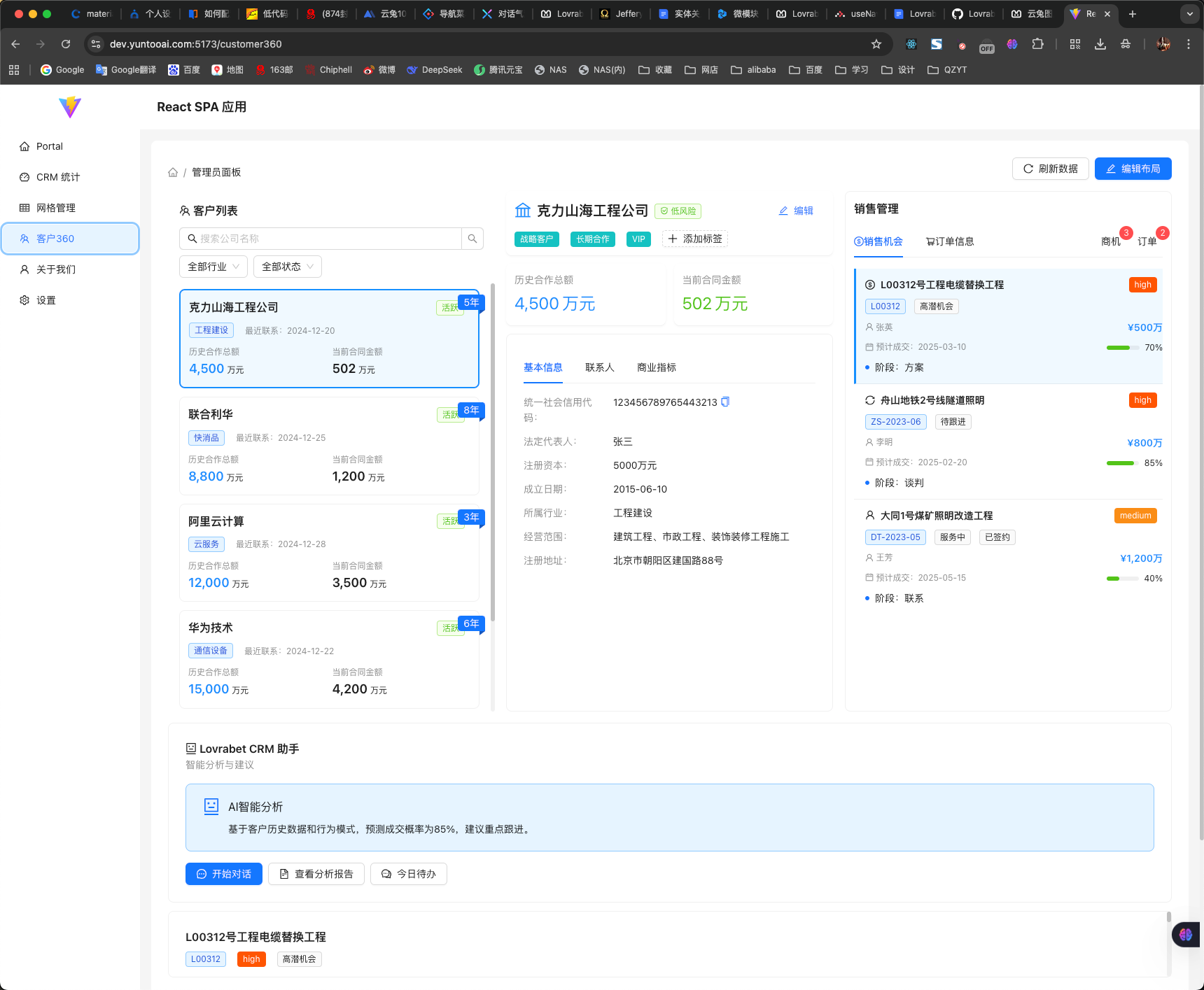
Switch the GitHub project to the crm-demo branch to see richer examples such as a dashboard and a Customer 360 view.
<bookmark name="GitHub - Lovrabet/sub-app-vite-demo at crm-demo" href="https://github.com/Lovrabet/sub-app-vite-demo/tree/crm-demo"></bookmark>
<grid> <column width-ratio="0.500000"> 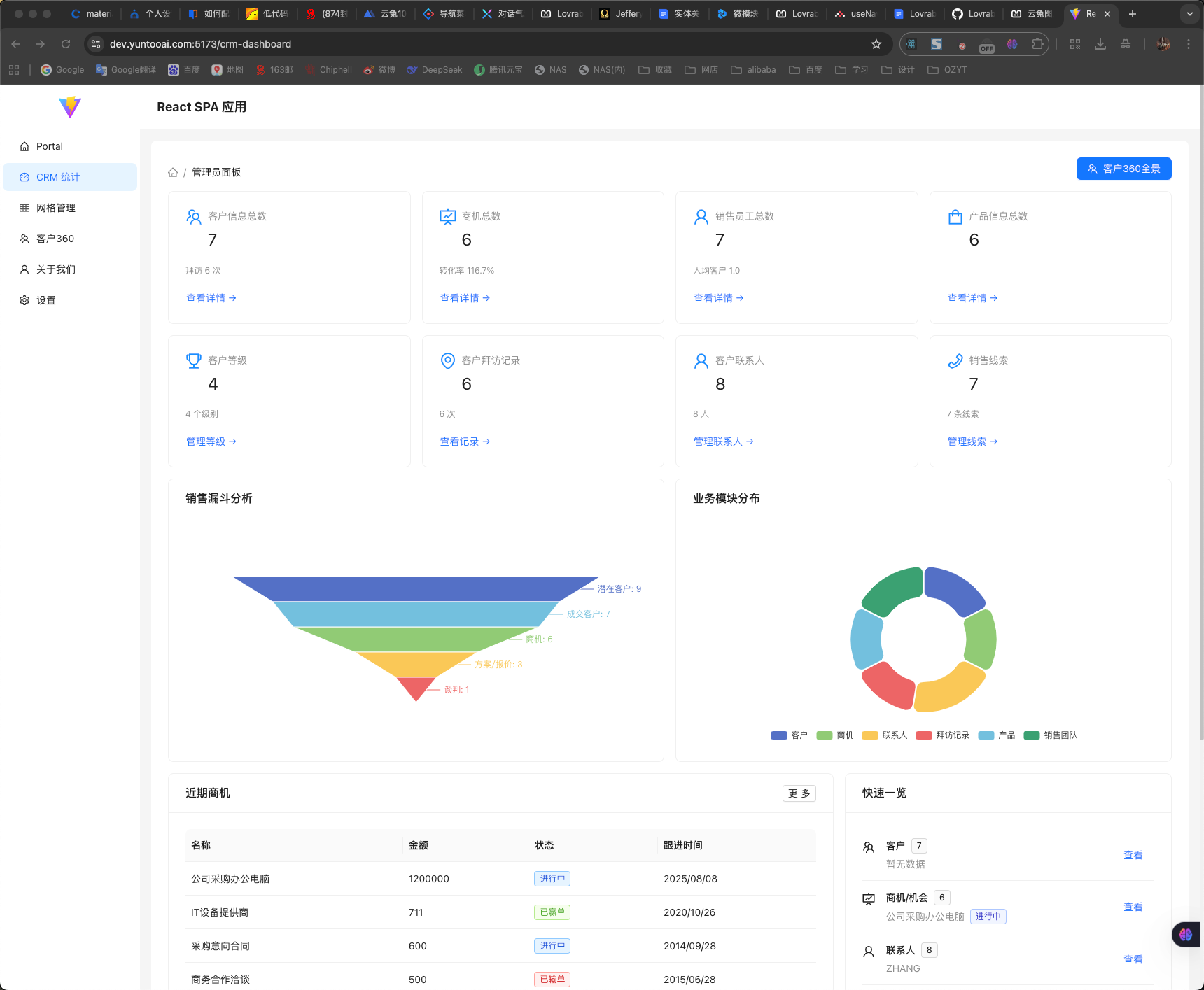 </column> <column width-ratio="0.500000">
  </column> </grid>