Lovrabet parent/child app development guide
Read this first
- Use this feature when you need to embed an existing, standalone frontend project (one you have the source code for) into the current parent app — with unified access, styling, and routing — while touching the original project structure as little as possible.
- Source-code embedding is built on the icestark micro-frontend approach, so get familiar with the basic micro-frontend concepts first.
- We recommend the Rabetbase CLI, which syncs your source-code child app pages in one command.
When to use it
- When AI-generated business pages and extension capabilities no longer meet your business needs, develop any custom page you like and extend the system.
- Consolidate multiple standalone frontends (for example, on different tech stacks) into one parent container app, each still developed and deployed independently.
- Incremental modernization: a legacy system doesn't have to be rewritten in one go — mount it as a child app first, then replace it piece by piece.
Configuration
Configuration entry
<grid> <column width-ratio="0.237320"> 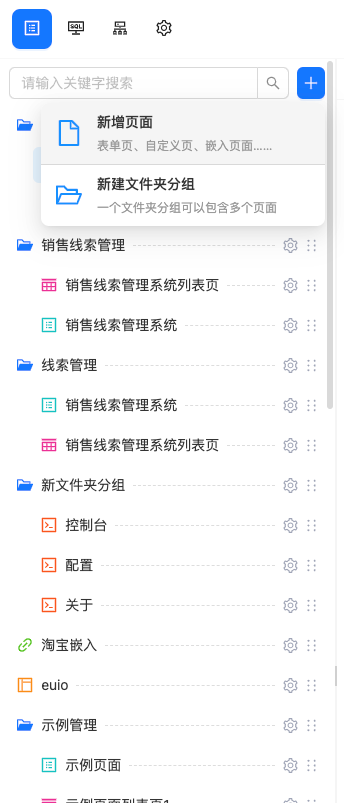
- Create a page </column> <column width-ratio="0.762680">
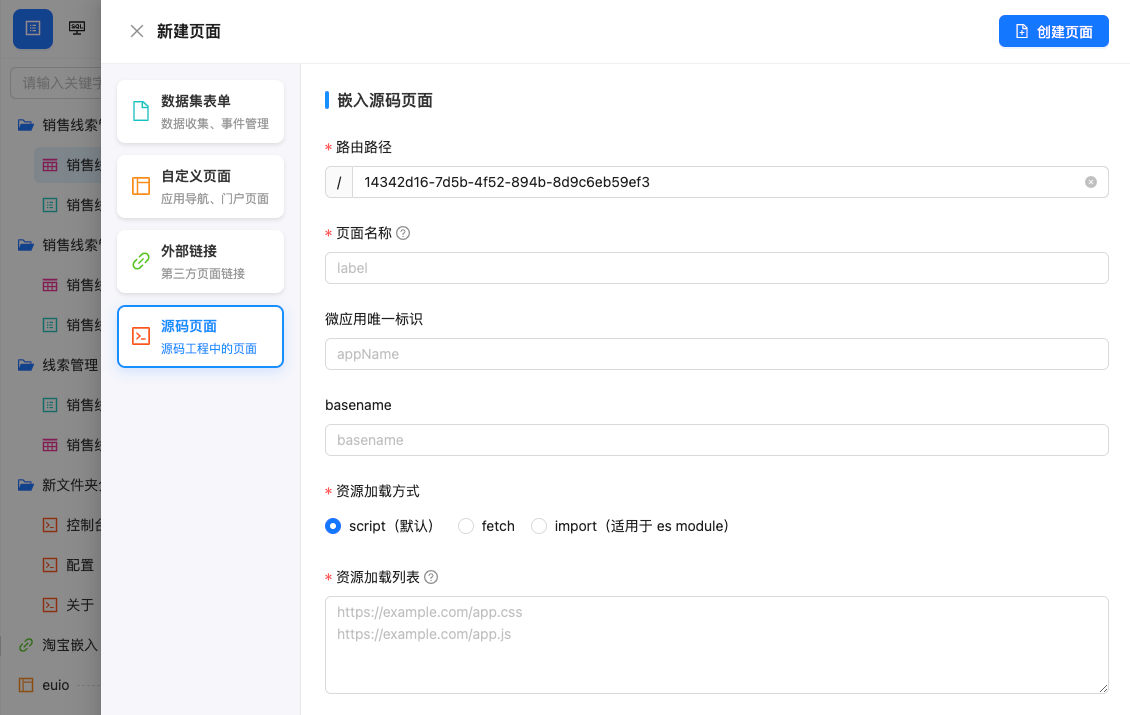
- Select "Source-code page" </column> </grid>
Field reference
Route path (required):
- The
pathportion of the URL used to access the app (for example:https://app-6ff2b2ef.yuntooai.com/${path}) - Must be unique across the entire app. It is generated automatically when you configure the page; keep it aligned with any frontend routes inside the child app.
- The
Page name (required):
- The name displayed in the menu when the app is accessed.
Child app unique identifier:
- Marks which source-code child app the page belongs to; multiple pages can belong to the same child app.
- Optional. If left empty, the route path (path) is used as the app identifier at runtime.
Basename:
- The basename the child app receives; needed when the child app has its own frontend routes.
- Optional. If left empty, the route path (path) serves as the basename by default.
Asset loading method:
- script (default) — the default. Loads the child app's script assets via
HTML <script />tags. - fetch — loads and caches script assets via
window.fetch; used in sandbox mode. - import — how
ES moduleschild apps are loaded. Required for projects built with Vite.
- script (default) — the default. Loads the child app's script assets via
Asset list (required):
- The built asset output of the child app project. Any address that serves static assets works; a CDN is preferred.
Configuration example
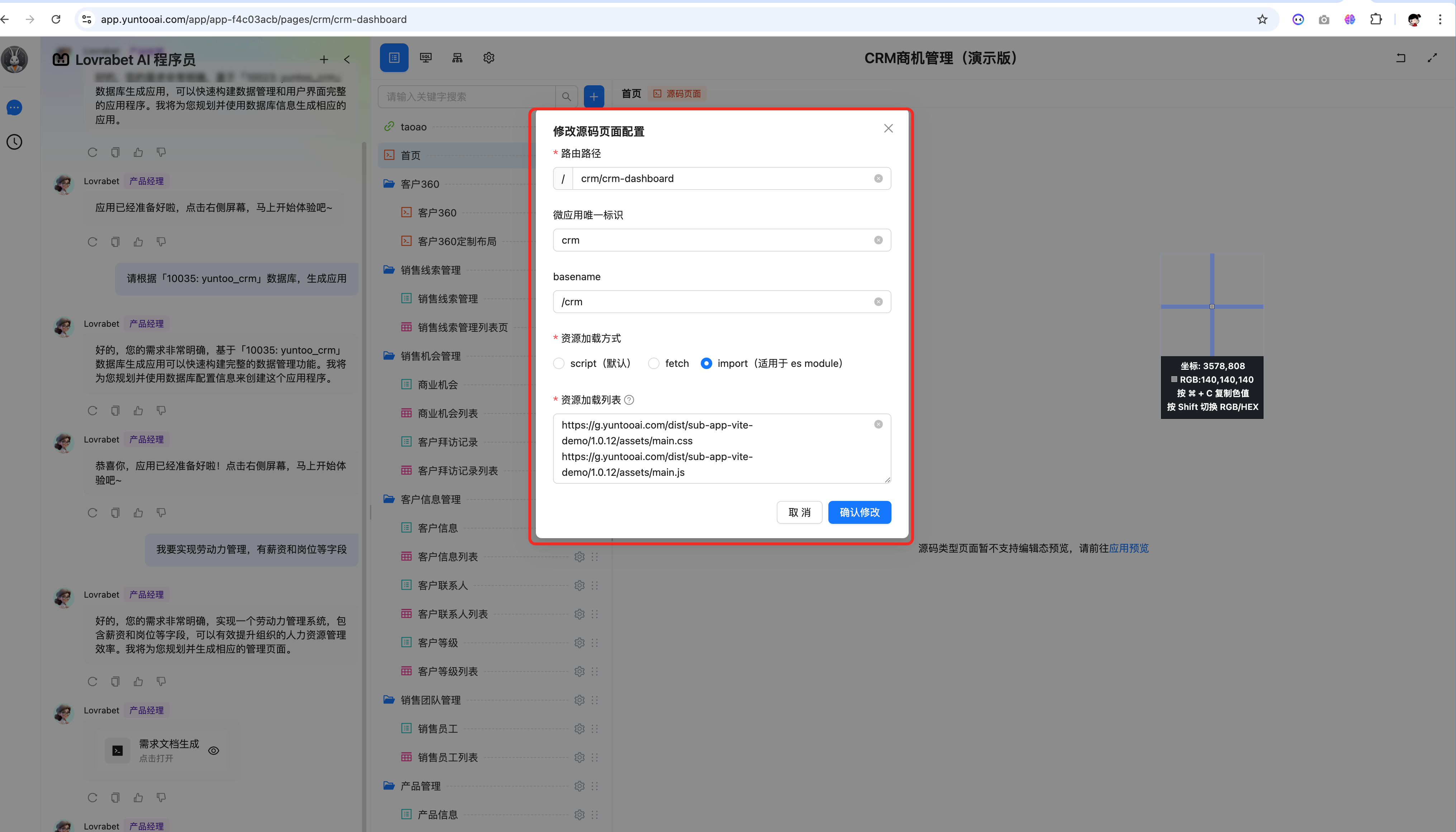
Using the home page of the demo app as an example: https://app.yuntooai.com/app/app-f4c03acb/pages/crm/crm-dashboard
Integrating a source-code project: detailed guide
Any source-code project can be integrated by converting it into an icestark child app. See the official docs:
We recommend React 18 + antd 5 + Vite as the stack for your source-code project.
Vite project example
<cite doc-id="JRizwCmQ7iUgVSkTYhecqb5lnQT" file-type="wiki" title="Vite 工程源码子应用接入自定义页面示例" type="doc"></cite>
Angular project example
<cite doc-id="Z9tFwpcSWiZ6kRkpv3xcsIA7nKb" file-type="wiki" title="Angular 工程源码子应用接入自定义页面示例" type="doc"></cite>
Webpack project example
TODO