Lovrabet CLI — The AI Suite for Business Processes
On April 21, 2026, the Lovrabet CLI — the AI operations suite for business scenarios — was officially released.
What the Lovrabet CLI is
The Lovrabet CLI is not a "command-line version of the admin console" — it's the entry point that brings the Lovrabet runtime into the AI ecosystem. It consolidates the app catalog, datasets, data operations, SQL, BFF, and diagnostics into a set of stable commands, so Agents, delivery teams, and business operations can start from real business objects — customers, orders, inventory, tickets — and complete queries, verification, execution, integration testing, and troubleshooting.
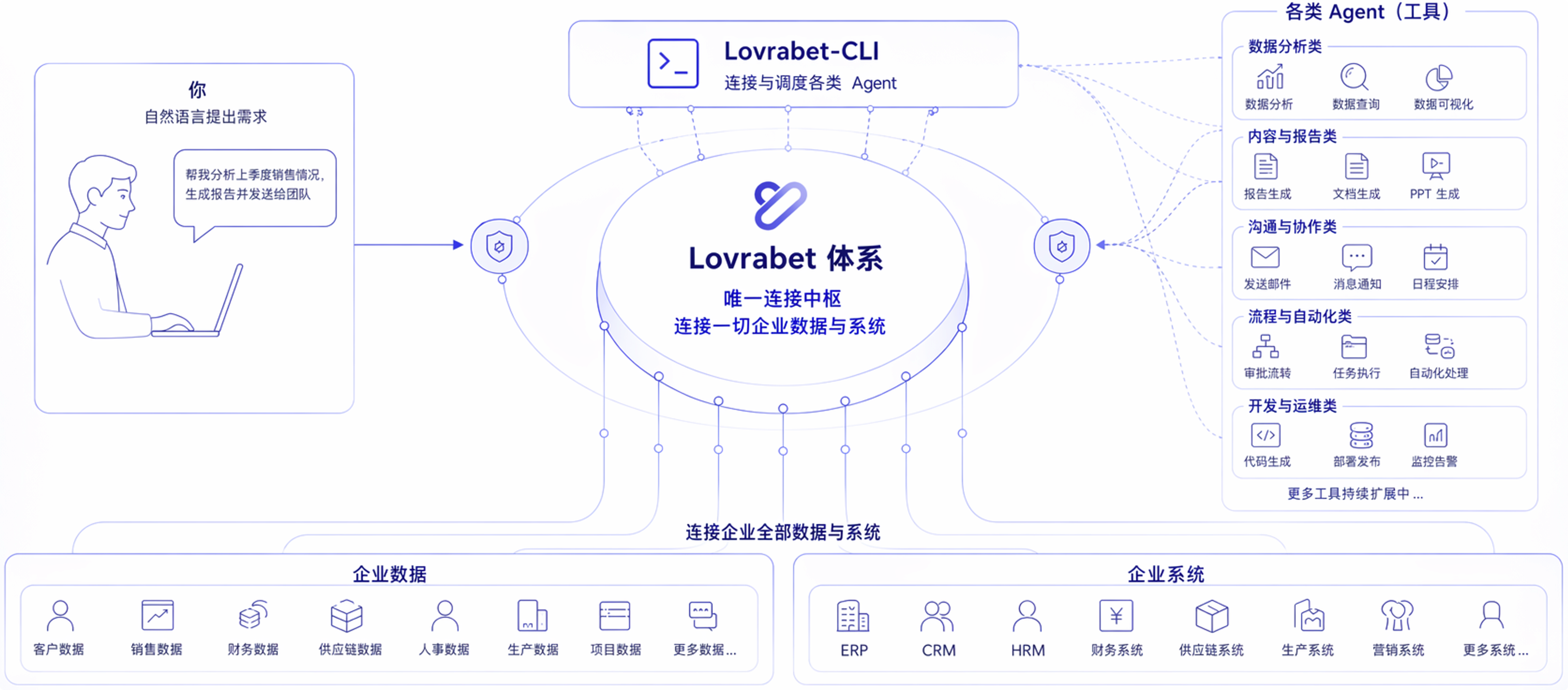
In typical usage:
- Business users just state the business goal clearly — for example, "find orders from the last 7 days that were paid but not shipped, summarize by warehouse, and give me a list of the anomalous orders".
- Agents and Skill maintainers decide which app to query, which dataset to use, whether to call SQL / BFF, and whether to loop in Feishu or DingTalk for notifications, task creation, or report delivery.
The core value of the Lovrabet CLI
Many enterprises already have systems, data, and processes. Yet when they actually want an Agent to get work done, the same problems keep coming up:
- Business users can't write commands
- Pages can only do so much, and flows break the moment they cross systems
- Querying data, sending messages, creating tasks, and changing status are scattered across different tools
The Lovrabet CLI solves exactly this:
- Designed for business users: the business side just states the goal — no commands to learn
- Systems that come with an execution entry point: a system built with Lovrabet isn't just a set of pages — it ships with its own CLI capabilities
- Easy to wire into the ecosystem: works with Feishu, DingTalk, WeCom, and similar tools, so the Agent can actually run a flow end to end
- Built for real business processes: beyond querying data, it continues with notifications, collaboration, and follow-up actions
What it can do for you
- List records — for example, customers to follow up, anomalous orders, overdue tickets
- Pull details — for example, the recent orders, tickets, and follow-up records for a phone number
- Compute statistics — for example, unshipped orders summarized by warehouse, or potential customers by industry
- Reuse existing business logic — call SQL or BFF that's already in place and produce business results directly
- Perform controlled writes — backfill, correct, and sync status, with risks contained by
riskLevel,--dry-run, high-risk confirmation, and similar mechanisms
How business users work with it
From the business side, the experience usually looks like this:
- State the business question directly
- The Agent picks the right execution path based on skills
lovrabetis called as needed behind the scenes, together with ecosystem tools like Feishu, DingTalk, and WeCom- What comes back is a list, a statistic, a recommendation, a notification result — or one controlled, completed business action
That's also why business users don't need to know appcode, dataset codes, sqlcode, or functionName in advance.
Working with skills
The point of the Lovrabet CLI is not to expose every low-level capability to the business side as-is, but to execute business flows reliably within clear boundaries.
That's why you'll see:
sql execandbff exec- But no
sql listorbff listinviting free-form exploration from the business side
The more common pattern:
- The business side describes "what result I want"
- The skill constrains "which capabilities this scenario may call"
- The Agent executes within that scope
The benefit: steadier flows and clearer boundaries.
How to state a business request to the Agent
Rather than "which command should I run", the business side gets better results by stating directly:
- Which system or business domain the question is about
- Which business object to work on
- The scope — time, warehouse, store, customer segment
- What result you ultimately want
- Whether this is read-only or writes are allowed
For example:
- Find customers added in the last 30 days who haven't placed a first order yet, summarize by industry, and give me a prioritized follow-up list for sales — read-only.
- Find orders from the last 7 days that were paid but not shipped, summarize by warehouse, and put together the anomalous-order details — read-only.
- Pull the recent tickets, orders, and follow-up results for this phone number and draft a reply the support agent can send the customer as-is — read-only.
- Change requirement 241 to "processing" — preview first, then execute.
For more concrete examples, continue with:
- Business question templates
- High-frequency business case studies
How it relates to the Rabetbase CLI
Think of the two as working in sequence:
- Rabetbase CLI covers the build and delivery phase — projects, interfaces, SQL, BFF, code generation, and other construction work
- Lovrabet CLI covers the runtime phase — querying, statistics, executing existing logic, controlled writes, and letting the Agent run real business flows
Put even more simply:
rabetbasebuilds the capabilitieslovrabetruns them
Where to start
If you're a business user / Agent user, start with:
- Business question templates
- High-frequency business case studies
- Case study: a business user files a request, the Agent delivers results across CLIs automatically
If you're an integrator / Skill maintainer / delivery engineer, continue with:
- Install and sign in
- Dataset discovery
- Data operations
- SQL and BFF
- Advanced: configuration, cache, and integration troubleshooting
- Security and automation
- Advanced tips and troubleshooting
- Lovrabet CLI riskLevel: the complete guide
- Enterprise self-hosted deployment: the .lovrabet.json guide (self-hosted / private deployment)