Install and Sign In
This page is mainly for integrators, Skill maintainers, and delivery engineers. Business users usually don't perform these steps themselves.
Current content is verified against
lovrabet-runtime-cli v2.0.12,@lovrabet/cli-framework v1.0.3, and@lovrabet/sdk v1.4.1. The latest version bundles a jq sidecar, so--jqgenerally needs no separate system jq; runtime SDK requests also carry the CLI call source, which helps backend troubleshooting.
When you need this page
Read this first if:
- You're bringing
lovrabetup on a machine for the first time - You're preparing the runtime environment for an Agent client
- You're installing or updating Lovrabet skills
- You're signing in with an AccessKey and confirming which apps the current account can see
If you only use the Agent from the business side, you can skip ahead to the business scenario docs.
Recommended: install automatically via an AI Agent
If you already use AI coding tools such as Claude Code, Codex, Cursor, Trae, or Windsurf, just copy the prompt below to your AI assistant. It follows the guide to install the CLI, install the Skills, and sign in with an AccessKey — you only step in to paste the AccessKey.
Prompt (copy straight to your AI assistant):
Mainland China node:
帮我安装 Lovrabet CLI:https://www.lovrabet.com/agent-install-guides/cn/lovrabet-cli.mdIndonesia node:
帮我安装 Lovrabet CLI:https://www.lovrabet.id/agent-install-guides/id/lovrabet-cli.mdSupported AI Agent tools: Claude Code, Codex, Cursor, Trae, Windsurf, GitHub Copilot
💡 If you don't use AI Agent tools, or prefer to control every step manually, continue with the manual steps below.
Manual install: 1. Install the CLI
Prerequisites
Node.js >= 20
npm install -g @lovrabet/lovrabet-cli@latest --forceVerify the installation:
lovrabet --version2. Install Skills
The recommended way is the CLI's built-in command to install or update Lovrabet Skills:
lovrabet skill installIt invokes the official skills tool for a global install. You can also run the equivalent command directly:
npx skills add lovrabet/lovrabet-cli -g -ySkills aren't about giving business users one more command — they tell the Agent:
- Which class of business question follows which flow
- Which SQL / BFF entries may be called
- Which operations are read-only and which allow writes
If you maintain personal or company Skills on the runtime platform, you can also use:
lovrabet skill pull
lovrabet skill push
Never put real AccessKeys, cookies, Authorization headers, or other credentials in public install docs or Skill bodies — keep placeholders only for demos.
3. Sign in with an AccessKey
The Lovrabet Runtime CLI now uses AccessKey authentication.
# 交互式登录
lovrabet auth login

# 非交互式登录
lovrabet auth login --access-key ak_xxxxxxxxxxxxxxxx
Right after signing in, confirm:
lovrabet auth status
lovrabet auth info --format compress
Where to get an AccessKey:
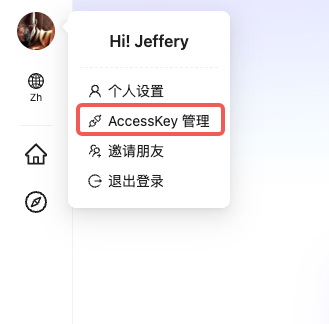
Lovrabet Workbench → avatar at the top left → AccessKey management
WARNING
[AccessKeys never expire — store them carefully] If you suspect a leak, delete it in the console and generate a new one.
4. Confirm apps and the default candidate
After signing in, the next step is usually checking which apps the current account can see. The Lovrabet Runtime CLI doesn't require creating a "project" or initializing a local workspace first; most commands accept the target app directly via --app / --appcode.
# 查看当前账号可见应用
lovrabet app list

# 只读本地 cache
lovrabet app list --local

# 强制打远端并刷新 cache
lovrabet app list --no-cache

# 可选:设置默认候选应用
lovrabet app use crm
Two things to note here:
app list/app pullmaintain the local cache.lovrabet.jsonis only an optional local user-intent config — for exampledefaultApp,appcode,env,accessKey- Remote app entries in
app listcarry the platform's real i18n configuration:enableI18n,languages,i18nInfo
The current version no longer writes the full app catalog into .lovrabet.json.
To see which languages an app supports, check languages or i18nInfo.langs; locale is only a local compatibility field and doesn't reflect the app's actual language support.
5. Priority order when the Agent picks an app
For integrators, this point matters.
When an Agent or script actually executes, the app source is resolved roughly in this order:
- An explicit
--appcode - An explicit
--app - The confirmed current app context
- The
defaultAppdefault candidate from config - The top-level compatibility field
appcode
Note: defaultApp is only a default candidate, not a forced context. When the user's request clearly points at a business domain — orders, products, inventory, CRM — and no app is specified, first validate datasets by keyword under the default candidate; only broaden to the app list if that fails.
Common usage:
# 直接指定 appcode
lovrabet data filter --appcode app-xxxxxxxx --code <datasetCode> --params '{"pageSize":10}'

# 临时指定应用名
lovrabet dataset list --app crm --name 客户

# 设置默认候选应用
lovrabet app use crm
lovrabet dataset list --name 客户
6. Run a readiness check
After installing and signing in, run through this set once:
lovrabet auth status
lovrabet auth info --format compress
lovrabet doctor
lovrabet app list
If you already know a dataset keyword, try this as well:
lovrabet dataset list --name 客户The point of this step isn't "business users start typing commands now" — it's confirming that:
- The CLI is installed correctly
- The AccessKey works
- The current environment, default candidate app, and app catalog are reachable
- The Agent can call it reliably from here on
7. Common global parameters
| Parameter | Description |
|---|---|
--appcode | Specify the appcode directly |
--app | Specify an app name ad hoc |
--env | Environment: production / development / daily |
--format | Output format: json / pretty / compress, default compress |
--jq | Filter JSON output with jq |
--dry-run | Preview the operation without executing it |
--yes | Skip high-risk confirmation |
--non-interactive | Force non-interactive mode |
--global | Use or write the global config; usually unnecessary for day-to-day business commands |
8. What the config file looks like now
There are usually just two common shapes:
Single app, direct connection
{
  "accessKey": "ak_xxx",
  "env": "production",
  "appcode": "app-xxxxxxxx"
}
Using a default candidate app name
{
  "accessKey": "ak_xxx",
  "env": "production",
  "defaultApp": "crm"
}
The current design emphasizes:
- A simple top-level config
- The app catalog coming from the remote plus the cache
- Locally storing only "which app I'd like to try first, which environment, which AK"
9. One line of advice for the business side
If you're onboarding an Agent for a business team, what the team really needs to know usually comes down to two things:
- State the question clearly in business language
- For write requests, explicitly ask for a preview first
As for commands, appcodes, dataset codes, sqlcodes, and function names — leave those to the Agent and skills in the background.