TIP
Goal: Add a new button — 调用三方服务测试 ("Call third-party service test") — to a Lovrabet smart list page. When the user clicks it, the page calls an external system's test API and shows the request and response in a modal. This article demonstrates a Lovrabet page calling an external system. It does not cover an external system calling the Lovrabet OpenAPI.
1. Confirm the calling scenario
<grid> <column width-ratio="0.500000">
TIP
External system calls Lovrabet
For example, a locker-control system reports locker status back to Lovrabet. This requires enabling the Lovrabet OpenAPI and configuring credentials such as an AccessKey. Not covered in this article.
</column> <column width-ratio="0.500000">
TIP
Lovrabet page calls an external system
For example, the user clicks "Open locker" or "Close locker" on a Lovrabet page, and the page calls the external system's API. Note: This is the only mode covered here, and we use Apifox Echo to simulate the external API call.
</column> </grid>
2. See the end result
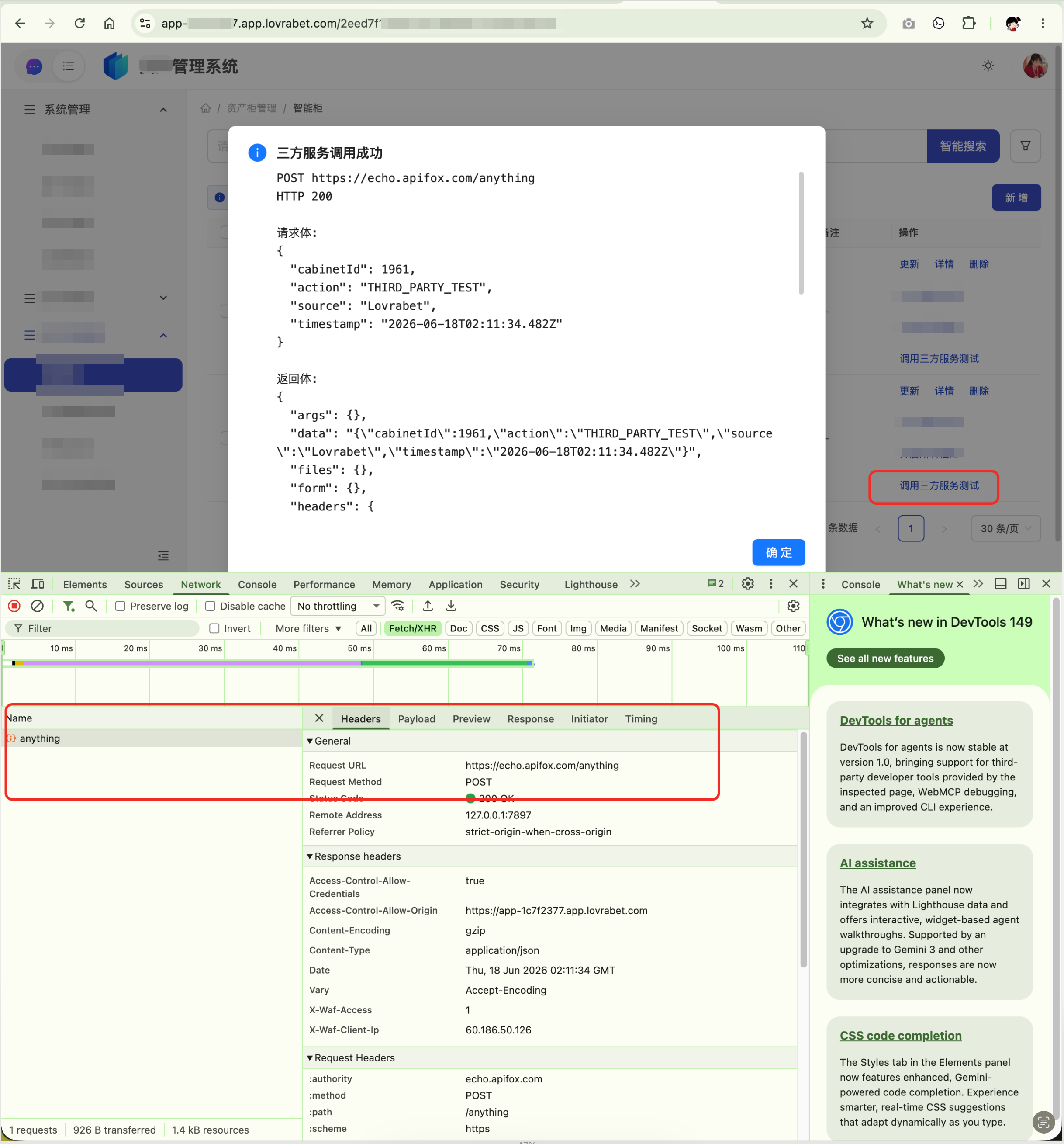
When you're done, the 调用三方服务测试 button appears in the row actions area of the list. Clicking it opens a modal showing the request URL, HTTP status code, request body, and response body.
3. Prepare the integration details
Before copying the development prompt, gather the following. Keep the placeholders as written and replace them with real values on your own machine.
| Item | What to enter |
|---|---|
| Local project path | <本地项目路径> — for example, your own project directory. |
| App code | <appCode> — the appCode of your current Lovrabet app. |
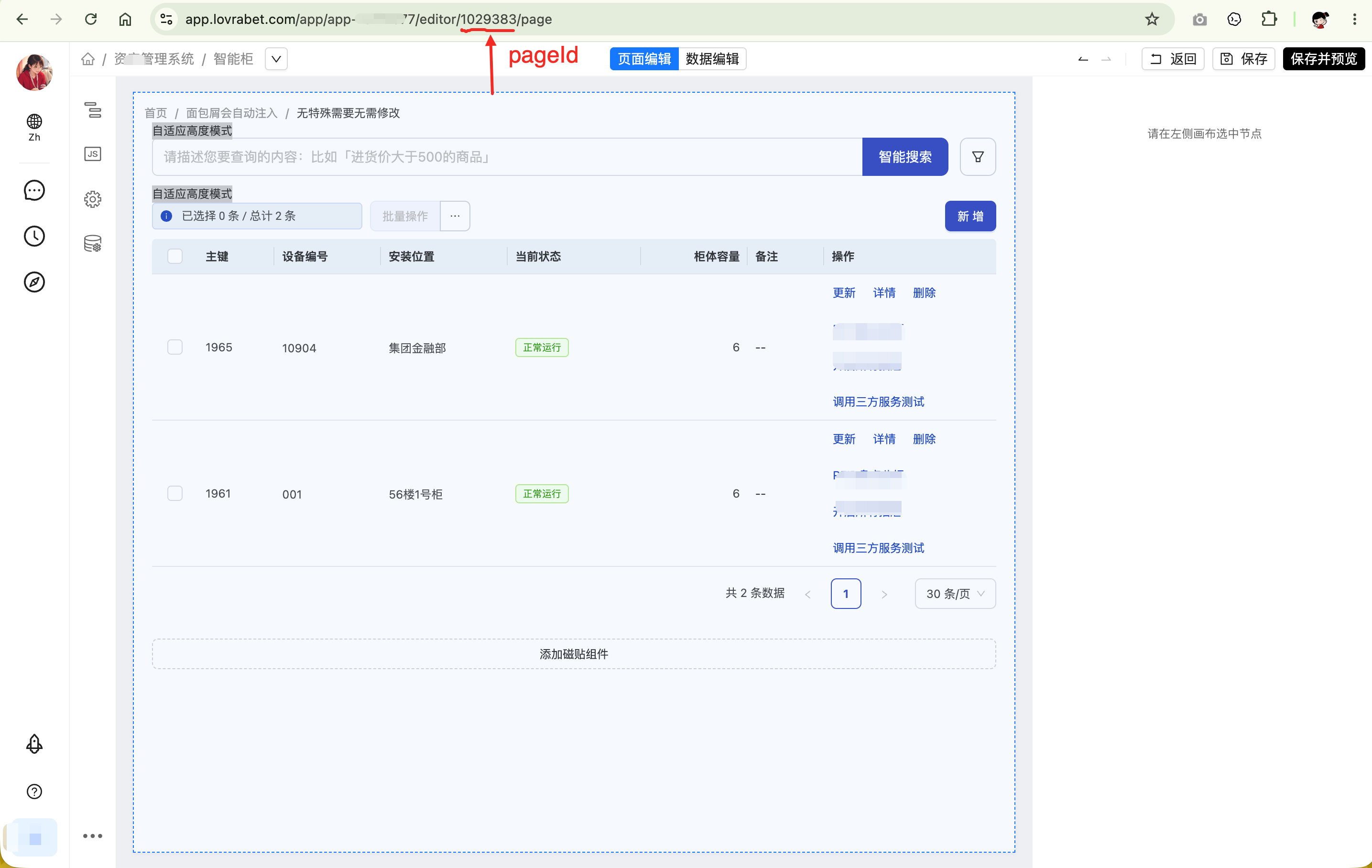
| Page ID | <pageId> — the ID of the smart list page that gets the new button. |
| Dataset code | <datasetCode> — the code of the dataset bound to the page. |
| Page file | <本地项目路径>/.rabetbase/page/<appCode>/<pageId>-FTP.json |
| Test endpoint | https://echo.apifox.com/anything — simulates the external system API. |
| Browser-side requirements | The external API must support HTTPS, public internet access, and browser CORS. |
| Credentials | Never write real AccessKeys, SecretKeys, or signing keys into frontend code. |
4. The development prompt for your Agent
Copy the block below to your local development Agent. Before copying, replace <本地项目路径>, <appCode>, <pageId>, and <datasetCode> with real values.
你是 Lovrabet 智能列表页开发助手。请使用 rabetbase CLI 修改智能列表页。

业务目标:
用户在 Lovrabet 列表页点击【调用三方服务测试】后,页面向外部系统测试接口发起 POST 请求,并在弹窗中展示请求和返回结果。

接入参数:
- 本地项目路径:<本地项目路径>
- appCode:<appCode>
- pageId:<pageId>
- 页面文件:<本地项目路径>/.rabetbase/page/<appCode>/<pageId>-FTP.json
- 数据集 code:<datasetCode>
- 测试接口:https://echo.apifox.com/anything

开发要求:
1. 使用 rabetbase CLI 拉取远端最新页面。
2. 确认页面绑定的数据集信息。
3. 在现有行操作区末尾新增按钮【调用三方服务测试】,不影响已有按钮。
4. 按钮点击后读取当前行 rowKey,并作为 cabinetId 写入请求体。
5. 请求方式为 POST,Content-Type 为 application/json。
6. 推送前先执行 page push dry-run,确认无冲突后再正式推送。
8. 回复说明新增按钮、调用效果和推送结果。

请求体示例:
{
  "cabinetId": rowKey,
  "action": "THIRD_PARTY_TEST",
  "source": "Lovrabet",
  "timestamp": 当前时间 ISO 字符串
}

成功后用 Modal.info 展示:
- 请求 URL
- HTTP 状态码
- 请求体
- 返回体

失败后用 Modal.error 展示:
- 错误信息
- 提示检查 CORS、网络可达性和接口状态

请完成:页面拉取、页面修改、page push dry-run、正式 page push,并汇总变更和推送结果。
Note: don't put real AccessKeys, SecretKeys, signing keys, or customer secrets in frontend code.
5. Core rabetbase CLI commands
TIP
These commands pull the page, confirm the dataset, pre-check the push, and push for real. The page edits themselves are made by your development Agent following the requirements in the previous section.
rabetbase page pull --id <pageId> --appcode <appCode> --dry-run --format compress
rabetbase page pull --id <pageId> --appcode <appCode> --force --format compress
rabetbase dataset detail --code <datasetCode> --appcode <appCode> --format compress
rabetbase page push --id <pageId> --appcode <appCode> --dry-run --format compress
rabetbase page push --id <pageId> --appcode <appCode> --format compress
6. Button behavior and JSAction reference
The button does the following. The code below is a reference implementation only — replace it with your own compliant API in production.
- Reads the current row's identifier
rowKey. - Sends a POST request to Apifox Echo.
- On success, shows the request URL, status code, request body, and response body.
- On failure, tells the user to check CORS, network reachability, and API status.
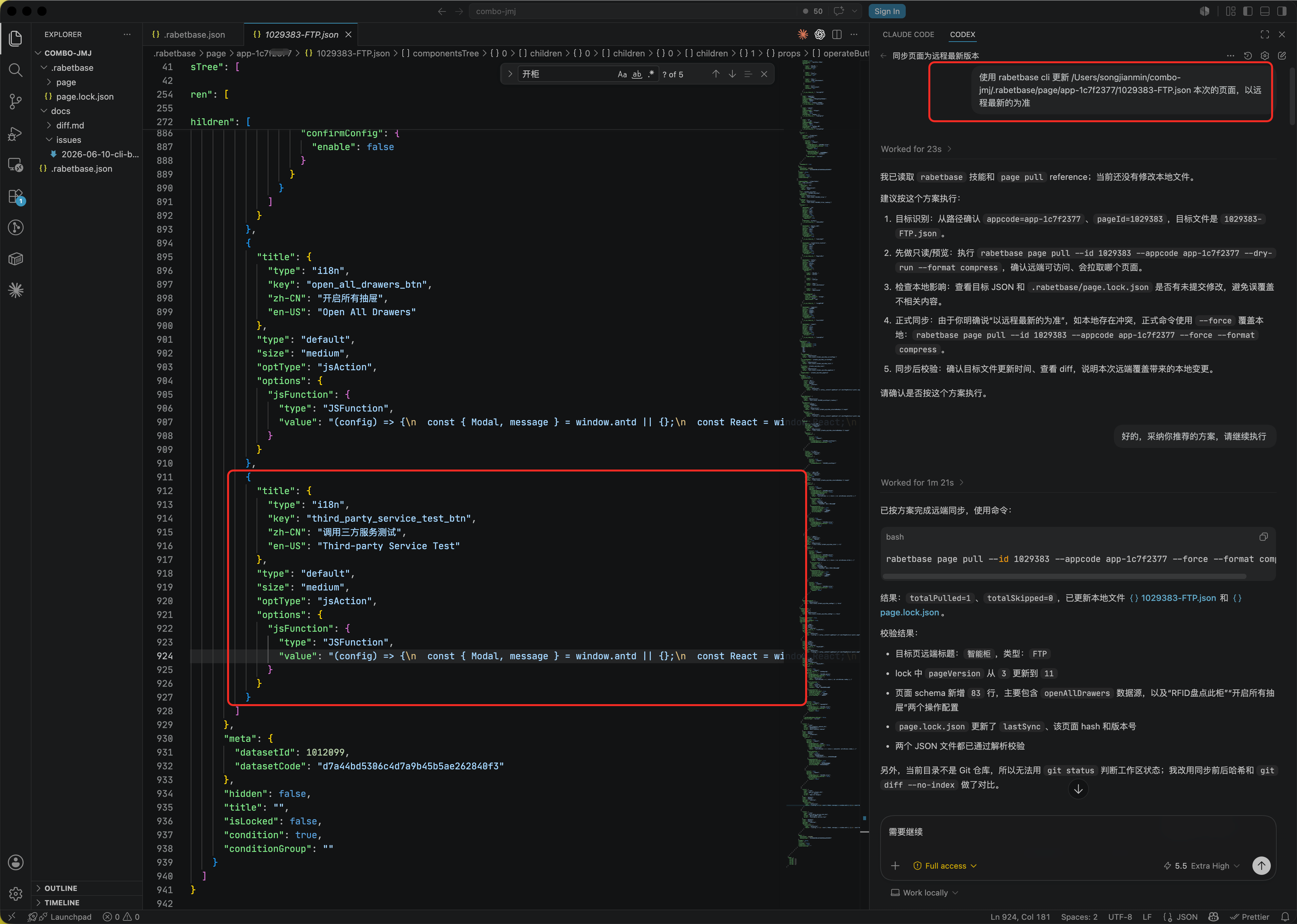
(config) => {
  const { Modal, message } = window.antd || {};
  const React = window.React;
  const rowKey = config.extraParams?.rowKey;
  if (!rowKey) { message.warning('请选择一条数据'); return; }

  const endpoint = 'https://echo.apifox.com/anything';
  const payload = {
    cabinetId: rowKey,
    action: 'THIRD_PARTY_TEST',
    source: 'Lovrabet',
    timestamp: new Date().toISOString()
  };

  message.loading({ content: '正在调用三方服务...', key: 'thirdPartyTest', duration: 0 });
  fetch(endpoint, {
    method: 'POST',
    headers: { 'Content-Type': 'application/json' },
    body: JSON.stringify(payload)
  })
    .then(async (response) => {
      const text = await response.text();
      let body;
      try { body = text ? JSON.parse(text) : null; } catch (e) { body = text; }
      if (!response.ok) {
        const err = new Error('HTTP ' + response.status);
        err.responseBody = body;
        throw err;
      }
      return { status: response.status, body };
    })
    .then(({ status, body }) => {
      message.destroy('thirdPartyTest');
      const bodyText = typeof body === 'string' ? body : JSON.stringify(body, null, 2);
      const resultText = 'POST ' + endpoint + '\nHTTP ' + status + '\n\n请求体:\n' + JSON.stringify(payload, null, 2) + '\n\n返回体:\n' + bodyText;
      Modal.info({
        title: '三方服务调用成功',
        width: 720,
        content: React ? React.createElement('pre', { style: { maxHeight: 420, overflow: 'auto', whiteSpace: 'pre-wrap', wordBreak: 'break-all' } }, resultText) : resultText,
        okText: '确定'
      });
    })
    .catch((err) => {
      message.destroy('thirdPartyTest');
      const errorText = (err?.message || '未知错误') + '\n请检查 CORS、网络可达性和接口状态。';
      Modal.error({
        title: '三方服务调用失败',
        width: 640,
        content: React ? React.createElement('pre', { style: { whiteSpace: 'pre-wrap', wordBreak: 'break-all' } }, errorText) : errorText,
        okText: '确定'
      });
    });
}
7. Verify the result
[ ] The
调用三方服务测试button is visible in the row actions area of the page.[ ] Clicking the button sends a POST request to
https://echo.apifox.com/anything.[ ] The modal shows the request URL, HTTP status code, request body, and response body.
[ ]
rabetbase page push --dry-runreports no conflicts.[ ] The real
rabetbase page pushsucceeds.
8. Confirm production integration boundaries
<grid> <column width-ratio="0.500000">
TIP
Suitable for direct frontend calls
- The external API supports browser CORS.
- The API is on public HTTPS and reachable from the page's network.
- No real secrets need to be exposed in the frontend.
- The auth token is temporary, low-risk, or designed for browsers.
</column> <column width-ratio="0.500000">
TIP
Not suitable for direct frontend calls
- The API requires an AccessKey, SecretKey, or signing key.
- The API is on an intranet or behind an IP allowlist.
- The third-party service doesn't allow cross-origin browser calls.
- You need centralized auditing, retries, data masking, or error governance.
- In these cases, expose a compliant API from your own server or gateway for the Lovrabet page to call.
</column> </grid>
TIP
Don't use Lovrabet BFF as a proxy for third-party APIs in production. Lovrabet BFF does not forward third-party API calls — that's deliberate, to keep it from being used for malicious forwarding or for bypassing third-party security policies. Apifox Echo is only a tool for testing browser-side calls, CORS, and request body structure; it is not a production API solution. For a real integration that involves secrets, intranet access, IP allowlists, complex authentication, or third-party APIs that don't allow cross-origin browser calls, expose a compliant API from your own server or gateway.