Rabetbase FAQ
This page collects frequently asked questions about the Rabetbase development stack (CLI + SDK + Skill + BaaS). If your question isn't listed, ask in the Lovrabet community.
1. Basics
Q1: How do Rabetbase and Lovrabet relate?
Lovrabet is for everyone — business users and developers alike. It's a complete platform for generating AI-Native business systems.
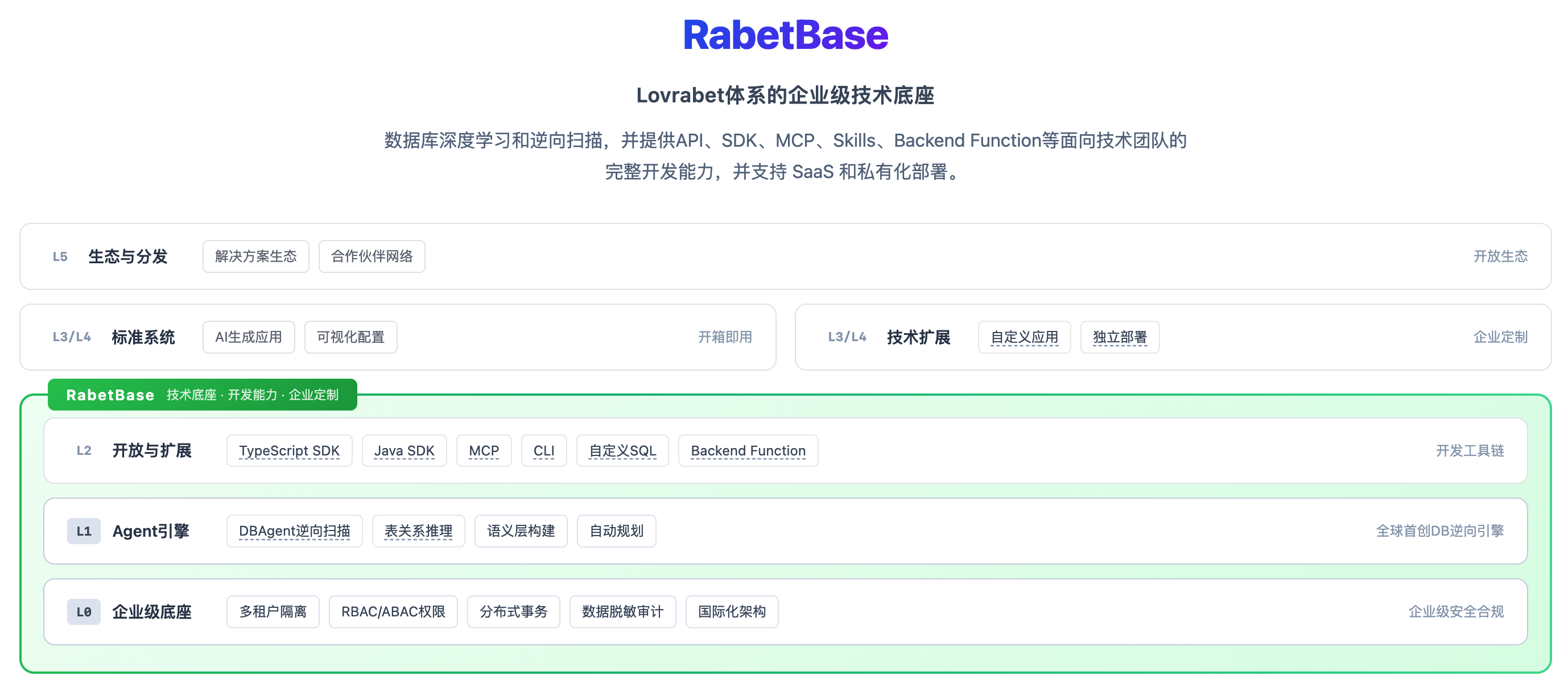
Rabetbase is Lovrabet's developer infrastructure layer. It provides standardized data access, permission control, and API capabilities to the apps above it, and hands developers the CLI + SDK + Skill trio — the whole flow from data operations to project deployment happens in the terminal, with no backend of your own to build.
<grid> <column width-ratio="0.500000"> The Lovrabet platform
- AI-Native business system generation
- DB Agent / Vibe Coding / generating systems from requirement descriptions
- Workspace / permission management
- Hosted runtime </column> <column width-ratio="0.500000"> The Rabetbase stack — part of the Lovrabet platform
- CLI: terminal tooling
- SDK: data access interfaces
- Skill: AI-assisted development
- BaaS: Backend as a Service </column> </grid>
Q2: Can I use Rabetbase without backend experience?
Yes. The BaaS layer already wraps every backend capability — database, APIs, permissions, authentication. All you do is:
- Create an app and data tables on the Lovrabet platform
- Run
rabetbase api pullto generate the SDK configuration - Work with data through the SDK's filter, create, update, and delete operations
No backend code to write, no servers to deploy.
Q3: What's the difference between Rabetbase CLI 2.0 and the old lovrabet CLI?
| Dimension | Old (lovrabet) | New (rabetbase 2.0) | |-|-| | Command prefix | lovrabet | rabetbase | | Build & deploy | lovrabet build | rabetbase run build | | AI integration | MCP Server | Skill (community standard) | | Command structure | Scattered by function | Unified two-level service + command structure |
TIP
Still on the old lovrabet CLI? Upgrade to rabetbase 2.0 — the old CLI is no longer maintained.
2. Installation and configuration
Q4: How do I install the Rabetbase CLI?
Verify the installation:
rabetbase --version
rabetbase --help
Q5: How do I install the Skill?
A Skill is a rule set for AI-assisted development that lets tools like Claude Code, Codex, and Cursor use the Rabetbase CLI correctly. Since Rabetbase is built for developers, the recommended path is the CLI's built-in command for installing the official development Skill:
rabetbase skill installIf your CLI version doesn't support skill install yet, use the equivalent command:
npx skills add lovrabet/rabetbase -g -yWARNING
Network note: If installing or refreshing the Skill reports that it cannot connect to github.com:443, timeout, or Could not connect to server, your network cannot reach GitHub. The CLI itself may already be installed. See troubleshooting Q28 <cite doc-id="Q4wvwGDb3i1woXkVsIpch45Inpf" file-type="wiki" title="Rabetbase 常见问题(FAQ)" type="doc"></cite>.
After installation, in Skill-capable Agents such as Claude Code, Codex, and Cursor, the AI understands the Rabetbase CLI rules for project initialization, database analysis, datasets, SQL, BFF, page menus, and code generation.
Developer troubleshooting steps:
- First, confirm the CLI itself is installed:
rabetbase --version
rabetbase --help
If both commands run, the CLI is installed; any later failure only means the Skill registration path needs attention.
- If you see
PromptScript does not support global skill installation, orFailed to install 1in the natural-language logs, it's usuallyskills@1.5.10auto-detecting a PromptScript Agent that has no global Skill directory — it doesn't mean the Rabetbase Skill failed to install. See upstream Issue #1352 and the fix PR #1362;https://github.com/vercel-labs/skills/issues/1362redirects to the same PR. - Cross-check with real output from the local
skillsCLI:
npx skills list -g --jsonOnly treat the output as evidence when the command actually ran in a local shell. App-private SkillHub output, natural-language summaries, or output from substitute commands proves nothing about global registration.
- As a temporary workaround, pin the previous installer version:
npx skills@1.5.9 add lovrabet/rabetbase -g -y--agent <agent>is a temporary troubleshooting aid only — it narrows the install target to an Agent that explicitly supports global Skills. Don't treat it as the primary install command for the Rabetbase CLI, and never let the Agent guess a target name it doesn't know.- In IM-style Agents such as Feishu Aily or DingTalk Wukong, if you hit 30-second timeouts, sandbox paths, or uncertain write directories, stop retrying automatically and have the user run the install command in a local terminal instead.
Q6: What authentication options are there?
Rabetbase supports two authentication modes:
| Mode | How it authenticates | Best for | |-|-| | WebAPI | Cookie (browser login) | Frontend apps | | OpenAPI | AccessKey + SecretKey | Backend services, CLI |
Frontends should use Cookie auth (obtained automatically when the user logs in via the browser); backends and the CLI use AccessKey auth.
INFO
Never hard-code an AccessKey in source! Use environment variables.
3. Common CLI commands
Q7: How do I create a new project?
rabetbase project create my-app
cd my-app
rabetbase api pull --appcode your-app-code
project create generates a complete project scaffold (build config, routing, API client). api pull generates SDK type definitions from your app's data.
Q8: How do I sync menus to the parent app?
rabetbase menu syncThe CLI scans the pages under src/pages, extracts menu names intelligently, and creates the menus in one batch.
Q9: How do I build and deploy?
rabetbase run buildBuild output lands in dist/, ready to deploy to a CDN.
Q10: CLI command cheat sheet
| Command | What it does |
|---|---|
rabetbase project create | Create a project |
rabetbase api pull | Pull API configuration |
rabetbase dataset detail | Inspect dataset structure |
rabetbase sql validate | Validate SQL syntax |
rabetbase sql save | Save custom SQL |
rabetbase sql exec | Run custom SQL |
rabetbase bff new | Create a Backend Function |
rabetbase bff push | Push BFF to the platform |
rabetbase menu sync | Sync menus |
rabetbase run build | Build the project |
rabetbase auth login | Log in |
rabetbase app list | List apps |
4. SDK data operations
Q11: How do I initialize the SDK client?
Use a singleton so the whole app shares one client instance:
// src/api/client.ts
import { createClient } from "@lovrabet/sdk";

export const client = createClient({
  appCode: "your-app-code",
});
Don't create a new client in every component.
Q12: How do filter, getOne, create, update, and delete work?
import { client } from "@/api/client";

// 查询列表(分页)
const { tableData, total } = await client.models.customers.filter({
  currentPage: 1,
  pageSize: 20,
});

// 查询单条
const customer = await client.models.customers.getOne("123");

// 创建
const newId = await client.models.customers.create({
  name: "张三",
  phone: "13800138000",
});

// 更新
await client.models.customers.update("123", { name: "李四" });

// 删除(仅 WebAPI 模式)
await client.models.customers.delete("123");
Q13: The delete operation throws an error — what now?
delete only works in WebAPI mode (Cookie auth). In OpenAPI mode, use a "soft delete" instead:
await client.models.customers.update(id, {
  status: "deleted",
  deleted_at: new Date().toISOString(),
});
5. SQL and Backend Functions
Q14: When should I use custom SQL?
| Scenario | Recommended |
|---|---|
| CRUD on a single table | SDK filter/create/update/delete |
| Conditional query on one table | filter + search/filter parameters |
| Cross-table joins | Custom SQL |
| Complex aggregation and statistics | Custom SQL |
| Grouped sums | Custom SQL |
Q15: How do I write custom SQL?
Create a SQL file under .rabetbase/sql/:
-- @lovrabet sqlName=myQuery description=我的查询
SELECT
  category,
  COUNT(*) as count,
  SUM(amount) as total
FROM dataset_orders
WHERE 1=1
  <if test="startDate">
    AND create_time >= #{startDate}
  </if>
GROUP BY category
Key syntax:
#{paramName}— parameterized query (prevents SQL injection)<if test="paramName">— dynamic SQL condition<=must be written as<=(XML escaping)
Q16: What is a Backend Function?
A Backend Function (BFF) is a JavaScript function that runs on the Lovrabet backend to handle complex business logic. There are three types:
| Type | What it is | How it triggers | |-|-| | HOOK | Attached to a dataset's standard APIs | Fires automatically on data operations | | ENDPOINT | Standalone HTTP endpoint | Called explicitly by the frontend | | COMMON | Shared function | Called from inside other BFFs |
Q17: How do transactions work?
const models = context.client.models;

await context.client.db.transaction(async (tx) => {
  // 创建主表
  const orderId = await models[TABLES.orders].create(orderData);

  // 创建明细
  for (const item of items) {
    await models[TABLES.orderItems].create({ orderId, ...item });
  }
});
Key rules:
- Use
context.client.models, nottx.models - Exceptions roll back automatically
- Keep slow operations out of transactions
6. AI-assisted development
Q18: What can the Skill do for me?
The Skill lets AI tools (Claude Code, Cursor) understand your business data structure so the code they generate works the first time:
- Pulls dataset structures automatically (table names, field names, field types)
- Uses CLI commands correctly (no guessed field names)
- Follows best practices (singleton pattern, error handling, pagination)
- Runs CLI commands for you (create projects, pull APIs, push BFFs)
Q19: How do I build a complete feature with AI?
Just describe the requirement in Claude Code:
Use the rabetbase CLI to build me a customer management page with a customer list (searchable, paginated), a customer detail page (editable), and a new-customer form (with phone number validation).
The AI then automatically:
- Creates the project with
rabetbase project create - Generates the SDK with
rabetbase api pull - Writes all the page code
- Builds with
rabetbase run build - Syncs menus with
rabetbase menu sync
Q20: Why is the AI-generated code wrong?
Likely causes:
- Skill not installed — run
npx skills add lovrabet/rabetbase --global - API not pulled — run
rabetbase api pullto refresh the SDK configuration - Vague description — spell out dataset names, field names, and page structure
7. Performance and security
Q21: How do I optimize list queries?
- Paginate — always pass currentPage and pageSize
- Debounce search — 300ms debounce
- Select only the fields you need — avoid SELECT * in SQL
- Add LIMIT — cap the number of rows a SQL query returns
Q22: An AccessKey has leaked — what now?
- Regenerate the AccessKey on the Lovrabet platform
- Update the environment variables
- Hunt down any hard-coded old keys
DANGER
Never hard-code an AccessKey in frontend code. Frontends use Cookie or Token authentication.
Q23: How do I handle sensitive data?
Masking on the frontend:
const maskPhone = (phone: string) => {
  return phone.replace(/(\d{3})\d{4}(\d{4})/, "$1****$2");
};
// 138****8000
Masking on the backend (recommended): use a Backend Function post-hook to mask data uniformly before it's returned.
8. Troubleshooting
Q24: CLI reports "command not found"?
Check where it's installed:
which rabetbase
rabetbase --version
If nothing turns up, reinstall or check your PATH.
Q25: API calls return 401?
Check your login state:
rabetbase auth loginFor AccessKey auth, confirm the environment variable is set:
echo $LOVRABET_ACCESS_KEYQ26: BFF push fails?
Common causes:
- Syntax errors — check with
rabetbase bff statusfirst - Wrong dataset code — check the codes in the TABLES constant
- Network issues — check your connection
Q27: SQL execution returns execSuccess: false?
Common causes:
- SQL syntax errors (check XML escaping)
- Wrong table or field names
- Mismatched parameter types
To debug:
rabetbase sql exec --sqlcode <sqlcode> --params '{}' --format jsonQ28: On Windows, rabetbase skill install / rabetbase update can't reach GitHub — what now?
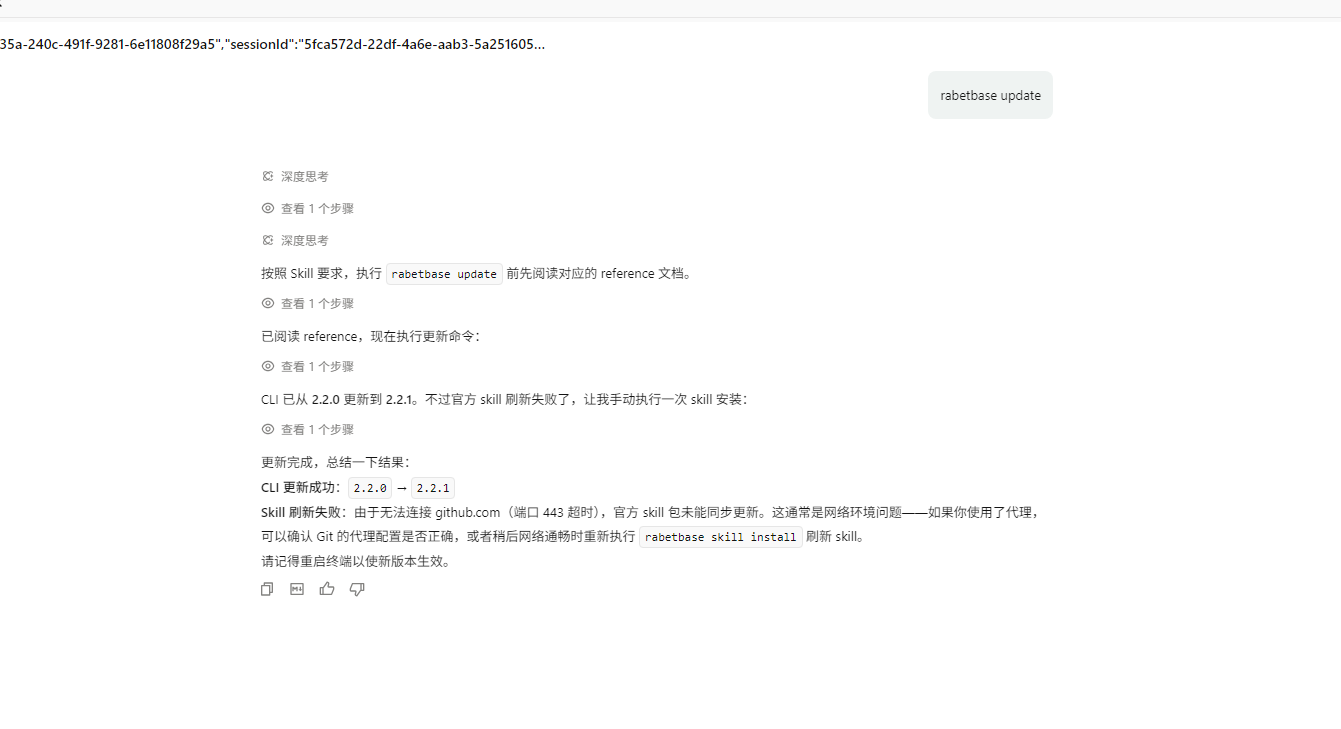
Symptom: On Windows, curl can reach GitHub, but rabetbase skill install or rabetbase update fails during the Git fetch with Connection was reset, a TLS connection reset, github.com:443, timeout, or Could not connect to server.
TIP
Note: The CLI package installs via npm; Skills refresh from GitHub sources. This usually happens when Git uses OpenSSL as its TLS backend, and it doesn't mean the CLI upgrade failed.
Step 1: Confirm the CLI itself works
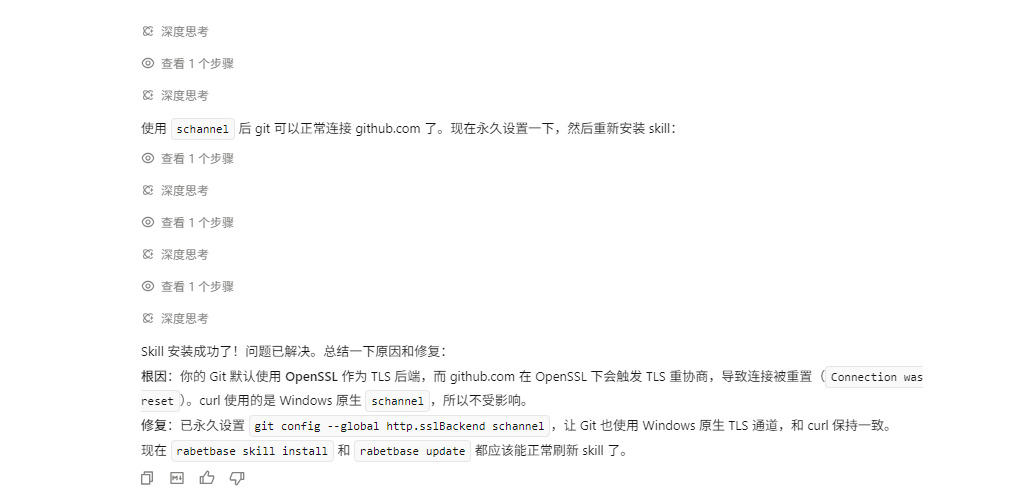
rabetbase --versionStep 2: Switch Git to the native Windows TLS channel
git config --global http.sslBackend schannelWhy this can help: when Git fetches GitHub repositories over HTTPS, its TLS backend is either OpenSSL or Windows Schannel. OpenSSL uses the certificates and handshake path bundled with (or separate from) Git, while Schannel uses the Windows system certificate store, enterprise root certificates, and system TLS policy. Corporate proxies, VPNs, and security software often write their root certificates only into the Windows certificate store, so the system curl can reach GitHub while Git's OpenSSL channel gets reset mid-handshake. Switching to schannel aligns Git's chain of trust with the system curl's.
Step 3: Refresh the Skill or re-run the upgrade
rabetbase skill install
rabetbase update
If it still fails after this, check your proxy, VPN, corporate network policy, or GitHub access. If rabetbase --version already shows the target version, keep using the upgraded CLI and run rabetbase skill install once the network recovers.
What it looks like after the fix
Q29: The old rabetbase still runs after installing — what now?
Symptom: You ran npm install -g @lovrabet/rabetbase-cli, but rabetbase --version shows the wrong version, or the command still behaves like the old one.

TIP
Cause: Multiple rabetbase binaries can coexist on one machine. The terminal runs whichever comes first in PATH, so even after a successful install you can still hit the old /usr/local/bin/rabetbase. This is common with NVM-managed Node versions.
Step 1: Find which binary is running
rabetbase --version
command -v rabetbase
type -a rabetbase
where rabetbase
Step 2: Check whether multiple rabetbase binaries exist
If the output shows both /usr/local/bin/rabetbase and /Users/<username>/.nvm/versions/node/<node-version>/bin/rabetbase, with /usr/local/bin/rabetbase first, your terminal is running the old entry.
Step 3: Remove the old entry and clear the shell cache
sudo rm /usr/local/bin/rabetbase
hash -r
rabetbase --version
command -v rabetbase
WARNING
Delete /usr/local/bin/rabetbase only after confirming it's the old entry. Afterwards, command -v rabetbase should point to the install path of your current Node/npm environment.
TIP
More questions? See the integration development guide, the SDK guide, and the CLI guide — all available on open.lovrabet.com.