TIP
A Rabetbase project workspace (rabetbase project create) is Lovrabet's extension development workspace for technical staff. This page explains the problems it solves, what it provides, and when to use it.
Background
Lovrabet already provides AI-powered automatic page generation — business users and admins can build common pages with natural language or configuration, no code required:
- ✅ Standard list pages — AI generates the full four-piece set (list/create/edit/detail), covering a large share of B2B basic pages
- ✅ Dashboards, data walls, and workbenches — text-to-page generation + SmartPage: describe the need and the page is generated
- ✅ Custom forms and cross-dataset views — AI generates React pages from existing datasets, with iterative additions of filters, exports, and bulk operations
For common scenarios like order lists, customer management, and ticket queries, AI-generated pages are already good enough.
But real enterprise business goes further. The platform provides the infrastructure for the scenarios below, yet AI can rarely finish them alone — technical staff need to code the integration:
- ⭕️ Multi-role approval flows — the platform has a BPMN process engine, but approval chains, conditional branches, and countersigning need engineers to integrate and wrap in Backend Functions
- ⭕️ Distributed transactions (finance, inventory) — the platform has transaction infrastructure, but multi-table writes, rollback, and consistency need engineers to encapsulate
- ⭕️ Complex access control — the platform has an ABAC permission model, but role boundaries, data permissions, and API authorization need engineers to wire in
- ⭕️ External system integration (ERP, payments, logistics) — Backend Functions can call external APIs, but integration, retries, and fault tolerance need to be written by engineers
- ⭕️ Complex reports and cross-table queries — the platform supports custom SQL and aggregation, but cross-table joins, metric definitions, and performance tuning require engineers to write managed SQL
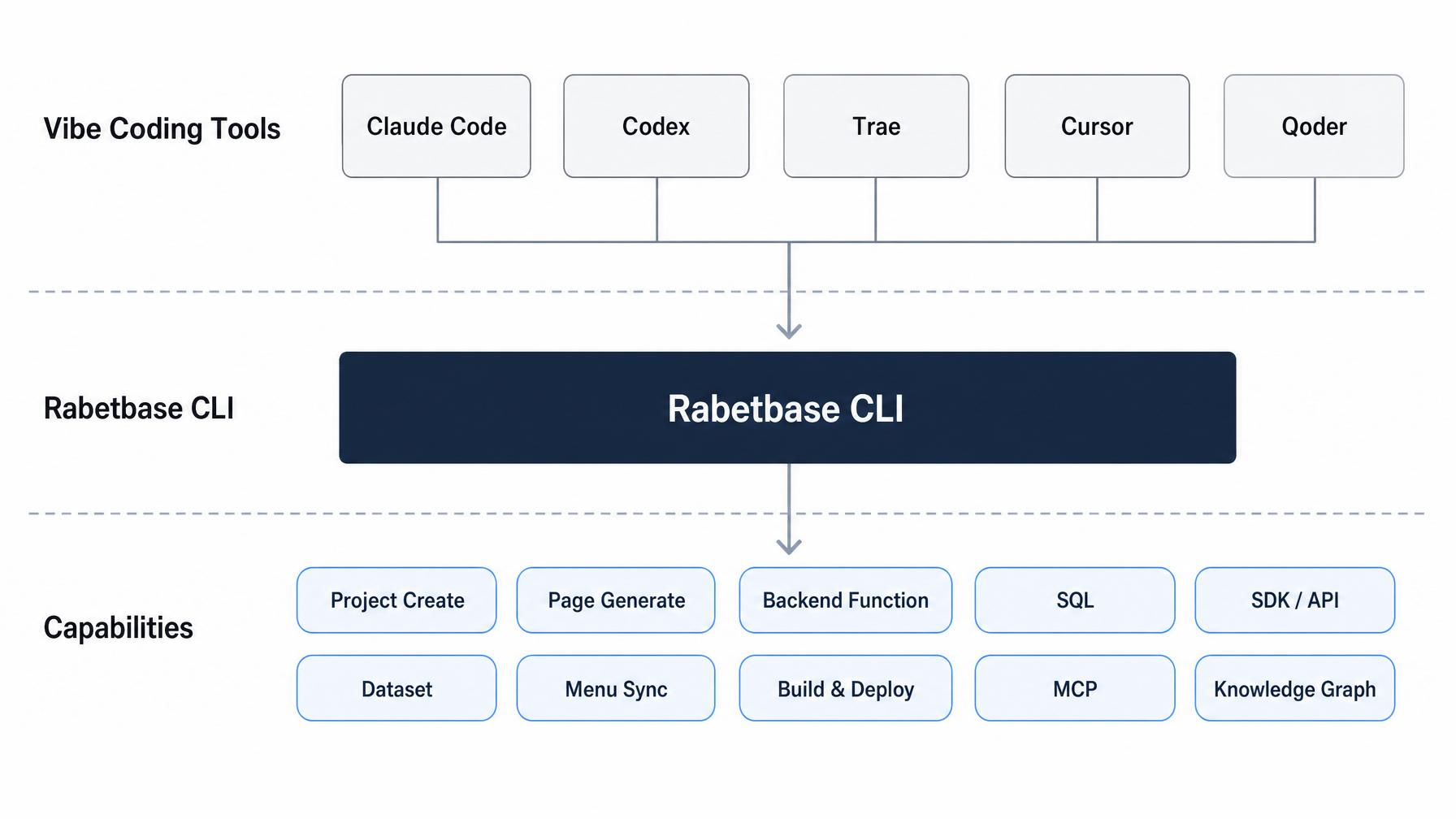
Put simply: AI already handles common pages well; the moment flows, transactions, permissions, integrations, or complex queries are involved, technical staff step in. The traditional approach bounces you between the console, API docs, SQL tools, and local code — a fragmented experience. The Rabetbase project workspace and CLI suite exist for exactly this: letting technical staff take on this kind of complex work through Vibe Coding in Claude Code, Codex, Trae, and Cursor.
What we provide
Rabetbase is more than a set of CLI commands. Its core value comes down to three things:
TIP
A knowledge graph of business models The platform has already analyzed every app's business models and dataset relations and drawn them into a knowledge graph. When AI writes code, it no longer guesses field names, relations, or enum values — these are known facts.
TIP
Vibe Coding and AI-native collaboration The companion rabetbase Skill has the AI read project config, data models, and existing code first in Claude Code, Codex, Trae, or Cursor — before writing any code. Nothing is generated from thin air; development is grounded in facts.
TIP
Engineering muscle for complex business One project create yields a complete React micro-frontend workspace, already wired to the SDK, Instant API, Backend Functions, SQL, and the parent app. You focus purely on business logic.
Why AI writes more accurate code in this project
In an ordinary project, AI writing business code is constantly guessing: is this field name or customerName? How are these two tables joined? What are the enum values? Wrong guesses mean endless rework.
A Rabetbase project is different. The platform has already analyzed the business models + dataset relations and drawn them into a knowledge graph. When AI writes code, that graph is its context:
- No guessing at fields — real field names, types, required flags, and enum values come from the platform, ready to use
- No guessing at relations — table-to-table and dataset-to-dataset relations are already analyzed, so cross-table queries are obvious
- No guessing at usage — the conventions and workflow guidance in the rabetbase Skill tell the AI when to query via the SDK, when to write SQL, and when to wrap a Backend Function
So the order of operations matters: create the project first, pull the data models next, then start Vibe Coding — context quality directly determines AI output quality.
When to use it — and when not to
✅ Use a project workspace when you are
- Building workbenches, dashboards, data walls, complex forms, or cross-dataset pages
- Wrapping Backend Functions: validation, transactions, multi-table writes, external system integration
- Writing complex queries, statistical reports, or managed SQL
- Integrating BPMN flows, ABAC permissions, or approval chains
- Needing Git collaboration, code review, and rollback-able changes
- Wanting AI to iterate long-term on a real project
❌ You don't need a workspace when
- A standard list page, text-to-page generation, or SmartPage covers it
- You're only viewing datasets, fields, or existing APIs
- You're just spot-checking a one-off runtime data query
- You're only adjusting business model display names, field meanings, or relations
Next steps
Once you've decided your scenario fits a project workspace, start here:
- Create a project: set up your local dev environment — build the project with one command (or one AI prompt) and see the full workspace structure and local preview
- Use Rabetbase in your Vibe Coding tool — how to prompt AI in Claude Code / Codex / Trae / Cursor so it completes page development, Backend Functions, SQL, and everything else automatically