TIP
Real-world business data operations are often complex. Simple Instant APIs that write and update single tables can't handle complex business orchestration — especially financial calculations, multi-table consistency, and transaction guarantees. These require a 100% deterministic engineering approach to keep business processes reliable.
Make business actions write back reliably
This page uses "generate an order from a quotation" in the CRM to show when single-table writes are not enough. This action writes the order master, writes the order line items, and updates the quotation and the opportunity — all at once. To keep the data 100% accurate, the execution must either succeed entirely or fail entirely, so it needs to be wrapped in a Backend Function as a stable service.
The CRM requirement: generate an order from a quotation
Sales has already quoted a price and the customer has confirmed acceptance. When a rep runs "Generate Order" in the CRM, the system can't just insert one order record — the order amount, line items, quotation status, and opportunity stage all have to change together.
In this tutorial's CRM example, the requirement reads:
Generate an order from a confirmed quotation: create the order master, copy the quotation line items into order line items, update the quotation status to Converted, and sync the opportunity stage to Won or Awaiting Fulfillment; before executing, show which tables will be written; after executing, return the order ID, line-item count, order amount, and the update result for each table.
| Business requirement | Action in the CRM | Why a single table isn't enough |
|---|---|---|
| Generate the order | Insert into the order master | An order master without line items can't support later fulfillment, shipping, or reconciliation |
| Keep the purchase details | Copy product, quantity, unit price, and discount from quotation items to order items | Missing or short line items make the amount and the actual purchase inaccurate |
| Prevent duplicate conversion | Update the quotation status to Converted | Without updating the status, the same quotation can be converted again |
| Sync the sales stage | Update the opportunity stage and the close time | Without syncing, the sales funnel, manager dashboards, and actual wins drift apart |
| Roll back on failure | No half-completed data survives a failed step | Customer, sales, and finance must all see the same business fact |
Who this is for
Implementation engineers, administrators, and technical leads.
Map out what one action touches
In this tutorial's CRM example, a single "quotation to order" action touches at least these datasets and fields:
| Dataset | Physical table | Key fields | Purpose |
|---|---|---|---|
| Quotation master | crm_quotation | id, customer_id, opportunity_id, status, total_amount | Validate that the quotation can convert, and update its status |
| Quotation items | crm_quotation_item | quotation_id, product_id, quantity, unit_price, discount | Read the line items to copy into the order |
| Order master | crm_order | id, customer_id, quotation_id, total_amount, status | Create the order record |
| Order items | crm_order_item | order_id, product_id, quantity, unit_price, discount | Write the order line items |
| Opportunities | crm_opportunity | id, stage, won_time, order_id | Sync the stage and close information |
| Customer Information | crm_customer | id, owner_id | Validate the customer and owner |
If your own system involves tickets, contracts, or project settlement, list it the same way: which records this action creates, which statuses it updates, and which logs it writes.
Option 1: implement with rabetbase in Claude Code
Paste the prompt below into Claude Code. The prompt describes only the business requirement and delivery constraints — no rabetbase commands needed. Claude Code breaks the task down on its own and uses rabetbase to handle the app, datasets, Backend Function, dry-run, and push checks.
请帮我在当前 Lovrabet 应用中实现一个 Backend Function:createOrderFromQuotation。

业务场景:
我们以 CRM 为案例。销售已经给客户出过报价,客户确认接受报价后,需要把这张报价单生成正式订单。

需要实现的业务动作:
1. 基于一张已确认的报价单创建订单主表。
2. 把报价单明细复制为订单明细。
3. 把报价单状态更新为已转订单。
4. 同步销售机会阶段和成交信息。
5. 防止同一张报价单被重复生成订单。
6. 任一步失败时,不留下半成功数据。

实现要求:
- 先识别当前应用里的真实数据集、字段、必填项、枚举值和关联关系,不要猜字段名。
- 先检查是否已经存在同名函数或可复用的公共函数。
- 函数需要支持 preview。preview 为 true 时,只返回将要写入和更新的计划,不修改业务数据。
- 正式写入前必须做字段校验、状态校验、金额校验和重复提交校验。
- 写入过程要保证订单主表、订单明细、报价单状态、销售机会阶段的数据一致性。
- 返回结果要包含 orderId、detailCount、totalAmount、updatedTables、operator、executeTime。
- 推送到平台前,先给出 dry-run 预览和影响范围。
- 未经我确认,不要正式推送或执行真实写入。

请最后输出:
1. 你识别到的数据集、字段和关联关系。
2. createOrderFromQuotation 的入参和返回结构。
3. preview 模式会返回的写入计划。
4. 正式写入时的执行顺序。
5. 一致性、防重复提交和失败处理方式。
6. dry-run 结果摘要。
7. 需要我确认后才能继续的操作。
What rabetbase normally goes through
flowchart TD
  A[确认应用和认证] --> B[读取数据集清单]
  B --> C[读取字段和关联关系]
  C --> D[检查已有 BFF / COMMON]
  D --> E[创建或同步本地 BFF 脚本]
  E --> F[编辑 createOrderFromQuotation]
  F --> G[自检字段、事务、幂等、返回结构]
  G --> H[查看 bff status]
  H --> I[push --dry-run 预览]
  I --> J{用户确认}
  J -->|否| K[继续修改本地脚本]
  J -->|是| L[bff push --yes 推送]
  L --> M[回平台核对 Backend Function]
M --> N[按需运行态验证]| Phase | What rabetbase does | What to check |
|---|---|---|
| Confirm the environment | Reads the command contract, auth status, and current app | rabetbase runs on your machine; the current app is correct |
| Read the data model | Pulls the dataset list, fields, operations, and relations | No guessed field names — real datasets are the source of truth |
| Check existing services | Reviews ENDPOINT and COMMON functions | Avoids creating a duplicate service |
| Generate the local script | Scaffolds the Backend Function locally | Function name, type, and script path are correct |
| Write the service logic | Implements preview, validation, multi-table writes, status sync, duplicate protection | A failed step returns a clear reason |
| Check local status | Shows whether the script is new, modified, or in sync | You know which function a push will affect |
| Dry-run preview | Lists only the functions to create or update; nothing is pushed | Confirm the push scope and risk points |
| Push | Syncs the script to the platform after you confirm | The service appears under Backend Function on the platform |
| Runtime verification | Calls the service from a page, a Skill, or the runtime CLI | Returns the order ID, line-item count, and update results |
Option 2: do it manually in the platform
You can do the same thing in the platform without Claude Code. Manual steps suit a small number of hand adjustments; for complex write services, generate and check the script with rabetbase first.
- Open App Management.
- Click Dataset Overview and confirm that the quotation master, quotation items, order master, order items, opportunities, and customer information datasets are recognized.
- Record each dataset's primary keys, foreign keys, required fields, enum values, and amount fields.
- Click Backend Function.
- Create or edit a write service. In the CRM example, name it createOrderFromQuotation.
- Implement preview first: return the order master to create, the line-item count, the order amount, and the quotation and opportunity fields to update.
- Execute the writes only after the user confirms.
- When the writes finish, return the order ID, line-item count, order amount, datasets updated, and the failure reason or rollback result.
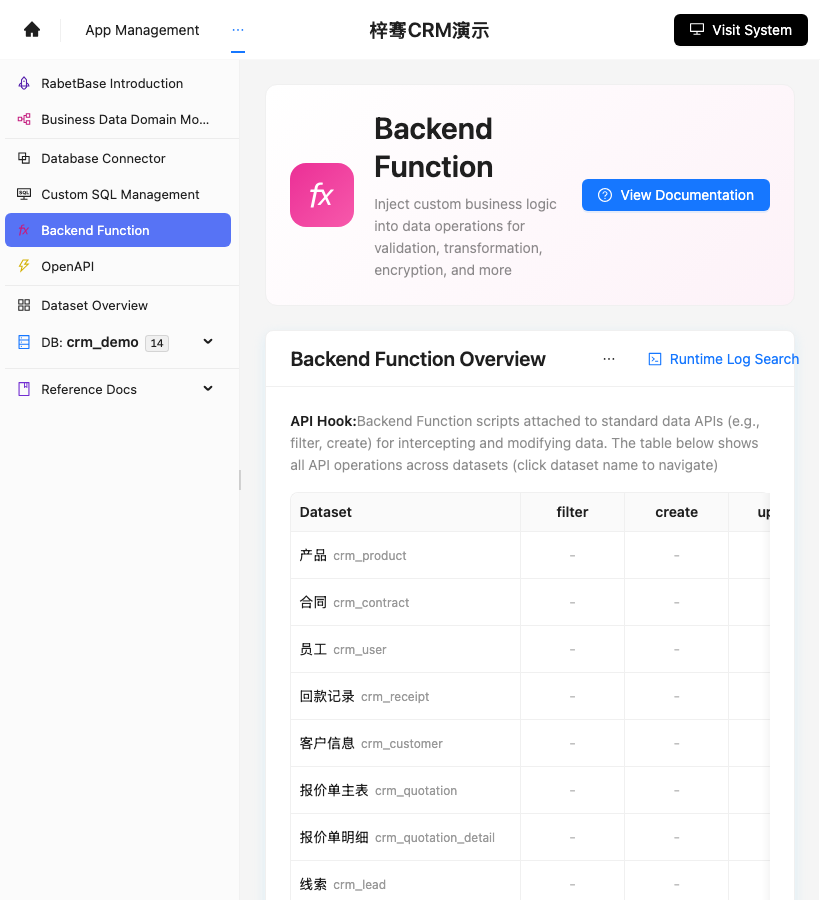
Screenshot reference: the Backend Function entry is shown below. Multi-table writes, transaction control, preview, and rollback logic are configured here.
Next steps
Continue to "Connect SQL, BFF, and Backend Functions to Skills".