Standardize multi-table metric definitions
This page pins down the multi-table relations and metric definitions in the CRM, so that Skills, SQL, and dashboards all share one set of definitions.
Who this is for
Sales managers, technical leads, and implementation engineers.
Steps
- Open App Management.
- Click Dataset Overview.
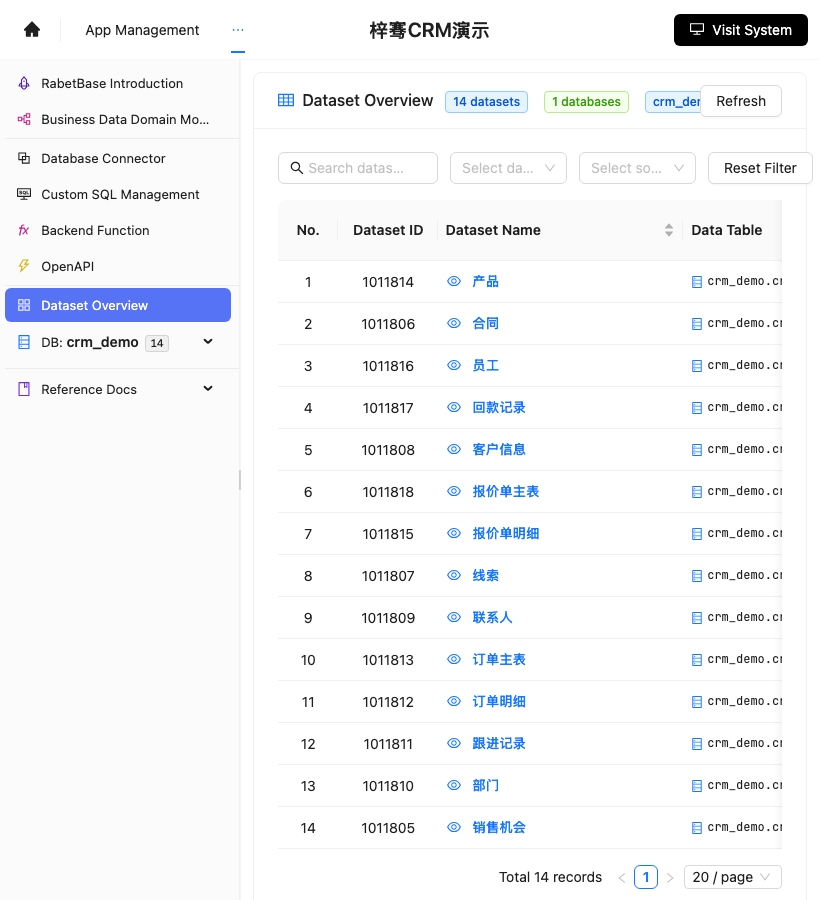
- Compare with the screenshot below and confirm you can see the 14 CRM datasets.
- Open "Customer Information".
- Note the customer primary key and owner fields.
- Open "Follow-up Records".
- Note the customer relation field and the follow-up time field.
- Open "Opportunities".
- Note the customer relation field, the stage field, and the amount field.
- Open "Contracts", "Order Master", and "Payment Records".
- Note the relation fields among contracts, orders, and payments.
Screenshot reference: the Dataset Overview entry is shown below. Customer, follow-up, and opportunity data is calibrated here.
First version of the metrics
| Metric | Definition |
|---|---|
| New leads this week | Leads created during the current week |
| Key account count | No follow-up in the last 14 days, plus an open opportunity |
| High-risk opportunities | Stage stalled beyond a threshold, or a large amount |
| Follow-ups this week | Follow-up records created this week |
| Expected deal amount | Sum of open opportunity amounts |
Write down each definition
Record each metric in this format:
text
指标:重点客户数
数据来源:客户信息、跟进记录、销售机会
筛选条件:最近 14 天未跟进;销售机会未关闭
统计方式:按客户去重计数
权限:按负责人和团队过滤
How you know it's done
- Every metric has a clearly stated data source.
- Every metric has explicit filter conditions.
- SQL, Skills, and dashboards use the same definitions.
- The sales manager can confirm what each number means.
If the numbers disagree
| Symptom | Check |
|---|---|
| Key account count is too high | Check that customers are deduplicated |
| Follow-up count is too low | Check the follow-up time field |
| Amounts don't match | Check the opportunity stage and closed status |
| The manager can't see details | Check team data permissions |
Claude Code prompt
text
请使用 rabetbase 检查目标应用的多表指标口径。
执行 rabetbase dataset links --appcode <你的应用 appCode> --format compress。
打开客户信息、线索、销售机会、跟进记录、合同、订单主表、回款记录的数据集详情。
输出本周新增线索、重点客户数、高风险销售机会、本周跟进次数、预计成交金额的字段来源和筛选条件。
本轮只读,不创建 SQL。
Next steps
Continue to "9. Configure the sales manager dashboard".