TIP
This guide walks you through configuring message notifications: prepare your bot or SMTP details per channel, create the app-level channel config and the dataset-level notification channel, then fire one real operation to confirm delivery.
When to use message notifications
Use message notifications when data in your system is created, updated, or deleted — or a specific interface is called — and the result needs to reach a group chat, a webhook receiver, or an inbox.
| What you want to do | Recommended channel | What to prepare | |-|-| | Push business changes to a Feishu group | FEISHU Webhook | A Feishu custom bot webhook URL and its security settings | | Push business changes to a DingTalk group | DINGTALK | A DingTalk custom bot webhook plus its signing or keyword rules | | Hand notifications to an external system | WEBHOOK | URL, headers, auth, and request-body requirements per the receiver's HTTP API | | Send notifications to fixed or role-resolved email addresses | EMAIL | An SMTP sender config and a confirmed recipient source |
TIP
This page covers the Feishu webhook mode only, not the Feishu app mode. Feishu app notifications involve app authorization, visibility scope, and recipient resolution — a different setup from group bots.
Choose a channel first
Decide where notifications should be delivered, then prepare that channel's official configuration.
| Channel | Best for | Official configuration reference | |-|-| | FEISHU Webhook | Receiving business notifications in a Feishu group | Feishu custom bot guide | | DINGTALK | Receiving business notifications in a DingTalk group | DingTalk custom bot creation and installation | | WEBHOOK | Sending to your own service, an automation platform, or any third-party HTTP endpoint | Confirm URL, headers, auth, and request body against the receiver's HTTP API docs | | EMAIL | Email notifications — approvals, alerts, CC'd results | RFC 3207 STARTTLS, RFC 8314 TLS recommendations for mail submission |
What to prepare
[ ] Confirmed the app and dataset to configure.
[ ] Confirmed which interface codes trigger notifications — prefer
triggerConfig.interfaceCodes.[ ] Prepared the channel-side webhook, signing secret, or SMTP sender config.
[ ] Prepared the message title, summary, field display, and jump buttons.
Configuration flow
TIP
Message notifications are configured in two layers: create the app-level channel config first, then the dataset-level notification channel. Never put message templates in the app-level channel config.
| Layer | What it stores | What never goes in | |-|-| | App-level channel config | Protocol settings such as webhook URL, SMTP host, signing secret, sender account, and request headers | messageTemplate, EMAIL recipients, trigger rules | | Dataset-level notification channel | channelConfigId, trigger rules, interfaceCodes, sceneCode, triggerConfig.messageTemplate, EMAIL recipient targets | Real secrets, SMTP passwords, or bot tokens exposed in plaintext to people who shouldn't see them |
Step 1: Create the app-level channel config
Open the notification channel config page, choose the channel type, and fill in that channel's protocol settings. Saving returns an app-level channel config ID.
{
  "channelType": "FEISHU",
  "channelConfig": {
    "webhookUrl": "https://open.feishu.cn/open-apis/bot/v2/hook/<BOT_TOKEN>",
    "signSecret": "<SIGN_SECRET>"
  }
}
When done, check that the config shows up in the list and its status is available.
Step 2: Create the dataset-level notification channel
Create a notification channel under the target dataset, select the channelConfigId from the previous step, then configure the trigger interfaces and the message template.
{
  "channelConfigId": "<CHANNEL_CONFIG_ID>",
  "channelType": "FEISHU",
  "triggerConfig": {
    "sceneCode": "DATASET_CHANGE",
    "interfaceCodes": ["DATA_CREATE", "DATA_UPDATE"],
    "messageTemplate": {
      "mode": "CUSTOM",
      "version": "v1",
      "templateType": "STANDARD_CARD",
      "theme": "blue",
      "title": "${event.operation} 通知",
      "summary": "数据已发生变化",
      "facts": [
        {"label": "数据集", "value": "${context.datasetName}"},
        {"label": "操作人", "value": "${event.operatorName}"}
      ]
    }
  }
}
Step 3: Enable the channel and fire one real operation
Enable the notification channel, then run one operation on the dataset that hits an entry in interfaceCodes. If the target group or inbox receives the message, the configuration works.
WARNING
For new configurations, use triggerConfig.interfaceCodes to define the CRUD or interface trigger scope. operations is a legacy compatibility concept — don't use it in new configs.
UI walkthrough
TIP
This section splits notification setup across two separate pages: register the channel config on the app-level page first, then the notification channel on the dataset page. The channel config stores protocol settings; the notification channel stores trigger rules and the message template.
| Page | What you register | What it stores | |-|-| | Channel management | The app-level channel config | Protocol settings such as webhook URL, signing secret, and SMTP. | | Dataset message notifications | The dataset-level notification channel | Trigger and content settings such as channelConfigId, interfaceCodes, and messageTemplate. |
Step 1: Register an app-level channel config
TIP
When you finish, the app has a reusable FEISHU Webhook channel config. Any number of dataset notification channels can bind to it later.
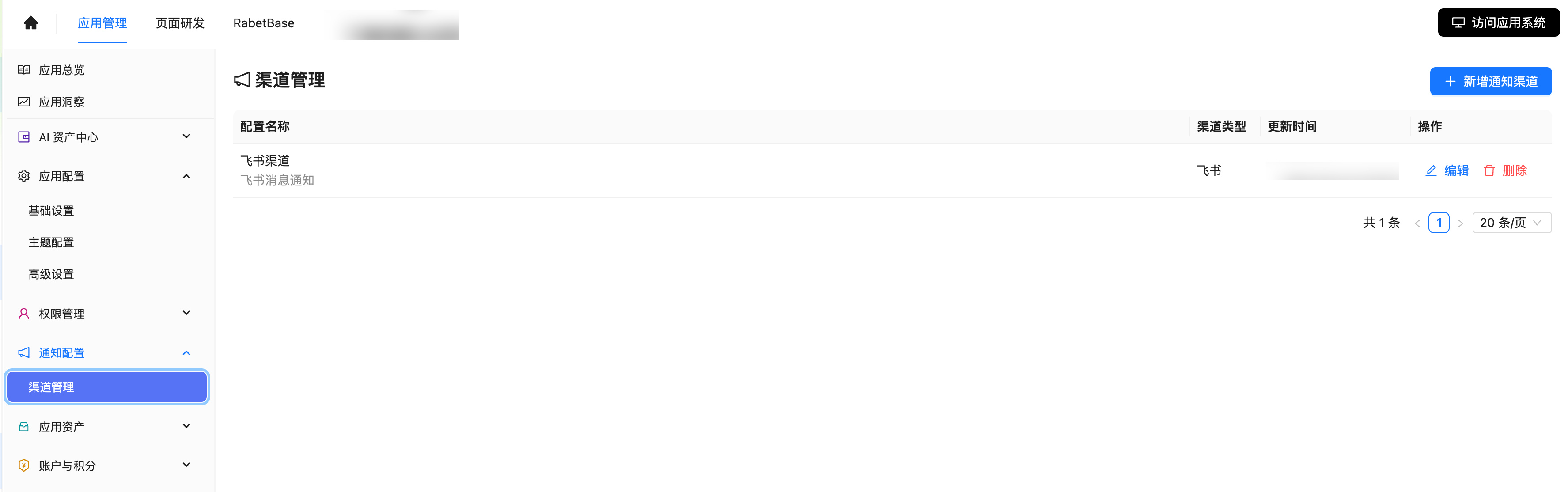
- Open "Notification settings" in app management and go to the "Channel management" list.
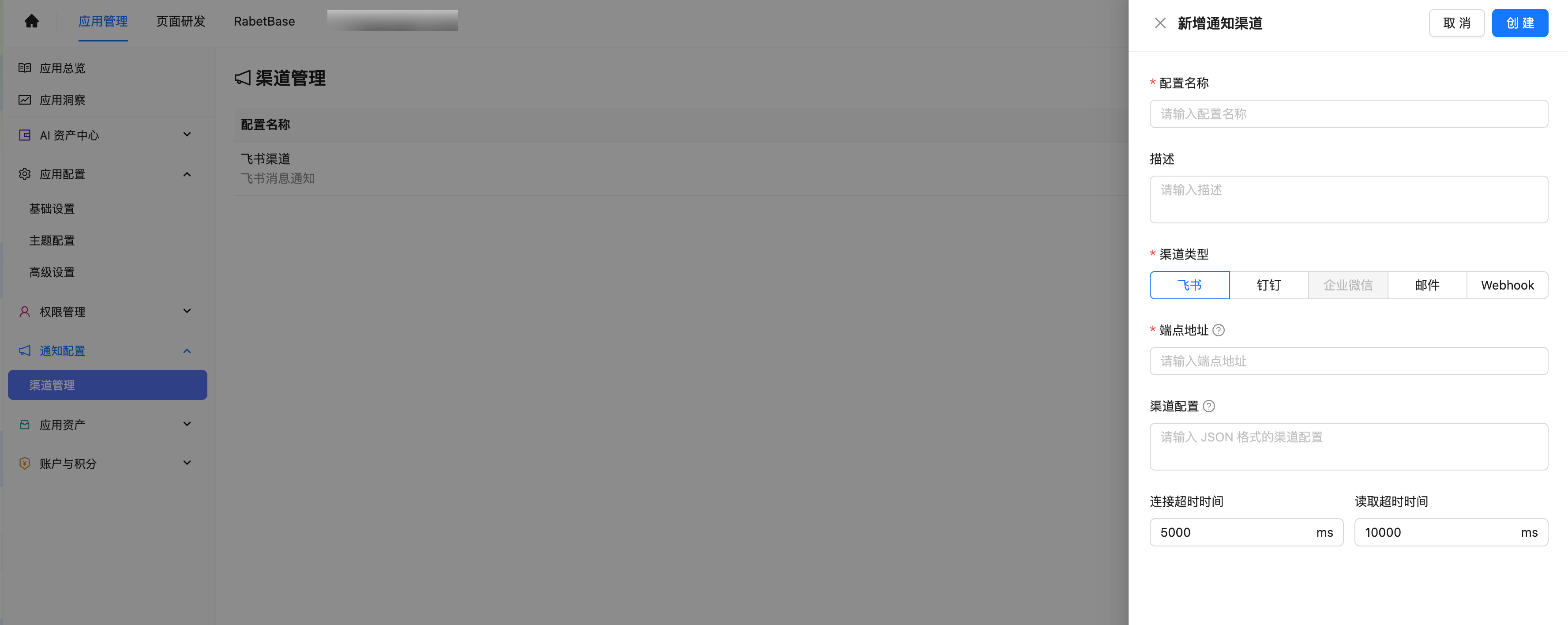
- Click "New notification channel". A creation drawer opens on the right.
- Choose "Feishu" as the channel type, then fill in the config name, description, endpoint URL, and channel config.
- Click "Create". Back in the list, the new channel in the first row means registration succeeded.
| Field | What to enter | Notes | |-|-| | Config name | A name you'll recognize. | Include the business scenario or test date so it's easy to pick when registering notification channels. | | Endpoint URL | The Feishu custom bot webhook URL. | Show only masked values in screenshots and customer docs. | | Channel config | Protocol-related JSON, such as bot mode and signing secret. | Protocol settings only — no messageTemplate here. |
Screenshots: channel registration
Channel registration UI
Step 2: Register a dataset-level notification channel
TIP
When you finish, the dataset has a new notification channel. The runtime matches the trigger interface against interfaceCodes and sends the message through the bound app-level channel config.
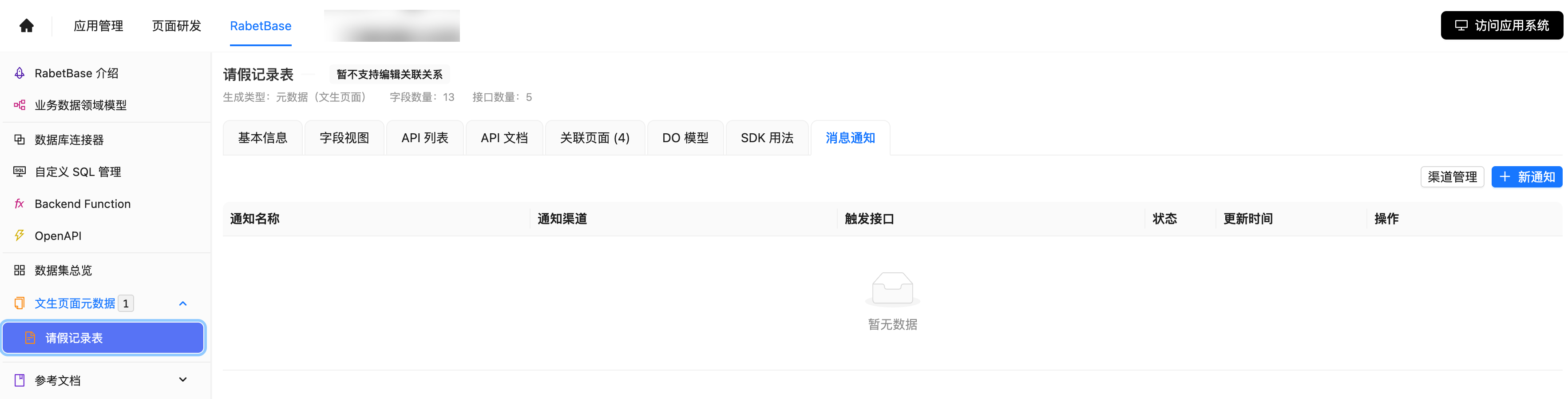
- Open the target dataset and switch to the "Message notifications" tab.
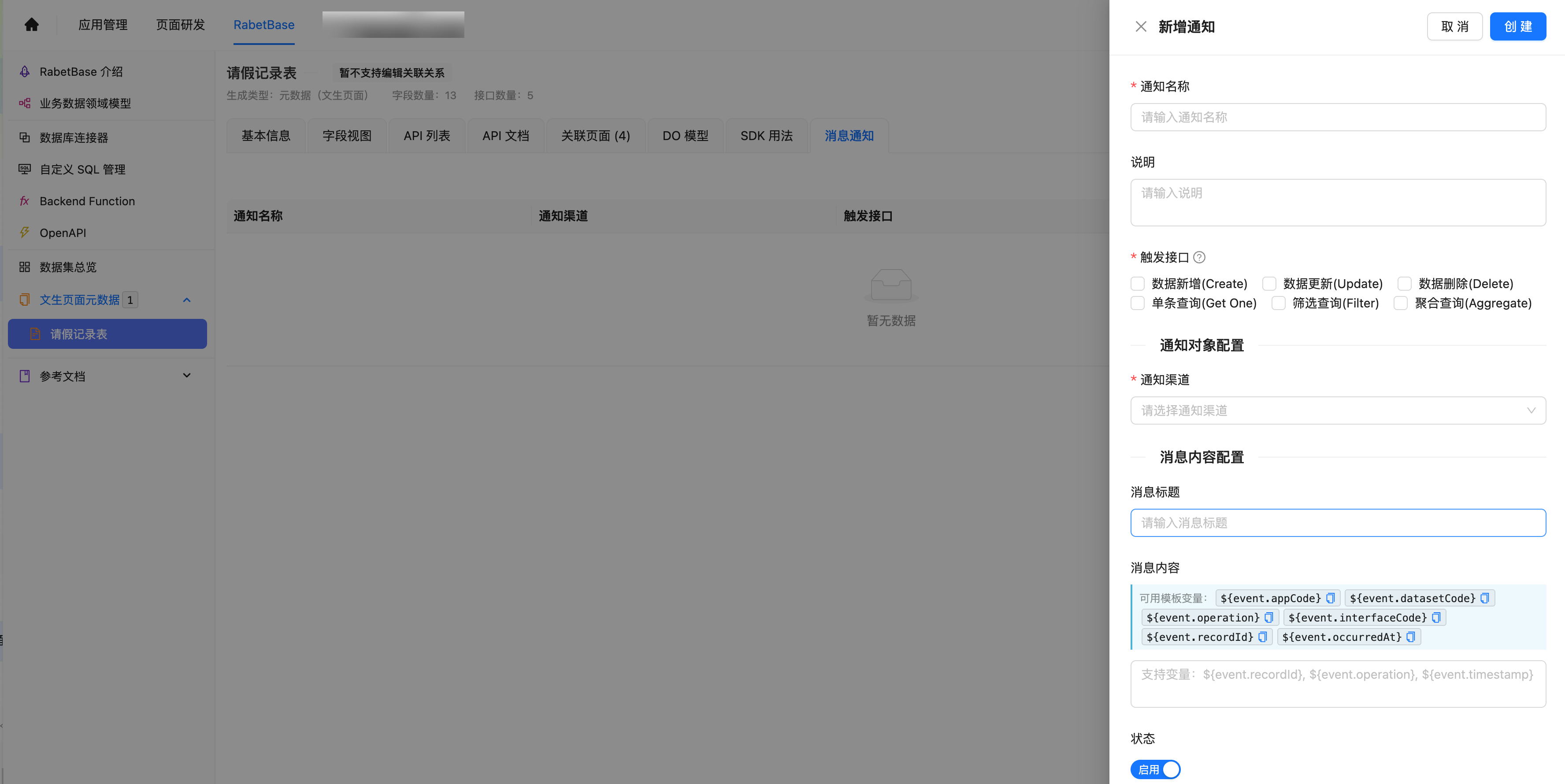
- Click "New notification". A creation drawer opens on the right.
- Fill in the notification name and description, then check the interfaces that should trigger it.
- Under "Notification channel", select the app-level channel config registered earlier.
- Fill in the message title and body, and keep the status "Enabled".
- Click "Create". Back in the list, the new channel in the first row means registration succeeded.
| Field | What to enter | How the runtime consumes it | |-|-| | Trigger interfaces | Check interfaces such as data create and data update. | Saved to triggerConfig.interfaceCodes. | | Notification channel | Select an app-level channel config. | Saved as channelConfigId, used to locate the protocol settings. | | Message title and body | The title and body recipients will see. | Saved to triggerConfig.messageTemplate. |
Screenshots: notification channel registration
WARNING
These screenshots verify the registration flow and list status only — no real message was sent. For delivery acceptance, use a dedicated test bot and test data.
How the runtime reads your config
The runtime reads only the fields stored on the notification channel. The config UI may organize forms around your business, but confirm these fields actually land where the runtime can consume them.
| Consumption point | Field the runtime reads | Result | |-|-| | CRUD trigger match | triggerConfig.interfaceCodes | Notification sends only when the current interface code hits | | Manual trigger match | triggerConfig.sceneCode | Notification sends only when the scene code matches | | Message template resolution | triggerConfig.messageTemplate | Primary source for new templates; channelConfig.messageTemplate is a legacy fallback only | | Channel protocol settings | endpointUrl, channelConfig | Each channel turns these fields into its own HTTP request or SMTP email |
WARNING
operations plays no part in current runtime matching. Don't rely on it in new configs to distinguish create, update, or delete.
Channel-by-channel setup
FEISHU Webhook
Delivers notifications to a Feishu group. The runtime sends a Feishu interactive card the same way a webhook group bot does; the Feishu app mode is out of scope here.
| Field the runtime consumes | How it's consumed | Result | |-|-| | Webhook URL | endpointUrl | Target address of the HTTP POST | | Signing secret | channelConfig.signSecret | Generates the timestamp and sign Feishu requires | | Message template | triggerConfig.messageTemplate | Renders the card title, theme color, summary, fields, and buttons |
{
  "channelType": "FEISHU",
  "endpointUrl": "https://open.feishu.cn/open-apis/bot/v2/hook/<BOT_TOKEN>",
  "channelConfig": {
    "signSecret": "<SIGN_SECRET>"
  },
  "triggerConfig": {
    "interfaceCodes": ["DATA_CREATE"],
    "messageTemplate": {
      "mode": "CUSTOM",
      "version": "v1",
      "templateType": "STANDARD_CARD",
      "theme": "blue",
      "title": "数据变更通知",
      "summary": "有一条数据已新增"
    }
  }
}{
"msg_type": "interactive",
"timestamp": "<EPOCH_SECONDS>",
"sign": "<FEISHU_SIGN>",
"card": {
"header": {
"template": "blue",
"title": {"tag": "plain_text", "content": "数据变更通知"}
},
"elements": [
{"tag": "div", "text": {"tag": "lark_md", "content": "有一条数据已新增"}}
]
}
}Official reference: Feishu custom bot guide.
DINGTALK
Delivers notifications to a DingTalk group. The runtime renders the standard message template as a DingTalk markdown message.
| Field the runtime consumes | How it's consumed | Result | |-|-| | Webhook URL | endpointUrl | Target address of the HTTP POST | | Signing secret | channelConfig.signSecret | When set, timestamp and sign are appended to the URL | | @ settings | channelConfig.atAll, channelConfig.atMobiles | Written into the at field of the DingTalk message body | | Message template | triggerConfig.messageTemplate | Renders the markdown title, body, fields, and links |
{
  "channelType": "DINGTALK",
  "endpointUrl": "https://oapi.dingtalk.com/robot/send?access_token=<ACCESS_TOKEN>",
  "channelConfig": {
    "signSecret": "<SIGN_SECRET>",
    "atAll": false,
    "atMobiles": ["13800000000"]
  },
  "triggerConfig": {
    "interfaceCodes": ["DATA_UPDATE"],
    "messageTemplate": {
      "mode": "CUSTOM",
      "version": "v1",
      "templateType": "STANDARD_CARD",
      "theme": "orange",
      "title": "数据更新通知",
      "summary": "有一条数据已更新"
    }
  }
}{
"msgtype": "markdown",
"markdown": {
"title": "数据更新通知",
"text": "### 数据更新通知\n\n有一条数据已更新"
},
"at": {
"isAtAll": false,
"atMobiles": ["13800000000"]
}
}Official reference: DingTalk custom bot creation and installation.
WEBHOOK
Delivers notifications to your own service or a third-party HTTP endpoint. The runtime sends the standard message together with the raw trigger payload.
| Field the runtime consumes | How it's consumed | Result | |-|-| | Request URL | endpointUrl | Target address of the HTTP POST | | Request headers | channelConfig.headers | Not consumed by the current direct-send path; don't present header auth as a working capability | | Message template | triggerConfig.messageTemplate | Renders the message object | | Trigger context | The payload at trigger time | Placed verbatim into the payload object of the request body |
TIP
If your receiver requires headers, a signature, or a Bearer token, confirm the runtime actually supports it first — the current direct-send path does not read channelConfig.headers.
{
  "channelType": "WEBHOOK",
  "endpointUrl": "https://example.com/notification/webhook",
  "channelConfig": {
    "headers": {
      "Authorization": "Bearer <TOKEN>"
    }
  },
  "triggerConfig": {
    "interfaceCodes": ["DATA_CREATE"],
    "messageTemplate": {
      "mode": "CUSTOM",
      "version": "v1",
      "templateType": "STANDARD_CARD",
      "theme": "blue",
      "title": "数据新增通知",
      "summary": "请处理新增数据"
    }
  }
}{
"channel": {
"channelCode": "<CHANNEL_CODE>",
"channelName": "业务通知",
"channelType": "WEBHOOK"
},
"message": {
"templateType": "STANDARD_CARD",
"theme": "blue",
"title": "数据新增通知",
"summary": "请处理新增数据",
"facts": [],
"actions": []
},
"payload": {
"interfaceCode": "DATA_CREATE",
"recordId": "<RECORD_ID>"
}
}EMAIL
Sends email notifications. EMAIL does not use an HTTP webhook; at call time, endpointUrl is parsed into an SMTP/SMTPS host and port.
| Field the runtime consumes | How it's consumed | Result | |-|-| | SMTP address | endpointUrl | Parses host, port, and SSL from smtp:// or smtps:// | | SMTP settings | channelConfig.username/password/from/auth/startTls/ssl | Builds the SMTP connection and sender identity | | Recipients, CC, BCC | triggerConfig.emailTargets | Used as fixed recipient targets | | Dynamic recipients | triggerConfig.audiences | When non-empty, takes precedence for primary recipients and clears cc/bcc | | Email template | triggerConfig.messageTemplate.subject/content | Preferred source for the subject and body; falls back to the standard card template when missing |
{
  "channelType": "EMAIL",
  "endpointUrl": "smtps://smtp.example.com:465",
  "channelConfig": {
    "username": "<SMTP_USERNAME>",
    "password": "<SMTP_PASSWORD>",
    "from": "notice@example.com",
    "auth": true,
    "startTls": false,
    "ssl": true
  },
  "triggerConfig": {
    "interfaceCodes": ["DATA_CREATE", "DATA_UPDATE"],
    "emailTargets": {
      "recipients": ["user@example.com"],
      "ccList": [],
      "bccList": [],
      "subjectPrefix": "[业务通知]",
      "fromName": "小系统通知"
    },
    "messageTemplate": {
      "subject": "数据变更通知",
      "content": "请查看本次数据变更:${event.recordId}"
    }
  }
}SMTP:
host=smtp.example.com
port=465
ssl=true
auth=true
Mail:
from=notice@example.com
to=user@example.com
subject=[业务通知] - 数据变更通知
html/text=请查看本次数据变更:<RECORD_ID>WARNING
For EMAIL, the current runtime rule is audiences first. Whenever triggerConfig.audiences is non-empty, the system resolves primary recipients from it, does not merge emailTargets.recipients, and stops reading ccList and bccList.
Official references: RFC 3207 STARTTLS, RFC 8314 TLS recommendations for mail submission.
Content placeholders
Standard placeholders
${event.appCode}         触发通知的应用编码
${event.datasetCode}     触发通知的数据集编码
${event.operation}       数据操作类型,如新增、更新、删除、读取
${event.interfaceCode}   触发通知的数据接口事件码,如 DATA_CREATE、DATA_UPDATE
${event.recordId}        触发通知的业务记录 ID
Event record placeholders
WARNING
Note: the ${event.record} placeholder only takes effect when the trigger interface type is Create or Update.
${event.record}                                    事件消息信息详情
${event.record.****}                               其中****指代操作数据的具体字段
${event.record.createUserId_label.****}            可以实现业务信息的多层选择
For example, to display the supplier channel in the notification, choose the variable ${event.record.supplier_channel}.
Verify the result
Once everything is configured, fire one real trigger to confirm it works.
[ ] The target dataset's notification channel is enabled.
[ ] The operation hit an interface code in
triggerConfig.interfaceCodes.[ ] The group bot, webhook receiver, or inbox received the message.
[ ] The message title, summary, fields, and buttons match
triggerConfig.messageTemplate.[ ] On failure, the runtime log shows the channel type, channel details, and the error reason.
| Symptom | Check first | Fix | |-|-| | No message received | Whether the channel is enabled and interfaceCodes matched | Reproduce with a create or update operation you know will trigger | | Group bot returns an auth failure | Webhook, signing secret, keyword, or headers | Re-copy the configuration from the official bot docs | | EMAIL has no recipients | Whether audiences is empty, or whether it resolves to an email | If dynamic recipients are empty, set fixed recipients via emailTargets.recipients | | EMAIL CC or BCC not working | Whether audiences is non-empty | If you need cc/bcc, don't configure a non-empty audiences at the same time |
FAQ
Where should messageTemplate live?
In the dataset-level notification channel, at triggerConfig.messageTemplate. Not in the app-level channelConfig.
What is channelConfigId?
It's the reference ID of an app-level channel config. Dataset-level notification channels use it to reuse protocol settings such as webhooks, SMTP, signing secrets, or sender accounts.
Do new configs still need operations?
No. New configs express trigger interfaces with triggerConfig.interfaceCodes. operations only matters for reading legacy configurations.
Are EMAIL fixed recipients merged with audiences?
No. When audiences is non-empty, it takes precedence as the source of primary recipients; fixed recipients, CC, and BCC are not merged into the send.
Can real secrets appear in docs?
Never. Bot tokens in webhook URLs, signing secrets, SMTP passwords, access keys, login credentials, and internal test accounts must not appear in customer-facing docs. Use <PLACEHOLDER> in examples.