Notification Backend Function development guide
This guide is for developers touching Lovrabet's notification capability for the first time. Follow the steps and you'll go from registering a notification channel to building, testing, and publishing — on your own — a Backend Function that sends notifications to a fixed Feishu group, and optionally wrapping it as a Skill for AI to call. The running example is sendFeishuNotification, which is live in a real production environment. The whole process is prompt-driven: describe the requirements to the Agent, and each step below also lists the rabetbase / lovrabet commands the Agent actually runs.
0. What you'll build
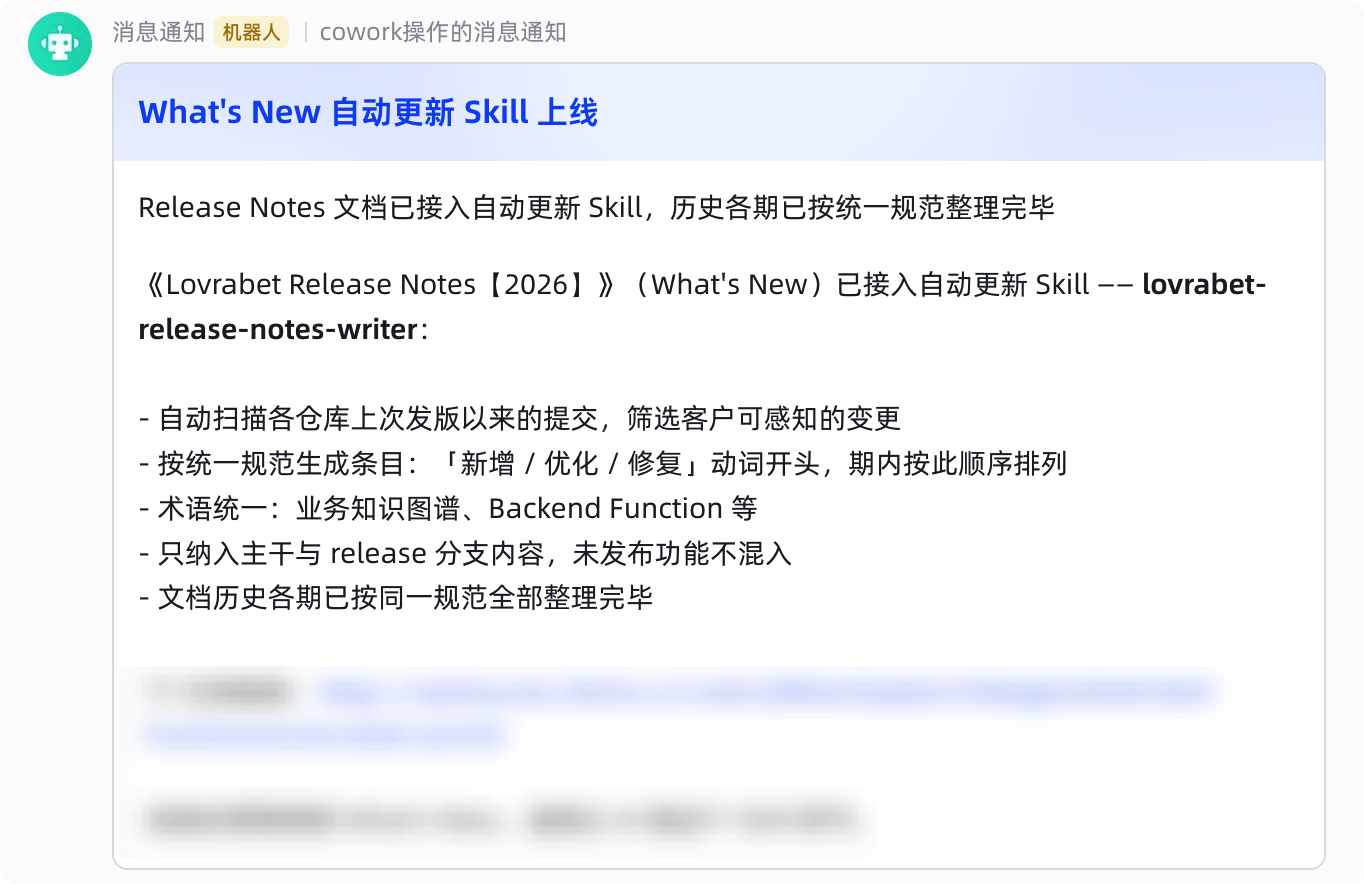
Send on-demand message notifications to a Feishu group via webhook, driven by your business logic. Example screenshot:
1. Understand the flow first
A notification passes through four layers from trigger to delivery. You only write the middle one:
- Caller: the
lovrabet bff execCLI, an SDK client inside a page, or another Backend Function — passes business parameters such astitleandbody. - Backend Function (the part you build): an ENDPOINT-type script that validates input, hardcodes fixed values such as the channel configCode, assembles the message body, and then calls the notification extension.
- notification extension: a built-in platform capability invoked via
context.client.extension.execute("notification", "send", ...). It looks up the notification config by configCode, renders a Feishu card (title + summary + Markdown details), and delivers it. - Notification channel: a Feishu group bot channel pre-registered in the platform's notification settings; each channel maps to one configCode. The endpoint never touches the webhook or the group ID directly.
Why this design: callers only care about business parameters. Switching groups or channels is a platform-configuration change, not a code change.
2. Before you start
- Set up your dev environment: make sure the rabetbase and lovrabet CLIs are installed and you are logged in (rabetbase for development, lovrabet for runtime verification). If not, just tell the Agent "help me set up the rabetbase and lovrabet dev environment" — it handles installation and authentication (i.e.,
rabetbase auth login/lovrabet auth login). - Configure a message channel
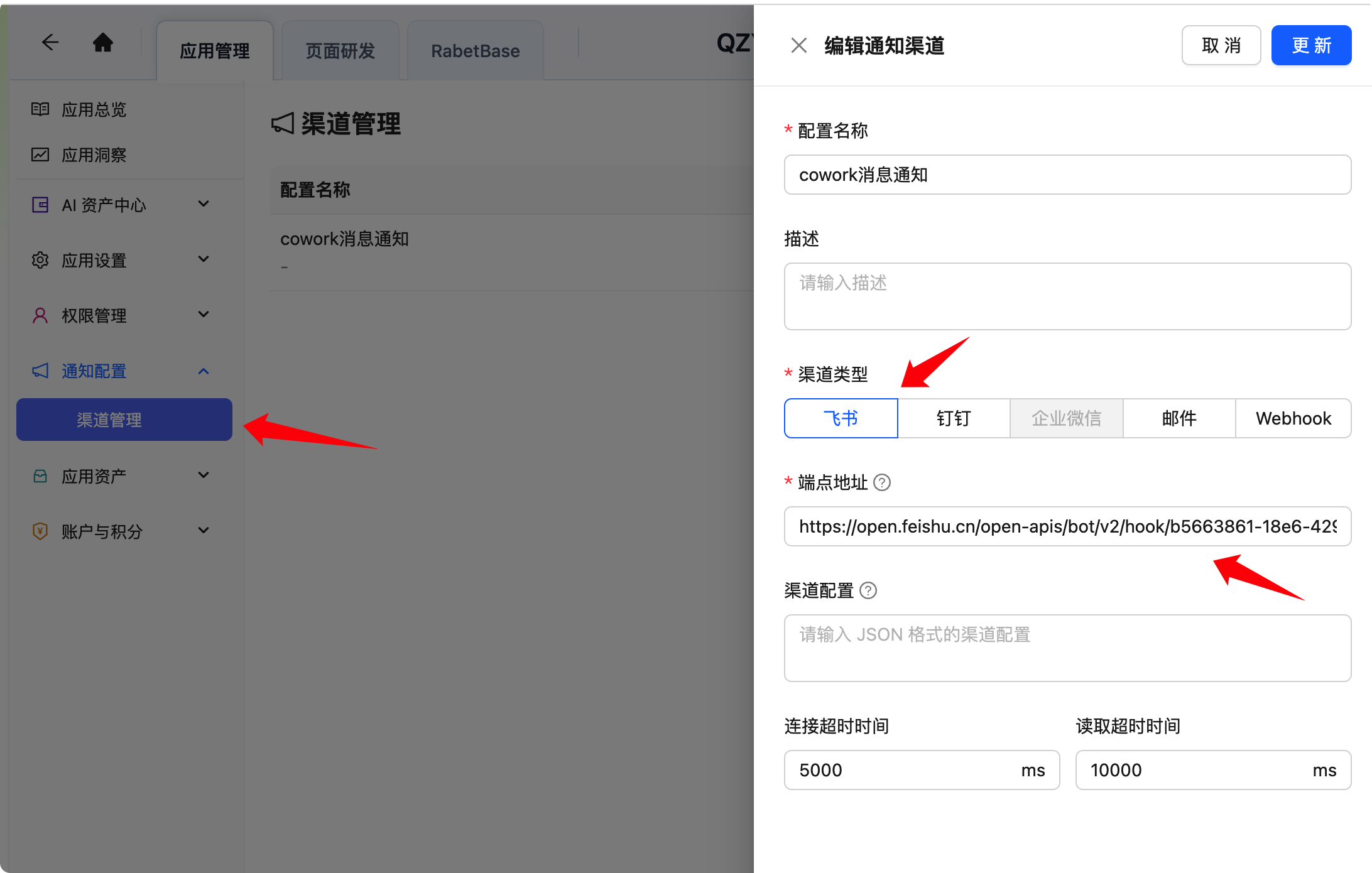
- Get the notification configCode: after registering the channel in the platform's notification settings, tell the Agent "show me the notification config list" — it runs
rabetbase notification config-listand returns configCodes likencc_xxxxxxxx.
3. Development steps
Step 1: Create the BFF skeleton
In an app repository that contains a .rabetbase directory, tell the Agent:
帮我创建一个 ENDPOINT 类型的 Backend Function,函数名 sendXxxNotification,用于发送消息通知The Agent runs
rabetbase bff create --type ENDPOINT --name sendXxxNotificationto create it. The generated script lives at.rabetbase/bff/<appcode>/ENDPOINT/sendXxxNotification.js— that file is the source code; edit it directly.
Step 2: Describe the notification requirements and let the Agent implement them
The Agent handles this step too — you just need to state the requirements clearly:
实现 sendXxxNotification:接收 title、body、summary(可选)、atUserIds(可选)四个参数;
校验输入合法性;把目标飞书群的 configCode 写死在脚本里,不允许调用方传渠道参数;
组装 {title, summary, theme, detailMarkdown} 消息体并调用 notification 扩展发送;
返回 {sent, channelType, message, mentionCount}。
The Agent implements the following contract. This list also doubles as your review checklist once it's done:
- Validate input: title is required, single-line, 1–100 characters; body is required, 1–4000 characters, hand-written
<at>tags forbidden; summary is optional, single-line, 1–200 characters; atUserIds is an optional array of up to 20 Feishu Open IDs, deduplicated, rejectingall. Any validation failure throwsINVALID_PARAMS:....- Hardcode the fixed config: the target channel's configCode lives in the script as a constant. Callers cannot pass channel parameters such as configCode, webhook, or group ID — this is the security boundary.
- Assemble the message body:
{ title, summary, theme, detailMarkdown }. When summary is omitted, it is generated by compressing body; when users are @-mentioned,<at id="ou_xxx"></at>is prepended to detailMarkdown.- Call the extension and return:
context.client.extension.execute("notification", "send", { configCode, message }), returning{ sent, channelType, message, mentionCount }.Core code skeleton (for review reference):
javascriptconst FEISHU_CONFIG_CODE = "ncc_xxxxxxxx"; // 固定通道 export default async function sendXxxNotification(params, context) { const title = normalizeTitle(params?.title); const body = normalizeBody(params?.body); const atUserIds = normalizeAtUserIds(params?.atUserIds); const summary = normalizeSummary(params?.summary) || buildSummary(body); const result = await context.client.extension.execute("notification", "send", { configCode: FEISHU_CONFIG_CODE, message: { title, summary, theme: "blue", detailMarkdown: buildDetailMarkdown(body, atUserIds) }, }); return { sent: result?.sent === true, channelType: result?.channelType || "FEISHU", message: result?.message || "通知发送成功", mentionCount: atUserIds.length, }; }
Step 3: Push to the platform
Tell the Agent:
把 sendXxxNotification 这个 Backend Function 推送到平台The Agent first runs
rabetbase bff push --type ENDPOINT --name sendXxxNotification --dry-runto preview, then runsrabetbase bff push --yesto push for real (a high-risk write).After a successful push, the platform clears the runtime script cache, so changes take effect immediately. Locally,
.rabetbase/bff.lock.jsonrecords each script's hash, remoteId, and version, which later pushes use for change detection.
Step 4: Verify at runtime
Tell the Agent:
调用 sendXxxNotification 发一条测试消息,验证能否正常发送The Agent runs
lovrabet bff exec --appcode <appcode> --name sendXxxNotification --params '...'to send one real message; it generates--paramswith a JSON serializer.Success means the response contains
sent: trueandchannelType: FEISHU. Verification posts a real message to the group, so keep the runs to a minimum.
Step 5 (optional): Wrap it as a Skill for AI to call
If you want colleagues to trigger it by simply telling the AI "send a Feishu notification: ...", tell the Agent:
把这个通知能力封装成 Skill 并推送到公司空间,让同事可以直接让 AI 向本群发通知。
然后把skill推送到Lovrabet平台
A Skill is essentially a SKILL.md file. Cover four things and you're set:
- Who to call: hardcode the appcode and Backend Function name — callers never need to know the channel configuration.
- Input contract: the meaning and rules of each parameter, e.g., title is a single line of 1–100 characters, body supports Markdown, atUserIds takes Feishu Open IDs.
- Send policy: by default, show the message draft to the user and send only after confirmation, to avoid accidental sends.
- Message style: get straight to the content, no pleasantries; attach a link when a document or requirement is involved.
Once written, the Agent runs
lovrabet skill push --scope companyto submit it for review. Colleagues install it by telling the Agent "install this skill" (i.e.,lovrabet skill install --code <skill-code> --appcode <appcode>).
4. Summary
The full path to a notification Backend Function: create the BFF skeleton → describe the requirements in natural language and let the Agent implement → push to the platform → verify at runtime. Once these four steps are done, the notification capability is ready to use in your runtime app. If you also want colleagues to fire off notifications with a single sentence to the AI, wrap it as a Skill and push it to the company space.