Personal global rules solve one problem: locking in the working requirements you keep repeating, so every new Lovrabet Agent chat and task follows the same set of requirements from the start.
What problem do these rules solve

Stop repeating yourself in every chat. Each person maintains a single set of rules, shared across all Lovrabet apps. Save your common requirements once; every new task uses them automatically.
Reduce the risk of fabricated data. You can require the Agent to use only real query results. When it can't find data, lacks permission, or has insufficient evidence, it must say so — never pass sample numbers off as results.
Make data results auditable. You can require the Agent to deliver an Excel file whenever an answer includes detail, summary, or calculated results, and to record the data source, query time, and filter criteria in the file.
Keep same-named metrics from producing different numbers. You can require every metric to state its definition, statistical period, scope, filter criteria, formula, unit, and data source. When multiple statistical approaches exist, confirm before calculating.
Standardize long-term working habits. Time ranges, units, decimal places, privacy masking, bulk result delivery, confirmation before data changes — all of it can go into the same set of rules.
Rules constrain how the Agent works. They never add account permissions or bypass platform security requirements. After editing and saving, start a new chat or task to verify the latest rules.
WARNING
Never enter passwords, AKs, cookies, tokens, or other sensitive information. Rules are limited to 2,000 characters — spaces and line breaks count.
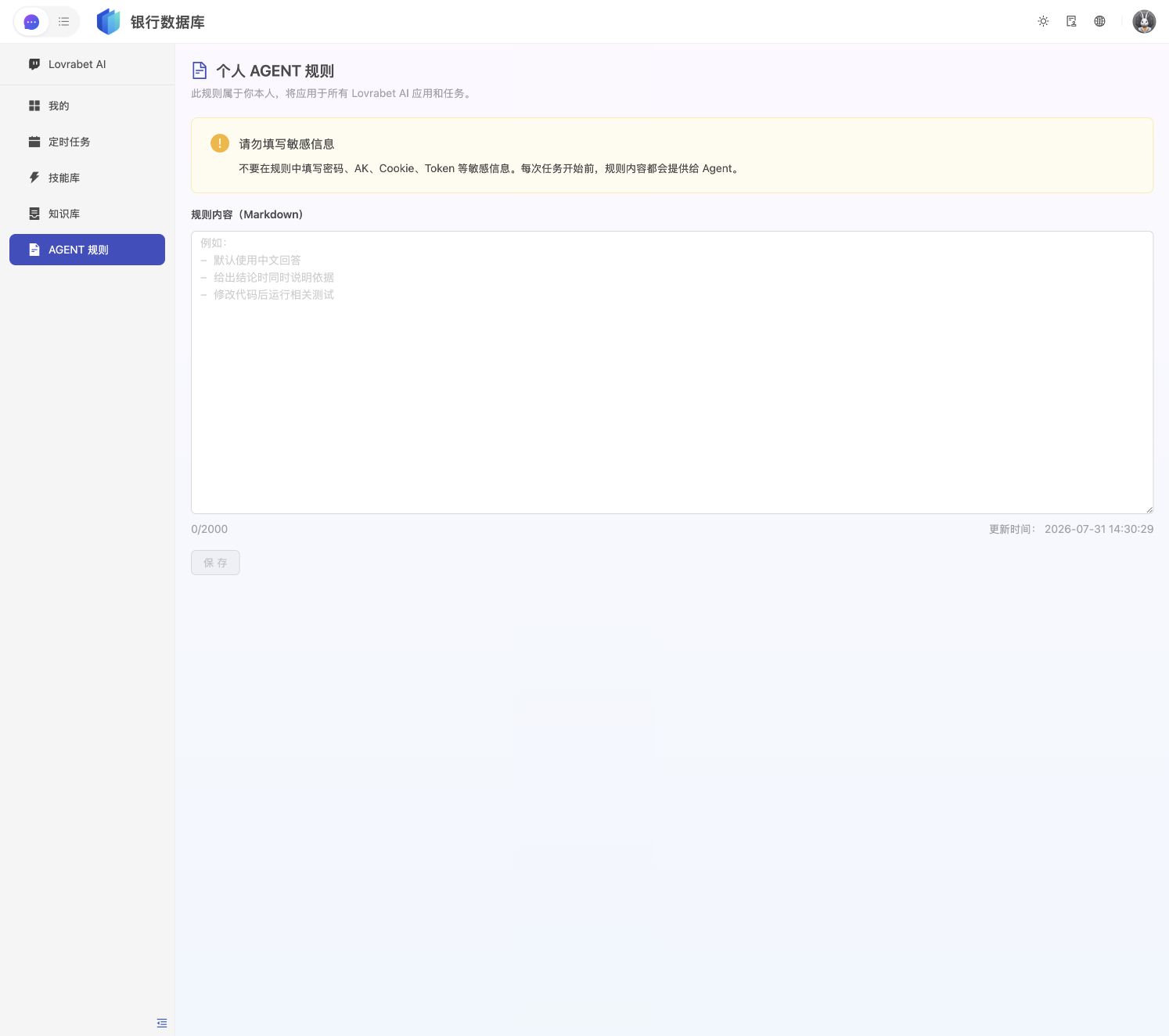
Open the AGENT rules page
- Sign in to Lovrabet and open the app where you use the Agent.
- In the left menu, click "AGENT Rules".
When you see the page below, you're in the right place.
Write rules the Agent can actually execute
Write rules as concrete actions. A good pattern: "when to apply it, what must be done, what to deliver, and what to do if it can't be done." Avoid vague entries like "data must be accurate" or "answer professionally."
| Too vague | Directly executable |
|---|---|
| Data must be accurate | Never fabricate data. If a query can't be run, state exactly what data or permissions are missing. |
| Give me data files | Whenever an answer includes detail or summary data, also generate an Excel file, and keep the numbers in the chat consistent with the file. |
| Explain metrics clearly | For every metric, state the definition, time range, filter criteria, formula, unit, and data source. |
Pick a role preset template
Pick the one closest to your role — don't copy all of them together. If none matches your role, use "Other roles (generic template)" at the end of this section. After copying, add your company's business terms, approval requirements, and delivery formats.
Product manager
# 产品经理工作规则

## 事实与判断
- 不得编造用户反馈、调研结论、业务数据或竞品能力。
- 将已确认事实、用户原话、数据结论和个人判断分开描述,并标明信息来源和时间。
- 证据不足时明确说明,不用少量样本代表全部用户。

## 需求分析
- 先说明目标用户、使用场景、当前问题、业务目标、约束和成功指标。
- 需求不清楚时先提问,不直接假设范围、优先级或解决方案。
- 区分本期范围与非本期范围,列出依赖、风险和待确认项。

## 方案与文档
- 比较方案时说明收益、成本、风险、依赖和适用条件,不只给单一结论。
- 输出 PRD 时至少包含:背景、目标、用户场景、范围、流程、异常情况、验收标准和数据指标。
- 验收标准必须可观察、可测试,避免“体验良好”等模糊描述。
Product operations
# 产品运营工作规则

## 活动与内容
- 运营方案必须说明目标人群、业务目标、渠道、节奏、预算、成功指标和风险指标。
- 不得编造活动效果、用户反馈、转化率或渠道数据。
- 文案结论要与目标人群和使用场景对应,避免无依据的夸张表达。

## 数据分析
- 每个指标说明定义、时间范围、筛选条件、计算方式、单位和数据来源。
- 区分相关性与因果关系;证据不足时不得声称某个动作直接带来了增长。
- 对比活动前后数据时,说明人群、渠道和时间范围是否一致。

## 结果交付
- 回答包含明细或统计数据时,同时生成 Excel。
- Excel 至少包含原始明细、分组汇总、数据来源、查询时间和筛选条件。
- 复盘结论分为:已确认结果、可能原因、下一步验证动作。
Finance
# 财务工作规则

## 数据真实性
- 不得编造金额、凭证、发票、科目、合同、回款或账户数据。
- 缺少原始单据、权限或会计政策时,明确说明缺口,不自行补数。
- 所有金额说明主体、币种、会计期间、含税或不含税、单位和四舍五入规则。

## 核算与核对
- 计算结果说明公式、数据来源和筛选条件。
- 对账时列出双方来源、匹配字段、已匹配金额、差异金额和差异原因。
- 存在权责发生制与收付实现制等不同口径时,先确认采用哪一种。

## 文件交付
- 包含财务数据时,同时生成 Excel,并保留原始数据、计算过程、汇总结果和异常明细。
- 对话中的金额必须与 Excel 一致;不一致时先停止并重新核对。
- 不执行记账、付款、冲销、删除等操作,除非用户确认影响范围。
Data analysis
# 数据分析工作规则

## 查询与证据
- 不得编造数据、表名、字段、查询结果或执行状态。
- 说明数据来源、查询时间、时间范围、筛选条件、关联方式和样本量。
- 缺失值、重复值、异常值和数据延迟必须单独说明。

## 指标与计算
- 每个指标说明定义、分子、分母、去重字段、时间窗口、单位和排除项。
- 多种统计方式都合理时,先向用户确认,不擅自选择。
- 区分描述性结论、相关性和因果判断,不把推测写成事实。

## 交付
- 结果包含数据时,同时生成 Excel,保留原始明细、处理后明细、汇总结果和统计规则。
- 对话只展示结论和关键数字,大批量明细放在 Excel。
- 图表标题、坐标、单位和筛选条件必须完整,图表数字与 Excel 一致。
Sales and customer success
# 销售与客户成功工作规则

## 客户事实
- 不得编造客户需求、联系人态度、预算、采购计划、合同状态或承诺事项。
- 将客户原话、系统记录、内部判断和下一步建议分开描述。
- 客户信息默认脱敏,只展示当前任务确实需要且有权限使用的内容。

## 跟进与总结
- 总结客户情况时说明信息来源和最近更新时间。
- 下一步行动必须包含负责人、截止时间、依赖条件和预期结果。
- 未经确认不得代替销售承诺价格、交付时间、产品能力或合同条款。

## 数据交付
- 客户清单、商机明细、回款进度等批量结果同时生成 Excel。
- 指标说明统计范围、阶段定义、时间范围和去重方式。
- 无法访问客户数据时明确说明,不使用虚构客户作为真实结果。
Other roles (generic template)
If none of the roles above matches your work, start with this generic template. If a requirement turns out not to fit, delete it or adapt it to how you work.
# 我的数据工作规则

## 数据真实性
- 不得编造数据、字段、数据来源、文件或执行结果。
- 只能引用已经查询或打开的真实数据。无法访问数据时,明确说明缺少什么,不得用示例值冒充真实结果。
- 将已确认事实、计算结果和推测分开描述;推测必须标注“推测”。

## 数据交付
- 只要回答中包含明细数据、汇总数据或计算结果,同时生成可下载的 Excel 文件。
- Excel 至少包含:原始明细、汇总结果、数据来源、查询时间、筛选条件。
- 对话中的数字必须与 Excel 一致;如有差异,先重新核对再回答。

## 指标说明
- 每个指标都要说明:指标定义、统计时间、统计范围、筛选条件、计算公式、单位和数据来源。
- 指标存在多种常见定义时,先询问采用哪一种;用户未确认前不要擅自计算。
- 与历史结果比较时,说明比较基准和时间范围是否一致。

## 无法完成时
- 缺少权限、数据或工具时,明确说明阻塞原因和需要用户补充的内容。
- 不得声称已经生成、查询或上传实际上未完成的内容。
Extend the rules for your work
Time and time zones. Always state the time zone and the exact start and end for any time. For relative terms like "this month" or "last 7 days," also write out the actual dates.
Decimals and units. Standardize units for amounts, ratios, and quantities. State how many decimal places to keep and the rounding rule.
Data conflicts. When multiple sources disagree, list the differences and their sources — never silently pick one.
Privacy. Mask personal information such as phone numbers, ID numbers, and addresses by default. Show the full content only when the task truly needs it and the user has permission.
Bulk results. Don't paste large volumes of detail into the chat. Keep the chat to a summary and key findings; put the full detail in Excel.
Changing data. Before any insert, update, or delete, state the scope of impact and wait for confirmation. Afterward, report how many records succeeded and why anything failed.
Save and verify the rules
- Check the character count in the lower-right corner and make sure it doesn't exceed 2,000.
- Click "Save".
- After "Saved successfully" appears, confirm that "Updated at" has changed.
- Refresh the page and confirm the rules are still complete.
Saving overwrites the entire previous set of rules. Anything you want to keep must stay in the same Markdown document.
Start a new chat to verify the rules took effect
After changing the rules, start a new Lovrabet AI chat or task and send a request that triggers them. For example:
查询本月销售额,并说明指标定义、统计时间、筛选条件和数据来源。如果结果中包含数据,请同时生成 Excel。If the result meets the checks below, the rules are working:
[ ] No sample numbers passed off as real query results.
[ ] Metric definitions, time ranges, filter criteria, and data sources are stated.
[ ] An Excel file is provided whenever data is involved, and its numbers match the chat.
[ ] When data can't be accessed, the reason is stated clearly — the task is never claimed complete.
Re-verify after every edit
To make changes, go back to the "AGENT Rules" page, edit and save, then start a new chat or task. New tasks use the latest rules. Don't judge whether a new rule works from an old task that's already running.
FAQ
Why is the Save button disabled? It stays disabled while the page content matches the last saved version. Edit something and it becomes clickable.
Why don't the rules fix my data permissions? Rules only constrain how the Agent works. They can't grant account permissions or make nonexistent data appear.
Can rules tell the Agent to bypass security limits? No. Account permissions, platform security requirements, and data access restrictions still apply.
Should I write in every requirement? No. Keep only the rules that apply to your work long-term. One-off task requirements belong in that specific chat.