Manually editing custom pages
INFO
This document is for technical users — troubleshooting and similar work.
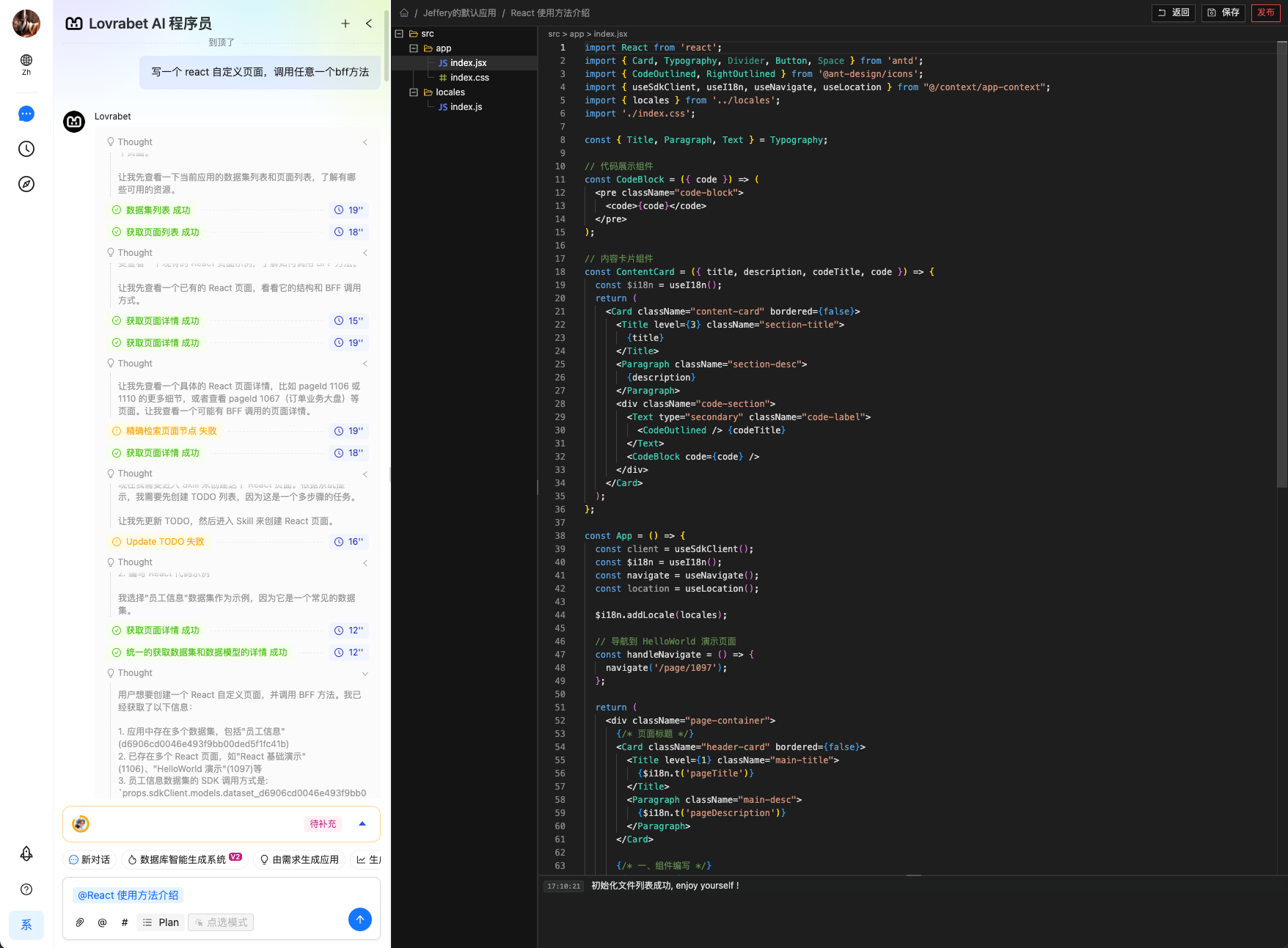
Every custom React page is its own standalone frontend React source project. Click "Edit page" in the top-right corner to enter manual editing mode.
You can modify the code freely online, then save and publish.
<grid> <column width-ratio="0.499859"> 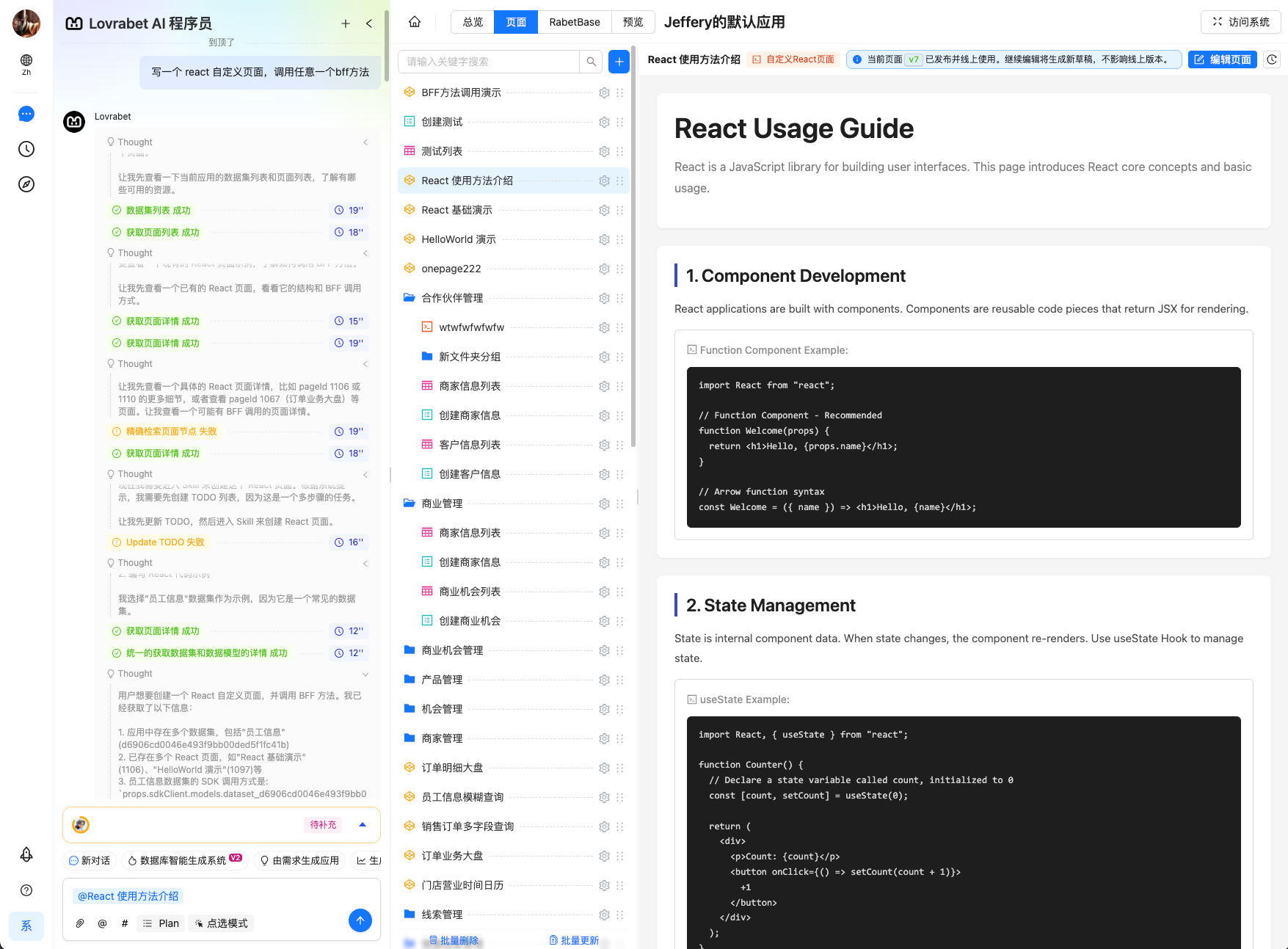 </column> <column width-ratio="0.500141">
  </column> </grid>
File path conventions
Use relative paths. Recommended structure:
- Entry:
src/app/index.jsx - Styles:
src/app/index.css - Locale bundles:
src/locales/index.js - Components:
src/components/*.jsx
Coding conventions
Component allowlist
In all code and files (including `src/**`, config files, scripts, etc.), imports are limited to the following packages and their sub-paths:
-
react@18-
react-dom@18-
lodash@4-
dayjs@1-
antd@5-
@ant-design/icons@5-
echarts@5
Available global methods
In any jsx file's React component, pull in context capabilities like this:
import { useSdkClient, useI18n, useNavigate, useLocation } from "@/context/app-context";

const client = useSdkClient(); // 用于访问后端数据和服务
const $i18n = useI18n(); // 国际化多语言实例
const navigate = useNavigate(); // 路由跳转实例
const location = useLocation(); // 浏览器 location 实例
Client API guide
The
clientAPI accesses backend data and services. You get theclientinstance with theuseSdkClientHook, and it supports three kinds of operations:- Dataset operations:
client.modelsprovides CRUD, filtering, aggregation, and more on a given dataset. - BFF execution:
client.bffinvokes defined Backend For Frontend functions. - Custom SQL execution:
client.sqlruns defined SQL queries.
- Dataset operations:
Usage principles
- Prefer dataset operations: for CRUD, filtering, and aggregation on a single dataset, use
client.modelsfirst. - Check BFF/SQL for complex operations: for cross-dataset, multi-step, or logic-heavy operations, look for an existing BFF or custom SQL first.
- No creating new functions: BFF and custom SQL can only call existing functions/queries — they can't create new ones dynamically.
- Prefer dataset operations: for CRUD, filtering, and aggregation on a single dataset, use
Dataset operations
- Operate on data in a given dataset. Call format:
await client.models.<dataset_code>.<function_name>(params);<dataset_code>is the dataset's unique identifier (e.g.dataset_8d2dcbae08b54bdd84c00be558ed48df); get the actual value from your tooling or documentation.- Supported operations
| Operation | Method | Description |
|---|---|---|
| Filter query | .filter({ where: {...}, currentPage, pageSize }) | Fetch a paginated list of records matching the conditions |
| Get one | .getOne(id) | Fetch a single record by primary key ID |
| Create | .create(data) | Add one record |
| Update one | .update(id, data) | Update the record with the given ID |
| Bulk update | .update([id1, id2], data) | Update multiple records at once |
| Delete one | .delete(id) | Delete the record with the given ID |
| Bulk delete | .delete([id1, id2]) | Delete multiple records at once |
| Export to Excel | .excelExport(filters) | Export matching records; returns the download file URL |
| Aggregate | .aggregate({ aggregate: [...] }) | Run aggregations (e.g. sum, average) |
- Examples
// 筛选查询
const response =
  await client.models.dataset_8d2dcbae08b54bdd84c00be558ed48df.filter({
    where: {
      status: "active",
    },
    currentPage: 1,
    pageSize: 20,
  });

// 根据 ID 查询
const user =
  await client.models.dataset_8d2dcbae08b54bdd84c00be558ed48df.getOne(
    "user-id",
  );

// 创建
const newUser =
  await client.models.dataset_8d2dcbae08b54bdd84c00be558ed48df.create({
    name: "John Doe",
    email: "john@example.com",
  });

// 更新
const updated =
  await client.models.dataset_8d2dcbae08b54bdd84c00be558ed48df.update(
    "user-id",
    {
      status: "active",
    },
  );

// 批量更新
await client.models.dataset_8d2dcbae08b54bdd84c00be558ed48df.update(
  ["id1", "id2"],
  { status: "inactive" },
);

// 删除
await client.models.dataset_8d2dcbae08b54bdd84c00be558ed48df.delete("user-id");

// 批量删除
await client.models.dataset_8d2dcbae08b54bdd84c00be558ed48df.delete([
  "id1",
  "id2",
]);

// 导出 Excel
const fileUrl =
  await client.models.dataset_8d2dcbae08b54bdd84c00be558ed48df.excelExport({
    status: "active",
    createTime: "2026-01-01",
  });

// 聚合查询
const stats =
  await client.models.dataset_8d2dcbae08b54bdd84c00be558ed48df.aggregate({
    aggregate: [
      { field: "amount", type: "sum", alias: "totalAmount" },
      { field: "age", type: "avg", alias: "averageAge" },
    ],
  });
BFF execution
Invoke defined Backend For Frontend (BFF) functions — for complex business logic, cross-dataset operations, third-party service calls, and the like.
- API signature
client.bff.execute<T>({
  scriptName: string;      // 已有 BFF 函数名称
  params?: Record<string, any>; // 可选参数
}): Promise<T>- Usage examples
const price = await client.bff.execute({
  scriptName: "calculatePrice",
  params: { productId: "prod-001", quantity: 10 },
});
console.log(price);interface PriceParams {
productId: string;
quantity: number;
couponCode?: string;
}
interface PriceResult {
unitPrice: number;
subtotal: number;
discount: number;
total: number;
}
const result = await client.bff.execute<PriceResult>({
scriptName: "calculateOrderPrice",
params: { productId: "p1", quantity: 2, couponCode: "SAVE10" },
});
console.log(`总价: ${result.total}`);interface DashboardStats {
userCount: number;
orderCount: number;
revenue: number;
topProducts: Array<{ name: string; sales: number }>;
}
const stats = await client.bff.execute<DashboardStats>({
scriptName: "getDashboardStats",
params: { timeRange: "last7days" },
});Custom SQL execution
Run defined SQL queries (read-only or controlled writes). The return structure is fixed — always check execSuccess first.
- API signature
interface SqlExecuteResult<T> {
  execSuccess: boolean;   // 是否执行成功
  execResult?: T[];       // 查询结果数组(成功时存在)
}

client.sql.execute<T>({
  sqlCode: string;        // 已有 SQL 查询代码
  params?: Record<string, any>;
}): Promise<SqlExecuteResult<T>>- Important: always check the execution result
const result = await client.sql.execute({ sqlCode: "xxxxx-xxxxx" });

if (result.execSuccess && result.execResult) {
  // 安全使用 result.execResult
  result.execResult.forEach((row) => console.log(row));
} else {
  console.error("SQL 执行失败");
}- Example
interface UserQueryParams {
  userId: number;
  status: string;
}

interface UserRow {
  id: number;
  name: string;
  email: string;
  status: string;
}

const result = await client.sql.execute<UserRow>({
  sqlCode: "getUsersByStatus",
  params: { userId: 123, status: "active" },
});

if (result.execSuccess) {
  console.log(`找到 ${result.execResult?.length} 个用户`);
  for (const user of result.execResult ?? []) {
    console.log(user.name);
  }
}
Error handling recommendations
Any API call can throw (network errors, insufficient permissions, invalid parameters, and so on). Wrap calls in try/catch:
try {
  const data = await client.models.dataset_xxx.filter({ currentPage: 1 });
  // 处理 data
} catch (error) {
  console.error("操作失败:", error);
  // 显示用户友好提示
}
For client.sql.execute, on top of try/catch, also check the execSuccess field.