From database to datasets
TIP
After you connect a database, Lovrabet analyzes its tables, fields, and relationships into datasets. Pages, APIs, SQL, and write-back services are then all built on top of these datasets.
What you'll see after connecting a database
| Where | What it's for |
|---|---|
| Business Data Model | See how tables relate — for example, whether customers link to contacts, or customers to follow-up records. |
| Dataset Overview | See which datasets were generated and which fields each dataset contains. |
| Dataset editing | Fix field display names, options, date formats, visibility, and other settings. |
| Permission management | Control which members can view or use the data. |
Which results to check first
Take a CRM scenario: after the database analysis, first confirm these records were recognized:
- Customers
- Contacts
- Follow-up records
- Sales opportunities
Then check that the relations are correct:
- Contacts link to customers.
- Follow-up records link to customers.
- Sales opportunities link to customers or contacts.
- Field names make sense to business users.
- Fields that shouldn't be shown are hidden or disabled.
Once these check out, business pages, Agent queries, API calls, and later write-back logic all share the same data semantics.
Once your datasets are ready
Datasets are the foundation for everything that follows. Different goals continue in different docs.
TIP
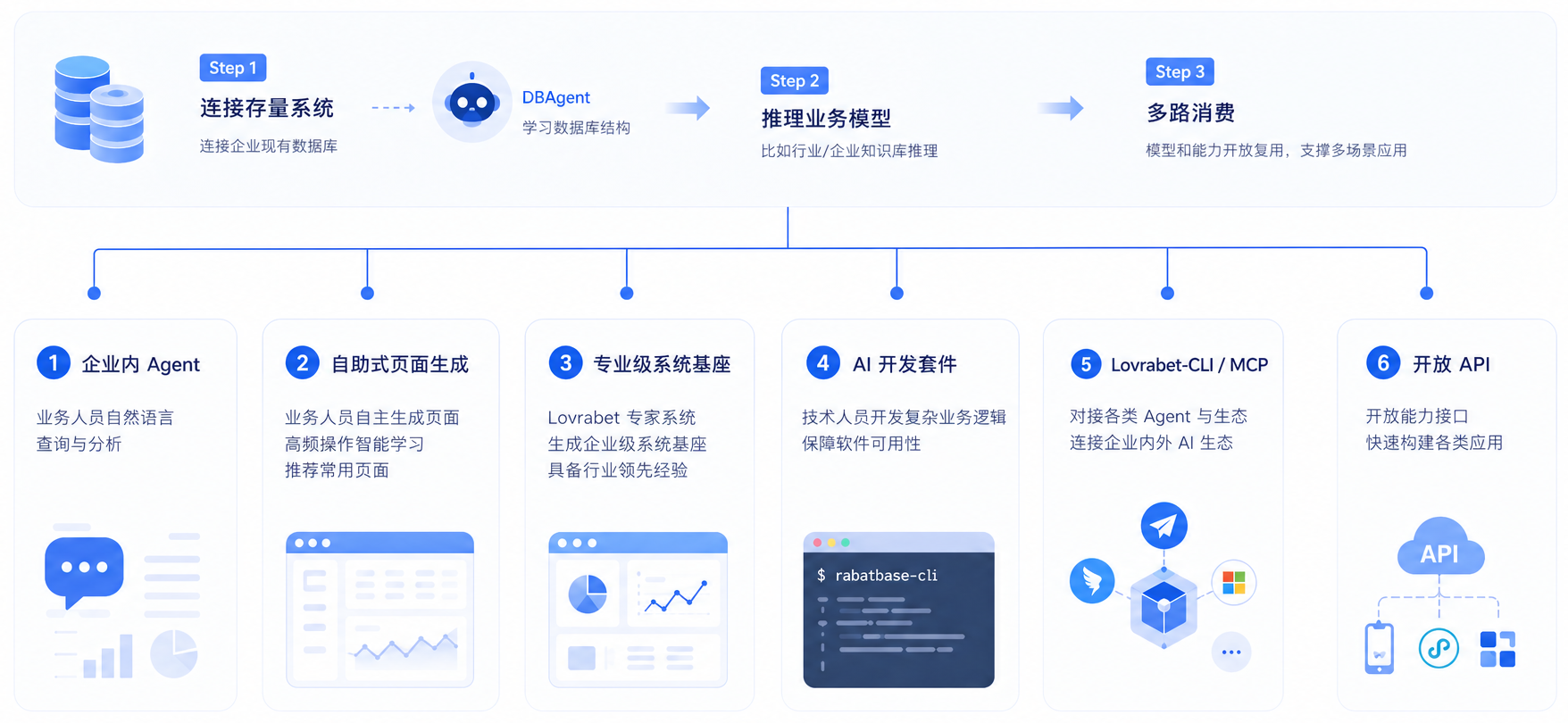
This diagram shows the capability chain once dataset analysis completes: start by connecting an existing enterprise database, then Lovrabet analyzes the tables, fields, and relationships into a data foundation that pages, Agents, APIs, and development tools can all share. Once your datasets are ready, six capability tracks open up:
- In-enterprise Agents: business users query, analyze, and act on system data in natural language.
- Self-service page generation: build list pages, detail pages, dashboards, and other business pages from existing datasets.
- Professional-grade system foundation: turn customers, orders, inventory, projects, and other records into a sustainable foundation for your enterprise system.
- AI development kit: developers extend complex business logic through rabetbase, SQL, Backend Functions, and more.
- Lovrabet CLI / MCP: connect external Agents, development tools, and the enterprise AI ecosystem directly to Lovrabet capabilities.
- Open APIs: expose datasets and business capabilities to external systems, mini programs, mobile apps, or other applications. In short, database analysis doesn't just produce a batch of field descriptions — it turns your existing enterprise data into a foundation that every core Lovrabet capability can reuse.
| What you want to do | Where to go next |
|---|---|
| Connect a database for the first time and analyze it | Connect a database and complete the first analysis |
| Field names, options, or table relations are inaccurate | Check and correct database analysis results |
| Manage fields, display names, options, and publish state | Dataset management |
| Let business users work with data in pages | Build pages, configure menus, and publish |
| Let external systems or Agents call the data | Build Instant APIs from datasets |
| Fixed, complex statistics or cross-table queries | Custom SQL management |
| Write-backs, approvals, state transitions, or transactional consistency | Backend Function docs |
How this section relates to later capabilities
Pages, Instant APIs, custom SQL, and Backend Functions are not configured in isolation — they all build on the same datasets.
The more accurate your datasets, the more stable your page rendering, API fields, statistics, and write-back logic will be.