Data list pages - feature overview
What is a data list page
A data list page is a business page built around one or more datasets. It brings search, filtering, detail views, editing, bulk processing, export, and permission control into a single entry point, so users can complete day-to-day data management right there.
In Lovrabet, data list pages are generated intelligently — AI reasoning on top of the Lovrabet AI Harness engineering foundation. AI generates the initial page from dataset fields, relations, and business semantics; business users and developers then keep refining it with the data list page editor or Vibe Coding.
It doesn't just render rows — it delivers complete business operations: from locating records and understanding fields to creating, updating, processing in bulk, and tracking status, forming a management entry point you can use as-is.
TIP
In one sentence: business data connected to Lovrabet quickly gains a management entry point that's ready to use, continuously upgraded, and still customizable.
Why use data list pages
In enterprise apps, most work revolves around business data: find a record, filter by conditions, view details, update a field, process in bulk, or export results. Data structures differ across businesses, but these operations look remarkably alike.
Data list pages distill these common capabilities into one unified page pattern. Connect a dataset and you get a working page — no rebuilding the search area, table, forms, and action buttons for every table.
Unified doesn't mean locked down. You can keep configuring fields, filter conditions, action permissions, and interactions, or extend complex business logic through Vibe Coding — balancing delivery speed with room to customize.
INFO
Data list pages work well as the default management entry point for business data: generate fast first, then configure and extend step by step around your real process.
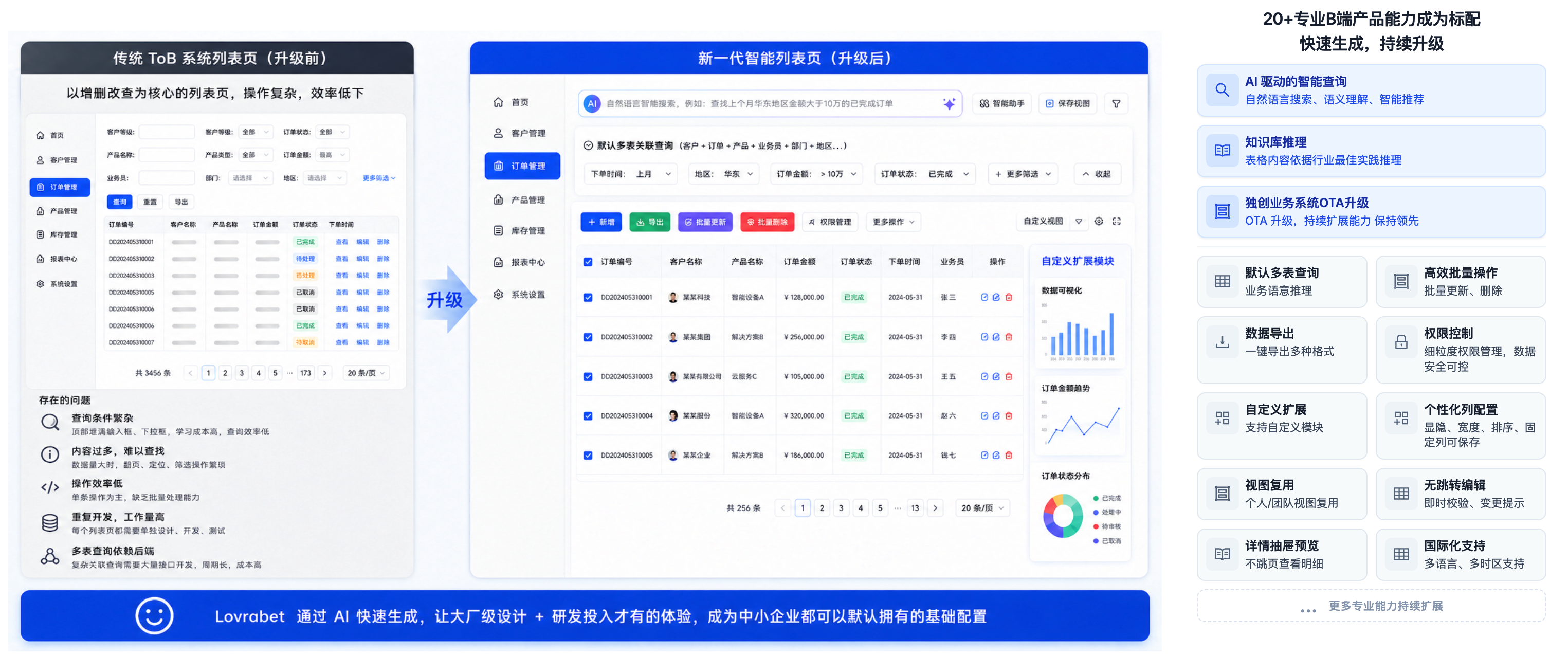
What a data list page includes
A complete data list page typically covers search and filtering, table display, detail views, create and edit, bulk actions, import and export, permission control, and AI assistance. Here's how they map to real usage.
Three core capabilities (AI-driven)
INFO
AI-powered query · Natural-language search, semantic understanding, smart suggestions No need to remember field names or build filter conditions — just ask in plain words for "high-intent customers nobody followed up last week". The list understands the intent, returns the results, and suggests related data.
INFO
Knowledge base reasoning · Table content reasoned over with industry best practices The table doesn't just lay out raw data. It reasons and annotates against an industry knowledge base — automatically flagging abnormal statuses and filling in business meaning — so nobody has to post-process it mentally.
INFO
OTA upgrades for business systems · Capabilities keep expanding, staying ahead When the platform ships new capabilities, your generated list pages get them automatically — no redevelopment, no re-release. They're always on the latest version.
Standard capabilities out of the box
<grid> <column width-ratio="0.500000">
INFO
Data query and preview Cross-table queries work by default (joining multiple tables by business semantics). Click a row to preview its details in a drawer — no jump to a detail page.
INFO
Personalization and extension Column visibility, width, order, and pinning can be saved as personal or team views, and custom modules can be attached.
</column> <column width-ratio="0.500000">
INFO
Data operations and export Select multiple rows to update or delete in bulk, edit cells in place with instant validation, and export to Excel / CSV and other formats in one click.
INFO
Security and localization Fine-grained permission control by role and field; multi-language and multi-timezone support, so cross-border teams can use it too.
</column> </grid>
TIP
Open for further development · Visual configuration, standard-code customization, Vibe Coding automation
- Visual configuration: adjust the list by dragging and configuring — no code changes.
- Ready for secondary development: the standard code is open — not a locked-down low-code black box.
- Vibe Coding automation: it's a standard code project, so you can modify and extend it with natural language in AI coding tools like Codex, Claude Code, Trae, and Cursor.
INFO
Everything above works out of the box and keeps expanding through OTA upgrades — existing list pages pick up new capabilities automatically, with no rework.